




Last updated: October 2026
1 Introduction
This manual introduces phonokit and its functions. The most up-to-date manual for the package, however, can be found in PDF format in the link above. phonokit is a Typst package designed to streamline the creation of phonological structures while maintaining typographical precision. Typst is a programming language for typesetting — there is a great tutorial here and an introductory YouTube series here.
The package provides intuitive functions for IPA transcription, IPA vowel charts (including a rotatable 3D vowel space) and consonant tables, schematic sound shifts, voice onset time diagrams, vowel dispersion plots, prosodic representations (syllables, moras, feet, prosodic words, metrical grids), sonority profiles, autosegmental phonology, multi-tier representations, feature geometry, SPE feature matrices, Optimality Theory tableaux, Harmonic Grammar, Noisy Harmonic Grammar, Maximum Entropy grammars, Hasse diagrams, numbered linguistic examples, and helper symbols. The main goals of phonokit are to minimize effort and maximize quality.
The GitHub repository for the package can be found at guilhermegarcia/phonokit. Comments, suggestions and bug reports are welcome — please open an issue in the repository.
1.1 Installation
Typst packages are loaded with the #import function at the top of your typ document. Replace X.X.X with the version you wish to import:
Package import (Typst Universe)
#import "@preview/phonokit:X.X.X": *The PDF manual documents the latest version on GitHub, which may be ahead of the latest version on Typst Universe. If an import from @preview fails with a “package not found” error, use the version listed on the package’s page instead, or load the package locally.
Alternatively, if you want the most up-to-date version, download or clone the repository and load the package locally:
Local import
#import "phonokit/lib.typ": *You may need a symlink depending on how you structure your files, since Typst restricts imports to files within the compilation root and its subdirectories.
1.2 Font
All functions in phonokit require the Charis font to work as intended out of the box (SIL International 2025). As of version 0.3.7, the user can set a global font to be used by the package throughout the document:
Setting the font
#import "@preview/phonokit:X.X.X": *
#phonokit-init(font: "New Computer Modern")  // add to the top of your document
2 IPA
IPA transcription is likely the most commonly used feature when typesetting documents in phonology. Typst supports unicode input directly, so technically you can type IPA symbols without a dedicated package. However, you may prefer to use a function-based workflow for that, especially if you’re coming from LaTeX. phonokit accomplishes that with the #ipa() function, which takes a string as input. Crucially, the function uses the familiar tipa input (Rei 1996), with a few exceptions (e.g., secondary stress is represented by a comma ,, not by two double quotes "").
2.1 Transcription
Symbols introduced by two backslashes \\ must not have adjacent characters. For archiphonemes, use \\ followed by a capital letter. Thus, while #ipa("N") maps to ŋ (its TIPA value), #ipa("\\N") renders a literal capital N — an archiphoneme — with the package font, so archiphonemes and phonemes stay typographically consistent. See the examples in Figure 1.
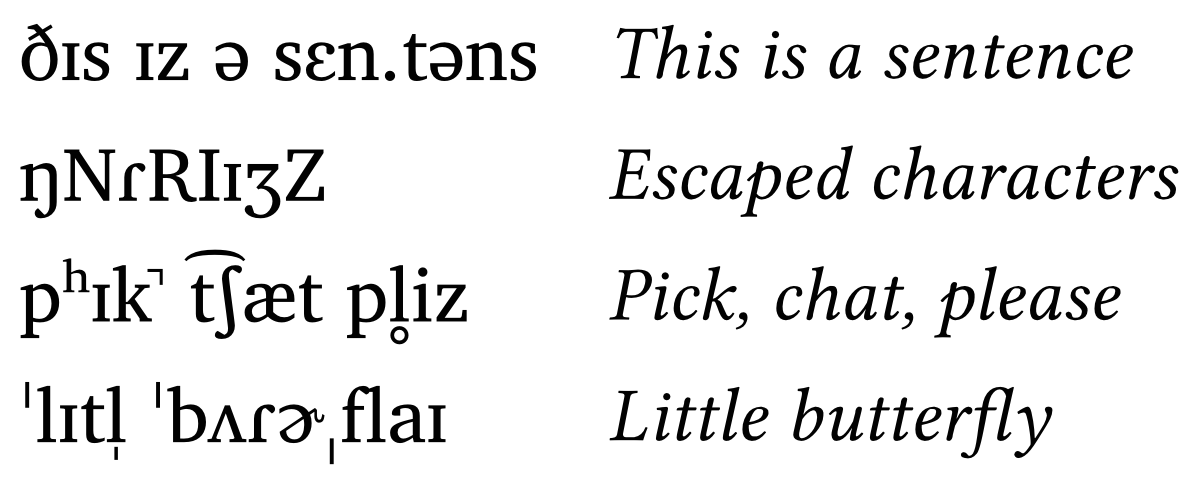
IPA transcription examples
#ipa("DIs \\s Iz \\s @ \\s sEn.t@ns")
#ipa("N \\N R \\R \\I I Z \\Z")
#ipa("p \\h I k \\* \\s \\t tS \\ae t \\s p \\r l iz")
#ipa("'lIt \\v l \\s 'b2R \\schwar ,flaI")
You can download the sheet as a standalone file here.
2.2 Consonants
Two additional functions allow users to quickly create consonant tables and vowel trapezoids given a string of phonemes. The function #consonants() mirrors the pulmonic consonants table in the IPA chart with some minor changes. For example, affricates are shown when affricates: true, and the argument abbreviate: true shortens labels for both rows and columns. Figure 2 shows the consonant inventory for Italian.
Consonant table (Italian)
#consonants("italian", affricates: true, abbreviate: true)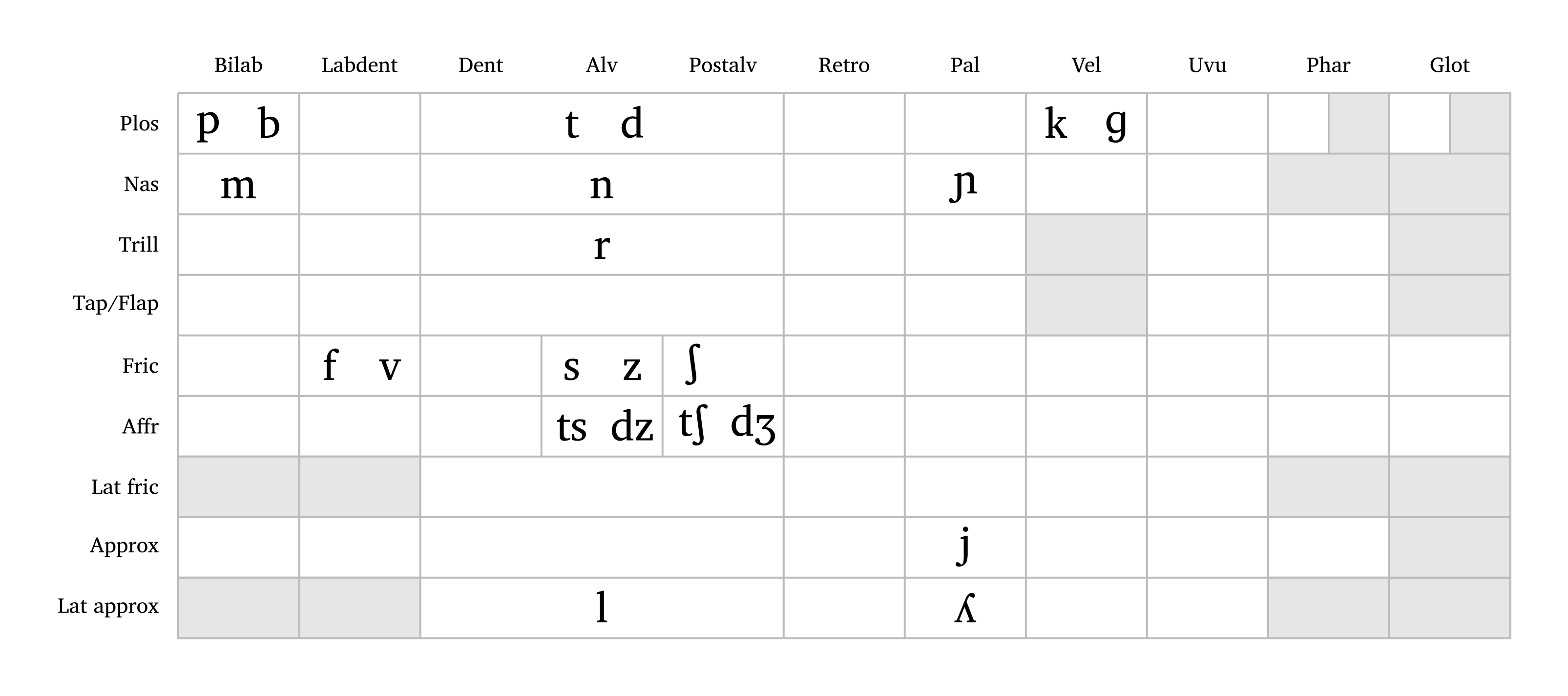
The user can either input a language name (Arabic, English, French, German, Italian, Japanese, Portuguese, Russian, Spanish — all lowercase; also all for all consonants) or a string of consonants to create a custom inventory. Custom consonants follow the same input format as #ipa(). Note that affricates and aspirated consonants require curly braces around them as well as affricates: true and aspirated: true, as shown in the caption of Figure 3. Individual symbols can be colored with phoneme-colors (e.g., phoneme-colors: ("p": red, "t": blue)), and labels can be localized with ui-lang: "fr" or ui-lang: "pt" (also available in #feat-matrix(), #geom() and #geom-group()). The function also supports flexible sizing with the scale argument.
Custom consonant table
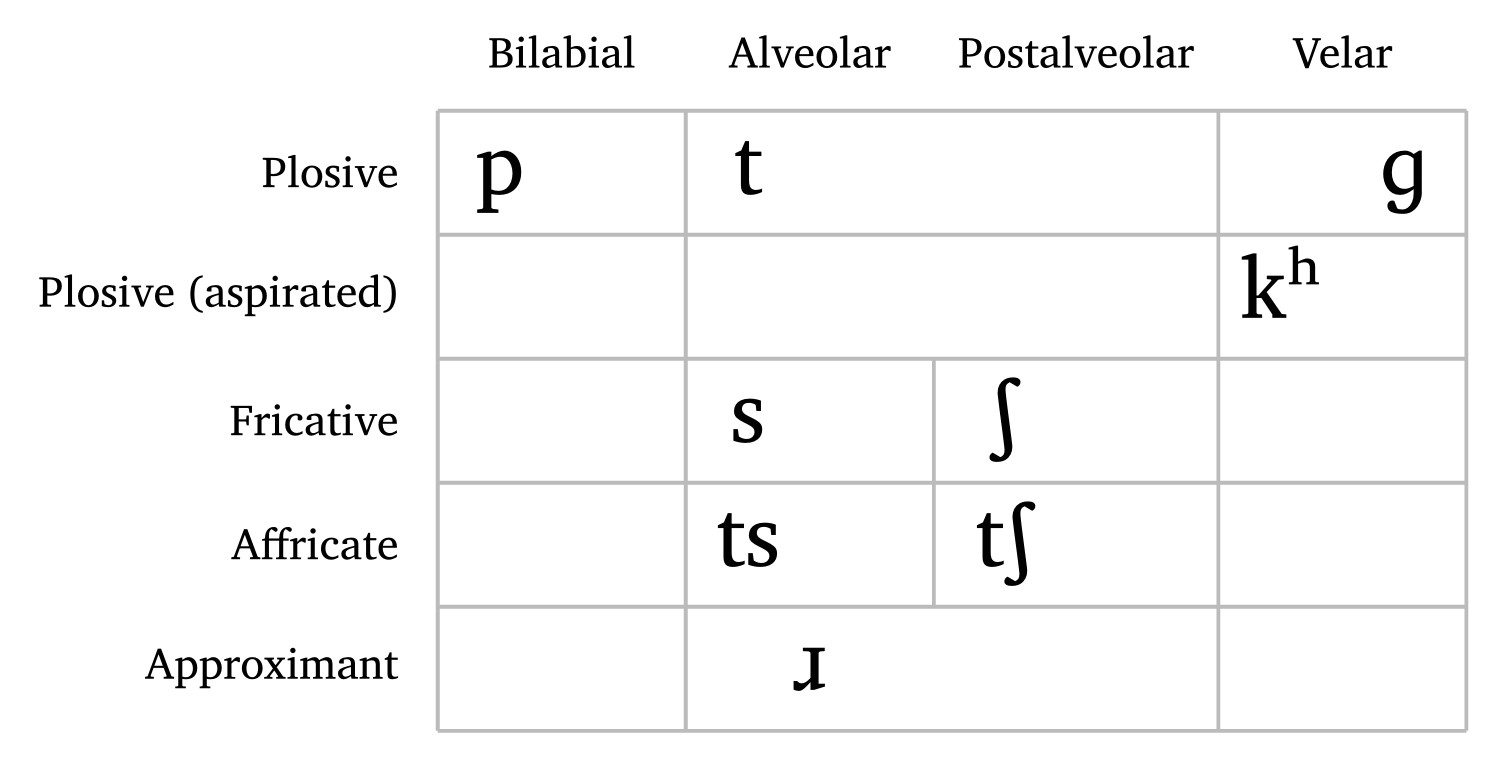
#consonants("ts{ts}psS \\*r g{tS} {k \\h}", affricates: true, aspirated: true)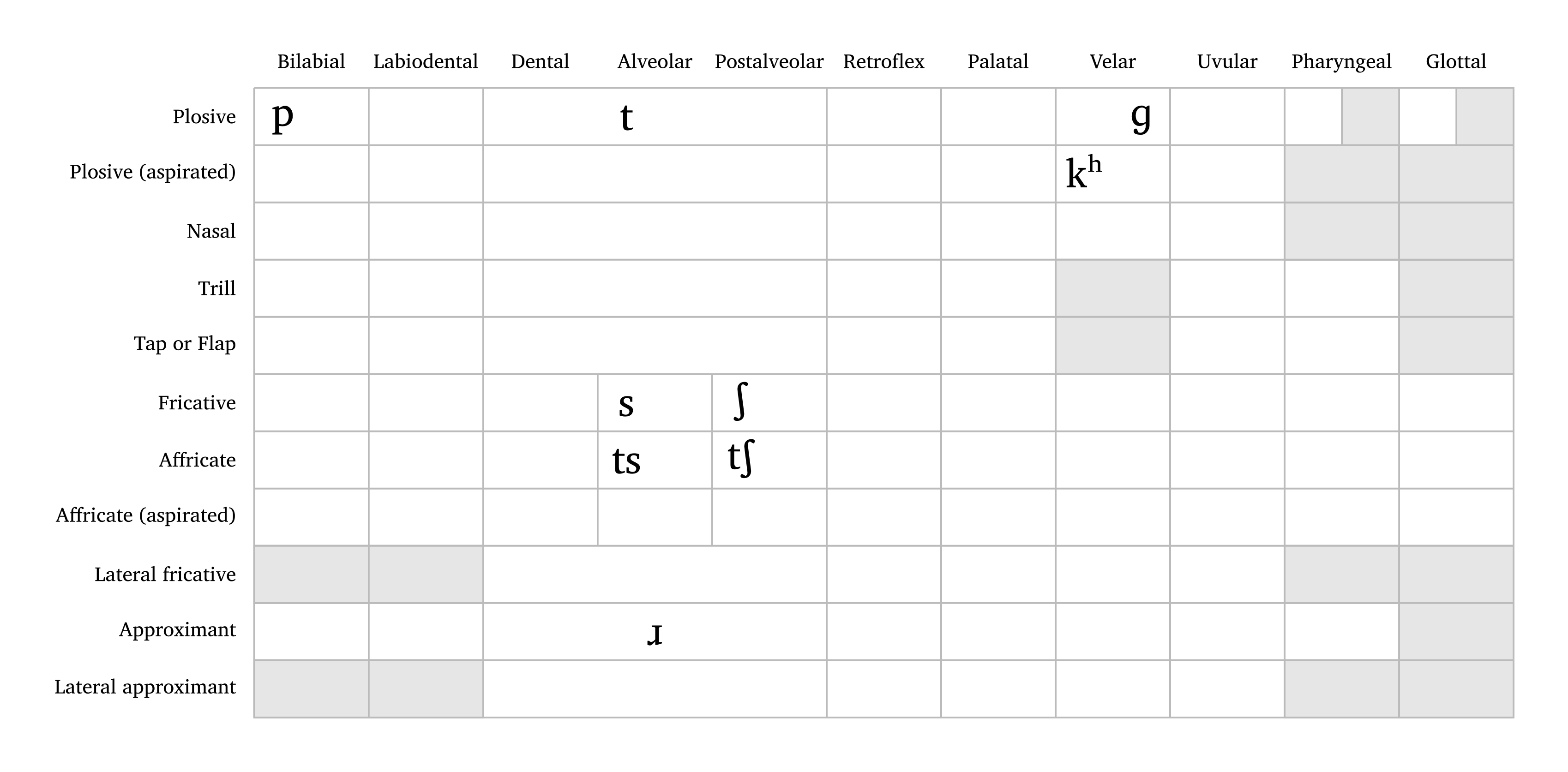
Full tables can be quite sparse, especially for small inventories. With simplify: true, empty rows and columns are dropped, which yields a more compact table. For finer control, delete-rows and delete-cols remove specific rows or columns by position (starting from 0). Figure 4 and Figure 5 repeat the two tables above with this option.
Simplified consonant tables
#consonants("italian", affricates: true, abbreviate: true, simplify: true)
#consonants("ts{ts}psS \\*r g{tS} {k \\h}", affricates: true, aspirated: true, simplify: true)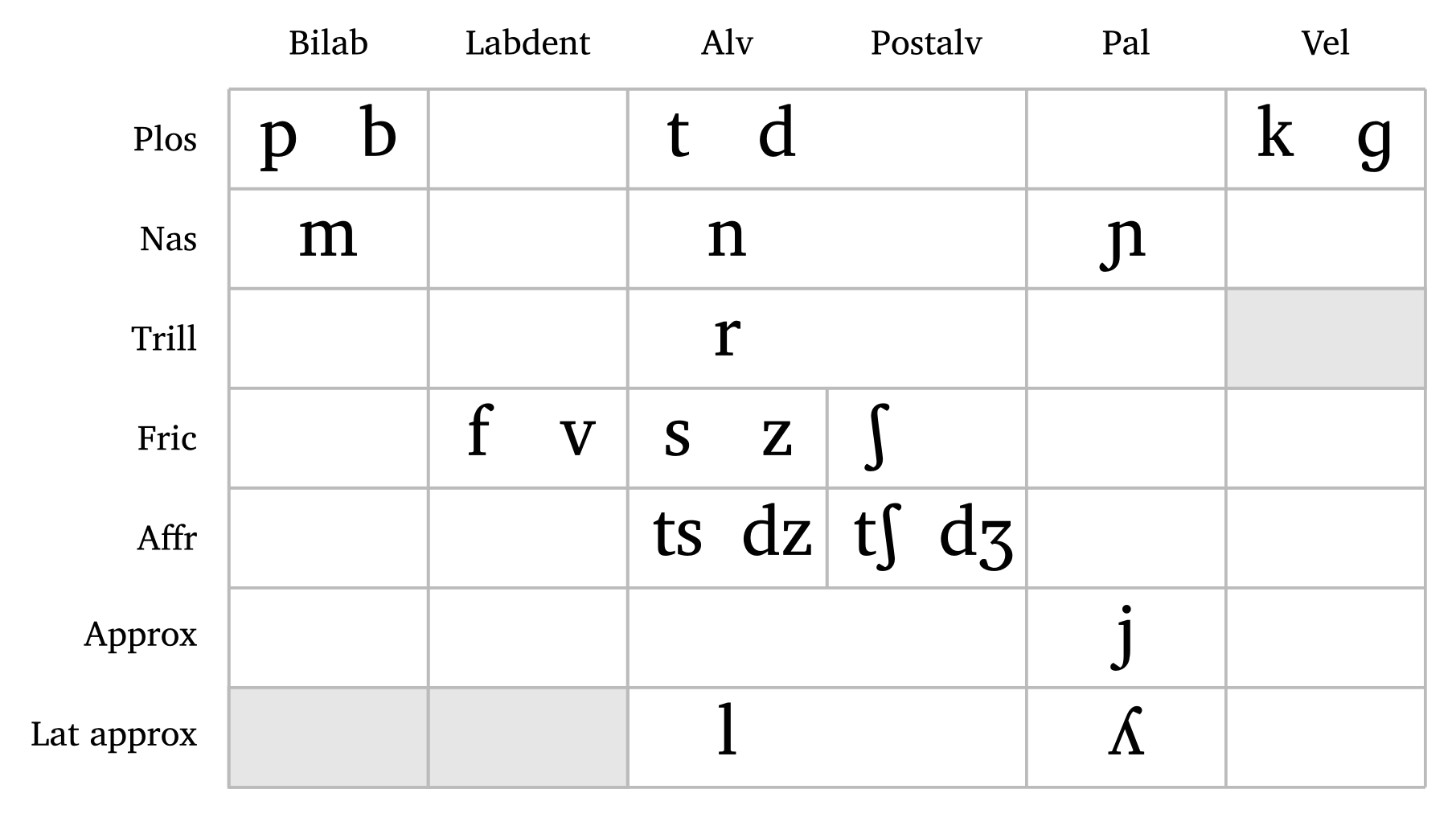
2.3 Vowels
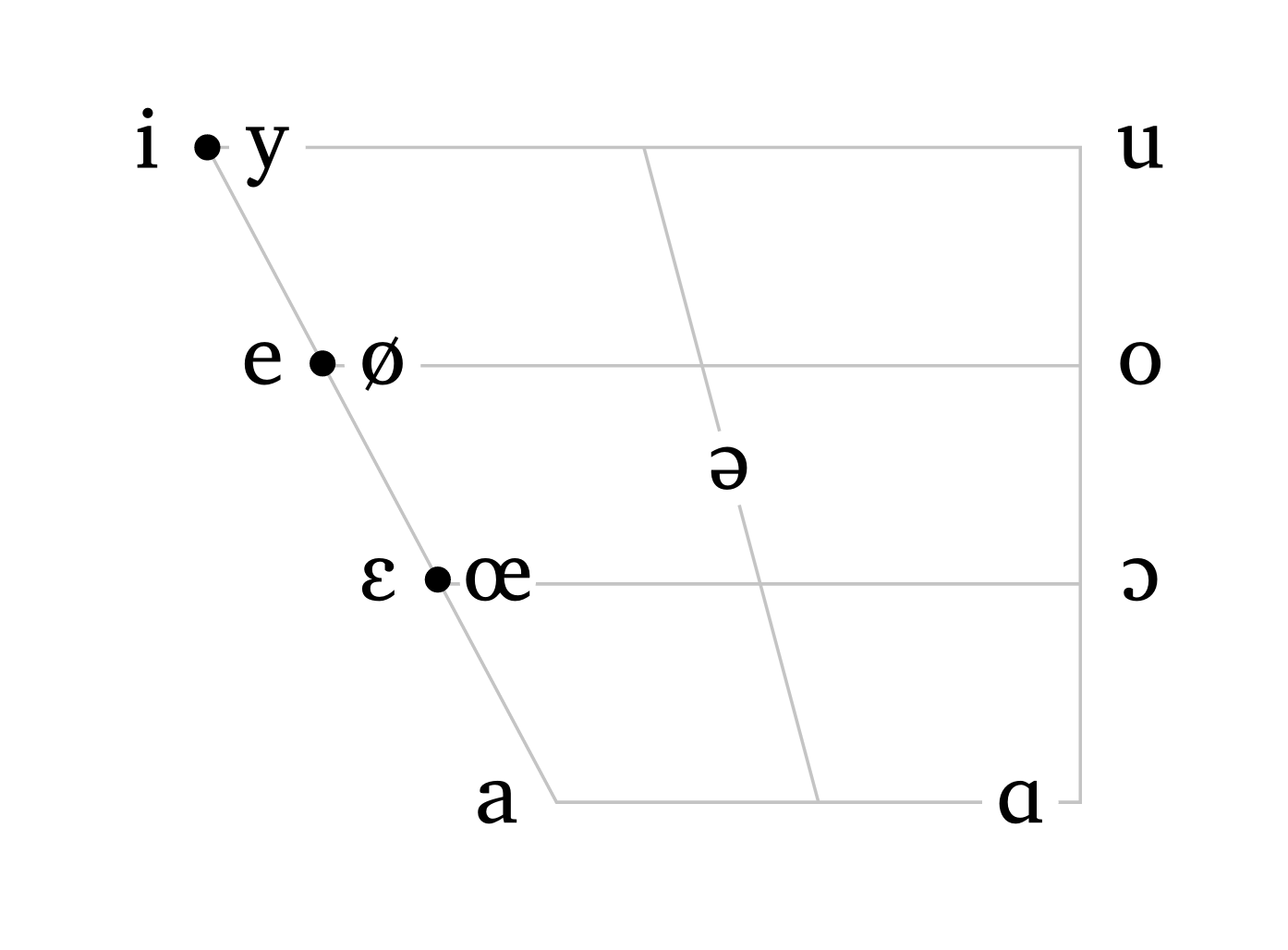
The function #vowels() also accepts either a pre-defined language or a string as input. The argument scale is available here too, so the user can adjust the size of the trapezoid as needed. Both #vowels() and #consonants() check preset names first; to make the intent explicit, use lang: (e.g., #vowels(lang: "english")). Unknown language names or unsupported symbols display an error listing the available presets instead of a chart. With nasals: true, the chart also shows nasal vowels, slightly offset from their oral counterparts. Among the presets, only French has them; in a custom string, only the vowels nasalized in the input are added, as in #vowels("aãioõu", nasals: true). As with #consonants(), symbols can be colored with phoneme-colors.
Vowel trapezoids
#vowels("english", scale: 0.6)
#vowels("french", scale: 0.6)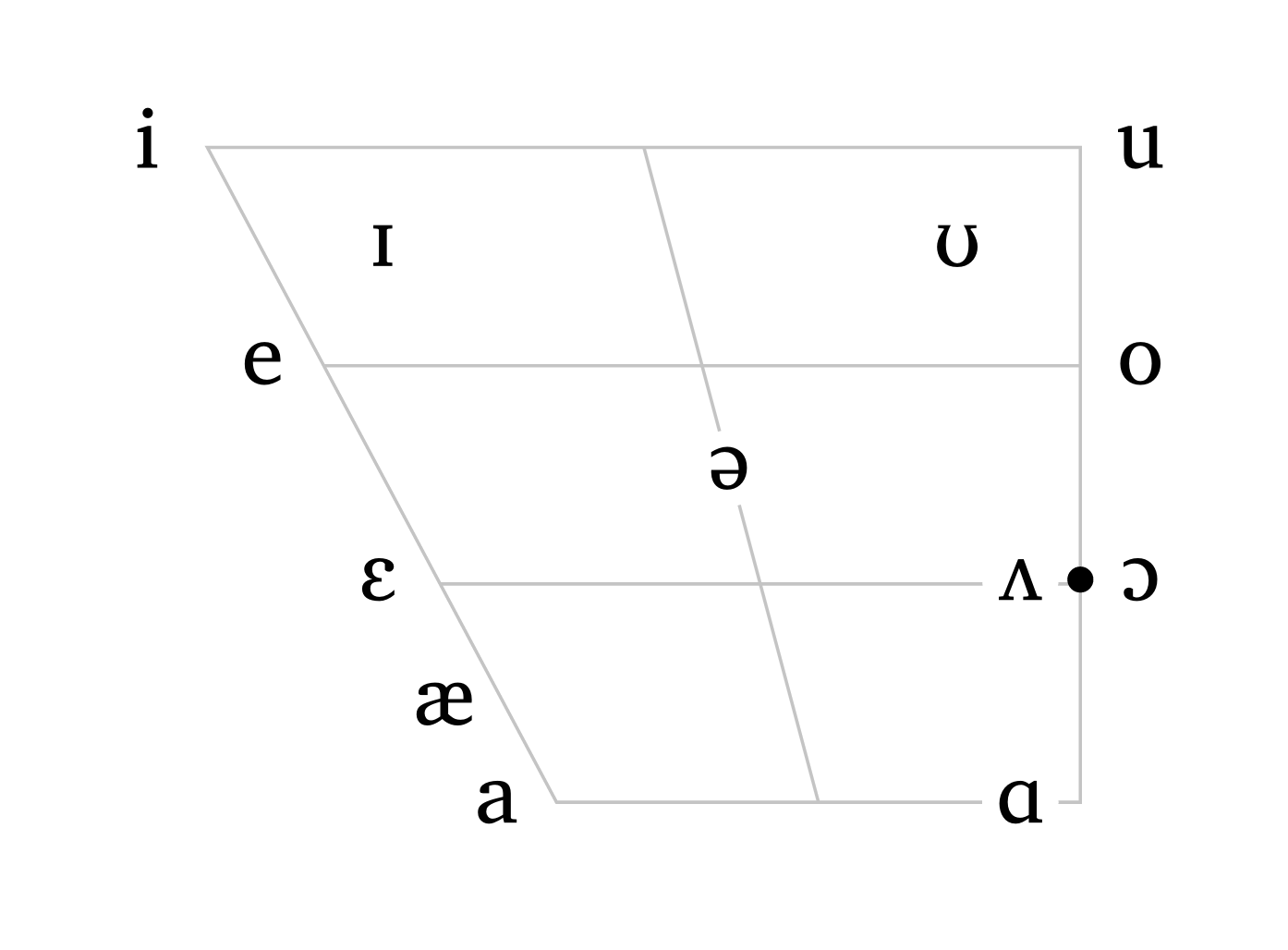
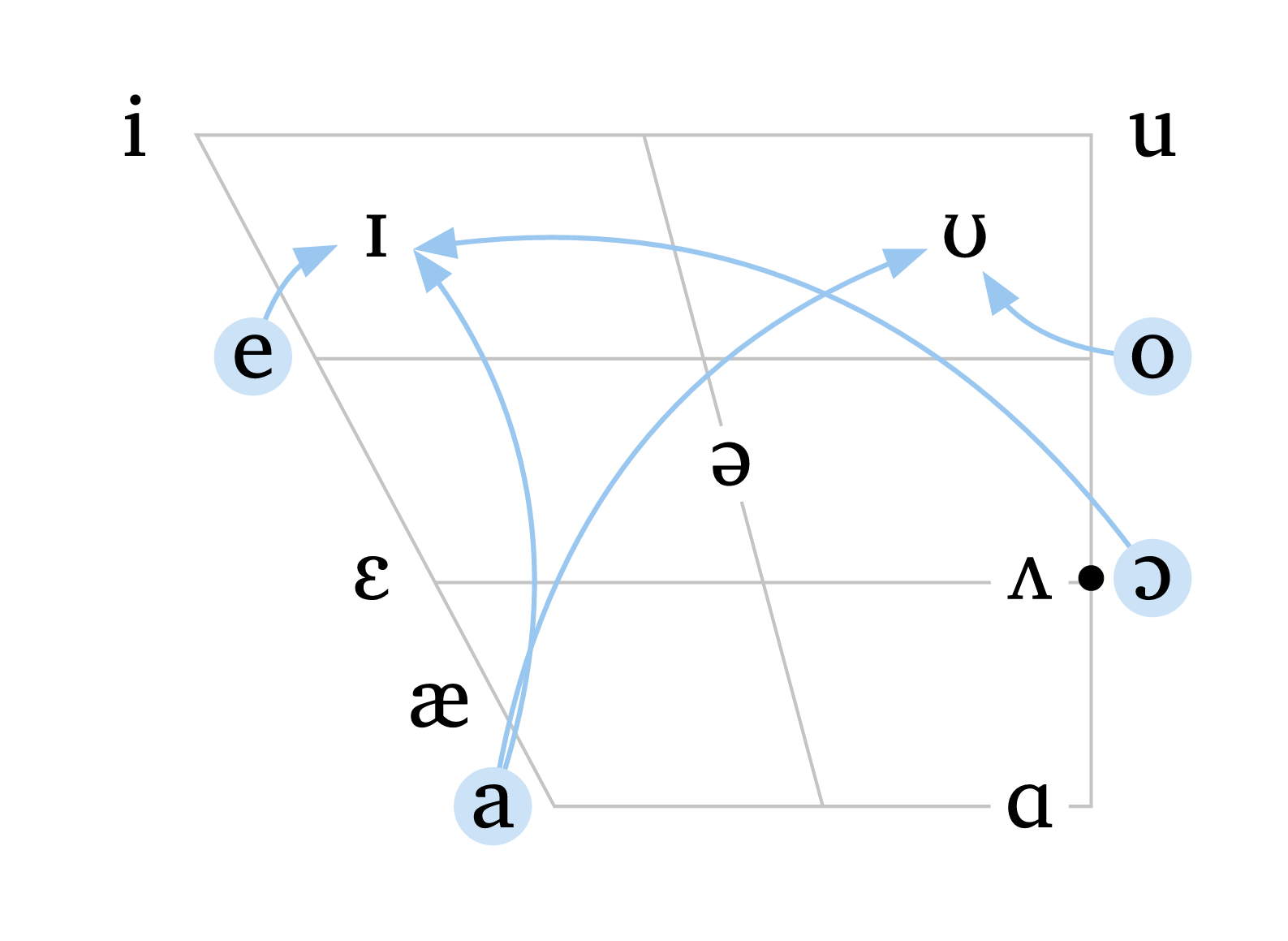
As of version 0.4.5, the function #vowels() accepts additional optional arguments to include arrows, shifted vowels, and highlights. Figure 8 illustrates how arrows and highlight can be used to display diphthongs in North American English. Arrows can be curved (curved: true) or dashed (arrow-style: "dashed"), and colors can be adjusted with arrow-color and highlight-color. Highlighted vowels sit on a colored circle, which can be resized with circle-size (default: 1).
Vowels with arrows and highlights
#vowels(
   "english",
   arrows: (
     ("a", "U"),
     ("a", "I"),
     ("e", "I"),
     ("O", "I"),
     ("o", "U"),
   ),
   arrow-color: blue.lighten(60%),
   curved: true,
   highlight: ("a", "e", "o", "O"),
   highlight-color: blue.lighten(80%),
)
The argument shift allows you to specify a vowel as well as a shift from its original position, enabling much higher flexibility for illustrating dialectal variation. Shifted vowels can be independently targeted by highlight, and arrows can target shifted vowels using the same shifted values. The color and size of shifted vowels can be adjusted with shift-color and shift-size. Figure 9 demonstrates arrows, shifted vowels, and the option to remove grid lines (rows: 0 and cols: 0).
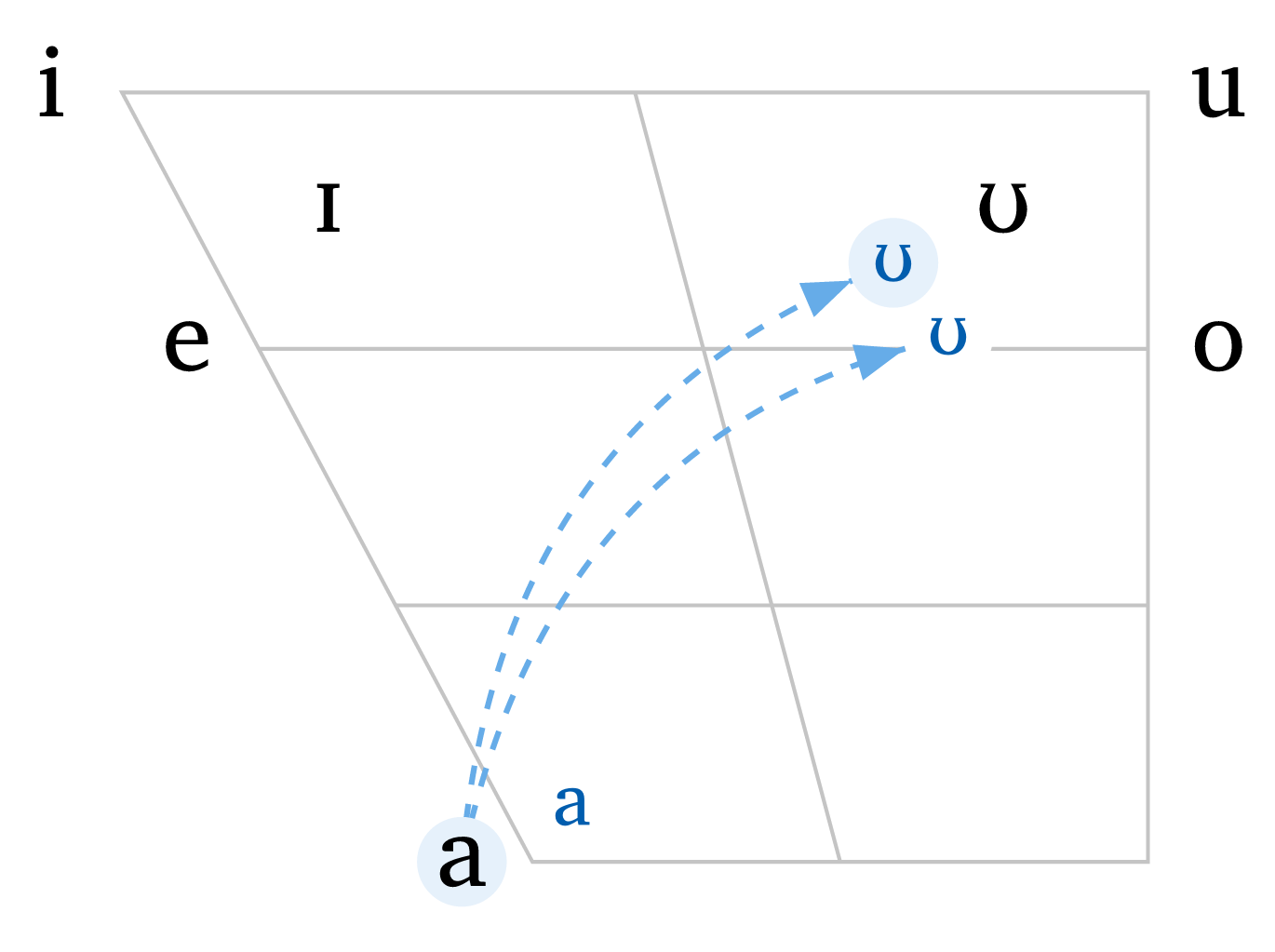
Vowels with shift
#vowels(
    "aeiouIU",
    arrows: (
      ("a", ("U", -0.6, -0.3)),
      ("a", ("U", -0.3, -0.7)),
    ),
    arrow-color: blue.lighten(40%),
    arrow-style: "dashed",
    curved: true,
    shift: (
      ("a", 0.6, 0.3),
      ("U", -0.6, -0.3),
      ("U", -0.3, -0.7),
    ),
    shift-size: 1.5em,
    shift-color: blue.darken(20%),
    highlight: ("a", ("U", -0.6, -0.3)),
    highlight-color: blue.lighten(90%),
    rows: 0,  // no grid lines
    cols: 0,
  )
2.4 3D vowel space
As of version 0.6.0, the function #vowels-3d() adds a third dimension to the trapezoid: rounding. Based on the vowel space in Ladefoged and Maddieson (1996, 283), the trapezoid becomes a prism whose front face is unrounded and whose back face is rounded. Front vowels sit on one side of the prism and back vowels on the other, at a depth that reflects their degree of rounding: /i/ is the least rounded vowel and /u/ the most rounded one, while the low vowels /a/ and /ɒ/ meet halfway. Schwa sits inside the prism.
By default, the function plots nine vowels (/i e ɛ a u o ɔ ɒ ə/), so #vowels-3d() needs no arguments; a subset can be passed in tipa-style input, as in #vowels-3d("ieau"). The view is set by rotation (around the vertical axis) and tilt (from above or below), which accept angles or plain numbers of degrees. Edges hidden from the current viewpoint are dashed, and vowels farther from the viewer are drawn smaller (depth-cue: false turns this off). Because the rotation is just an argument, generating one frame per angle produces the animation in Figure 10.
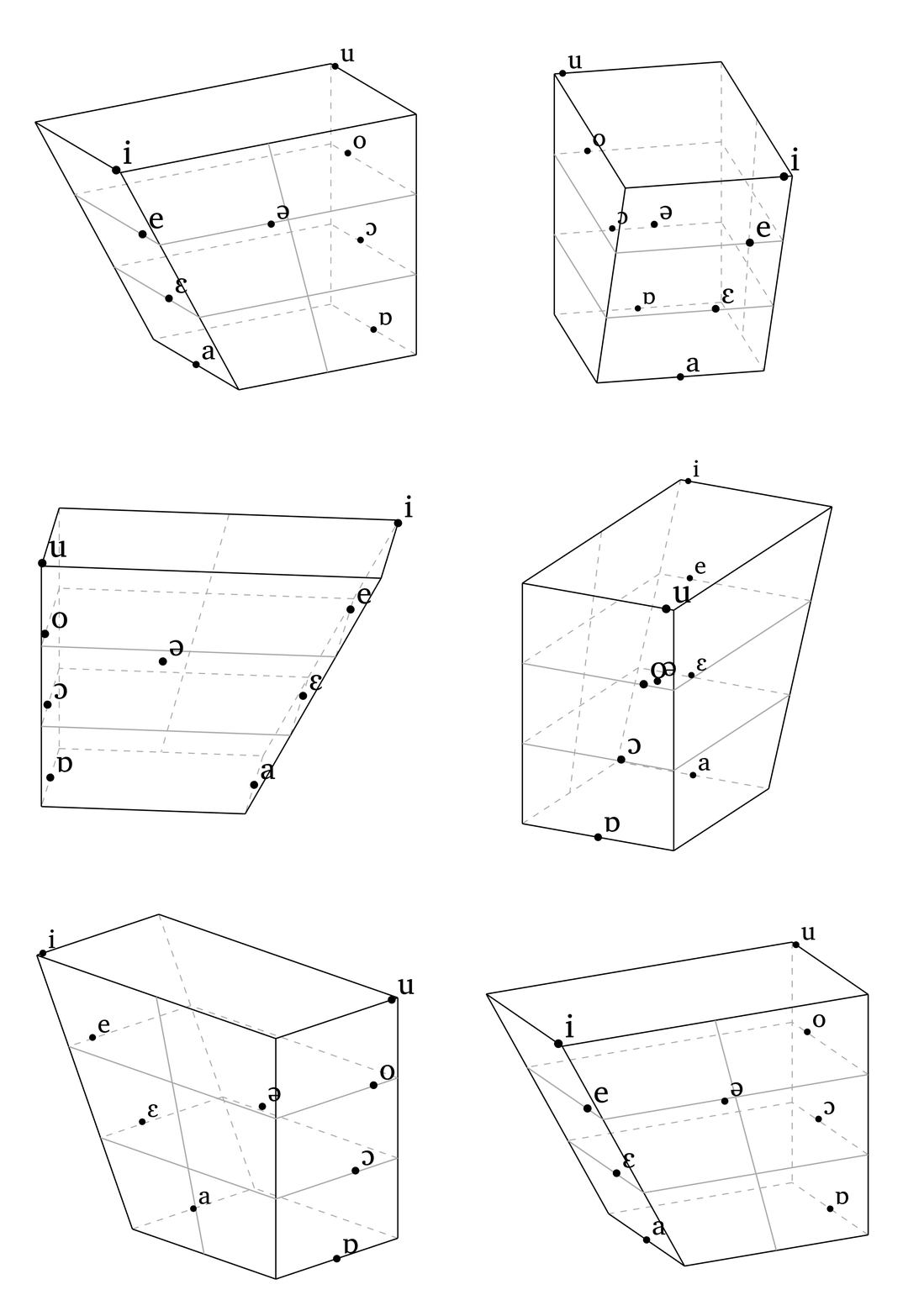
#vowels-3d(), one frame per 3.6 degrees.
3D vowel space
#vowels-3d()                                    // default view
#vowels-3d("ieau@", rotation: -40, tilt: 35)    // custom subset and view
#vowels-3d(rotation: 0, tilt: 0)                // flat front view
3 Phonetics
3.1 Sound shifts
The function #sound-shift() is meant for cases where a vowel trapezoid is no longer the best fit, such as schematic chain shifts, mergers, or splits in which symbols must be placed freely in two-dimensional space. Each node is defined by a label and a position, and arrows connect nodes by referring to those labels directly. Arrows can be curved, nodes can be circled (highlights), and the whole representation can be scaled. Figure 11 shows a schematic representation of the Northern Cities Shift (Labov et al. 2008).
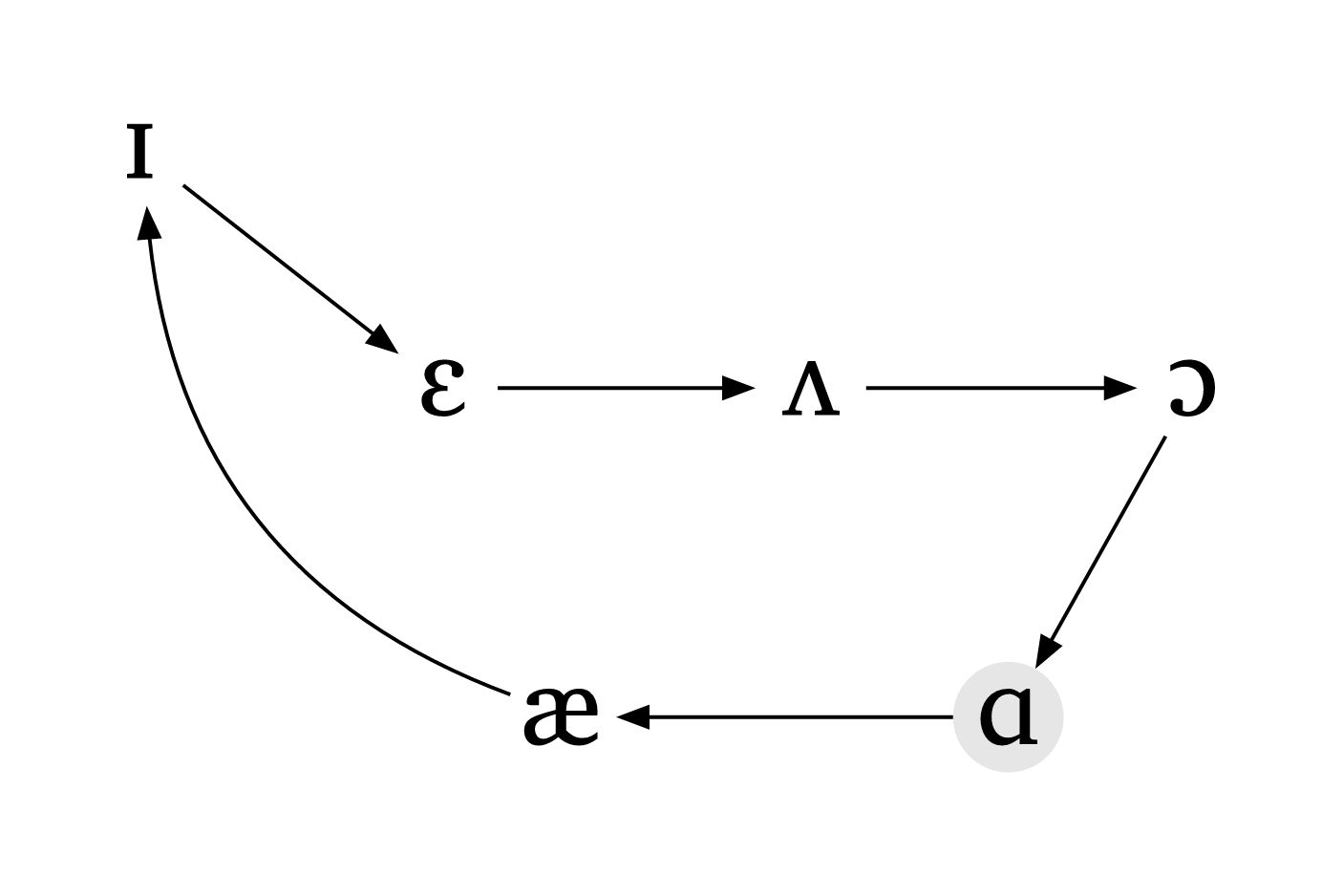
Sound shift
#sound-shift(
  nodes: (
    (label: "I", at: (-4.2, 2.8)),
    (label: "E", at: (-1.9, 1.0)),
    (label: "2", at: (0.9, 1.0)),
    (label: "O", at: (3.8, 1.0)),
    (label: "A", at: (2.4, -1.5)),
    (label: "\\ae", at: (-1.0, -1.5)),
  ),
  arrows: (
    ("E", "2"),
    ("2", "O"),
    ("O", "A"),
    ("A", "\\ae"),
    ("I", "E"),
    (from: "\\ae", to: "I", curved: true, curve: 0.28),
  ),
  scale: 0.7,
  highlights: ("A",),
)
3.2 Voice onset time
The function #vot() creates schematic timelines to illustrate negative, zero, and positive voice onset time values. A minimal diagram only needs the VOT value, as in #vot(-70), but the function also supports localized labels (ui-lang), optional segmental annotation below each interval, and aesthetic adjustments such as fill colors and the display of schematic voicing waves. The diagrams are pedagogical illustrations, not plots of acoustic measurements.
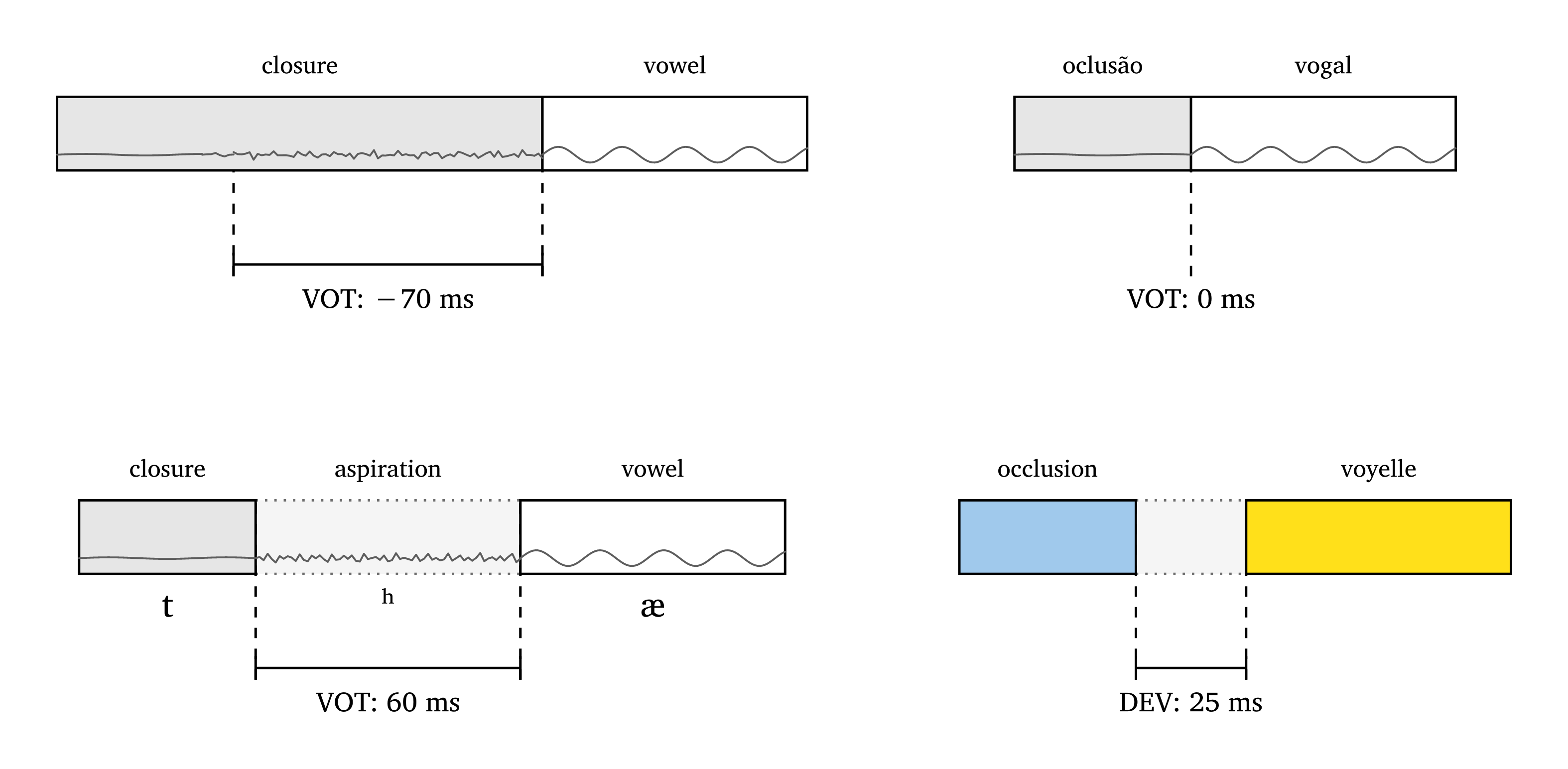
#vot().
VOT diagrams
// minimalist function
#vot(-70)

// support for French and Portuguese labels
#vot(0, ui-lang: "pt")

// annotate diagram using IPA symbols
#vot(60, closure-segment: "t", interval-segment: "\\h", vowel-segment: "\\ae")

// various arguments to customize diagrams
#vot(
  25,
  ui-lang: "fr",
  voicing: false, // optionally hide illustrative waves
  fill-closure: blue.lighten(50%).desaturate(30%),
  fill-vowel: yellow.lighten(10%),
)
3.3 Vowel dispersion
The function #formants() creates a vowel plot to illustrate vowel dispersion, using the Lilaq package (Mc-Zen 2025). It generates synthetic tokens around mean F1 and F2 values: sd sets the standard deviation for F1 (and for F2, unless sd2 is given), and the number of samples defaults to 10 per vowel. As with #vowels(), preset languages are available (Figure 13); their values are schematic and meant for teaching only. Use seed (default: 1) to reproduce the same vowel positions across figures. Optional ellipses, point sizes, colors, and scale are also available.
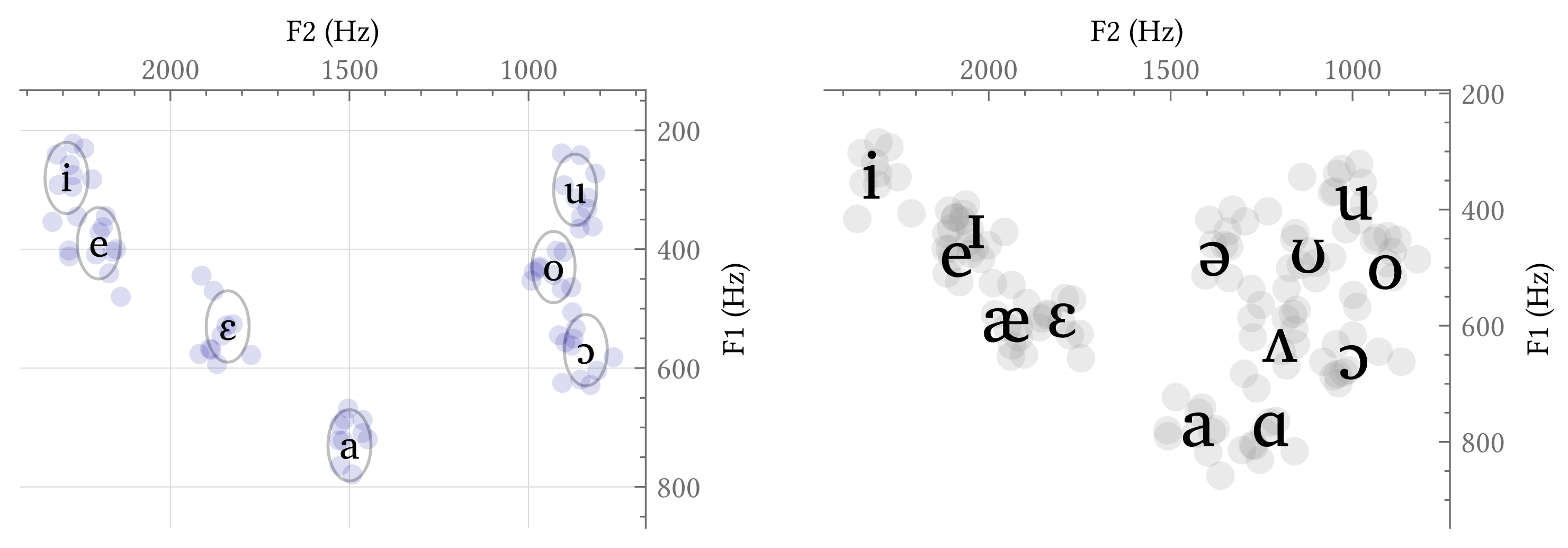
Vowel dispersion
#formants("italian", scale: 0.6, ellipse: true, axis-size: 1.3em)
#formants("english", point-size: 100,
  point-color: luma(150),
  axis-size: 1.3em,
  vowel-size: 2.8em,
  grid: false,
  scale: 0.6
)
To plot real data, pass a csv file to the source argument. The file needs a header with vowel, f1, and f2 columns (other columns are ignored). In this mode, vowel means are computed from the observed values, and ellipses use sample standard deviations. The file formants_sample.csv, used in Figure 14, is available in the extras/ directory of the repository.
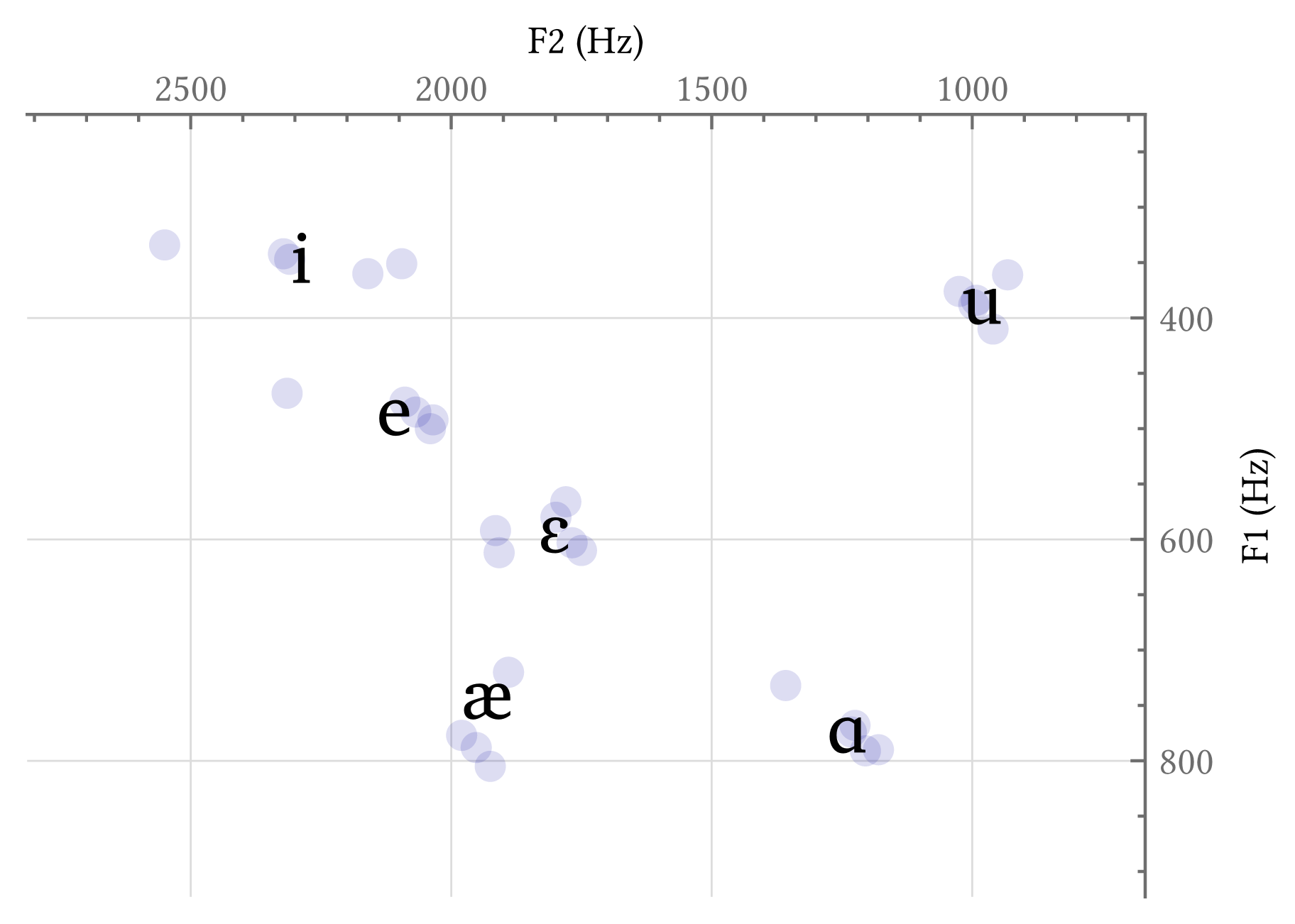
csv file.
Formants from a csv file
// vowel,f1,f2,speaker
// i,342,2322,s1
// ...
#formants(source: csv("extras/formants_sample.csv"), scale: 0.8)
4 SPE
Rewrite rules can be complex, and phonokit provides two primitive functions for feature matrices that can be combined to form SPE-style rules (Chomsky and Halle 1968).
The first function is #feat-matrix(), which outputs the maximal feature matrix for a given phoneme (with the option for 0 values if all: true). This can be useful in introductory courses introducing the notion of distinctive features. The function is based on the features in Hayes (2009). Figure 15 shows matrices for the phonemes in “patchy”.
Feature matrices
#feat-matrix("p") #feat-matrix("\\ae") #feat-matrix("\\t tS") #feat-matrix("i")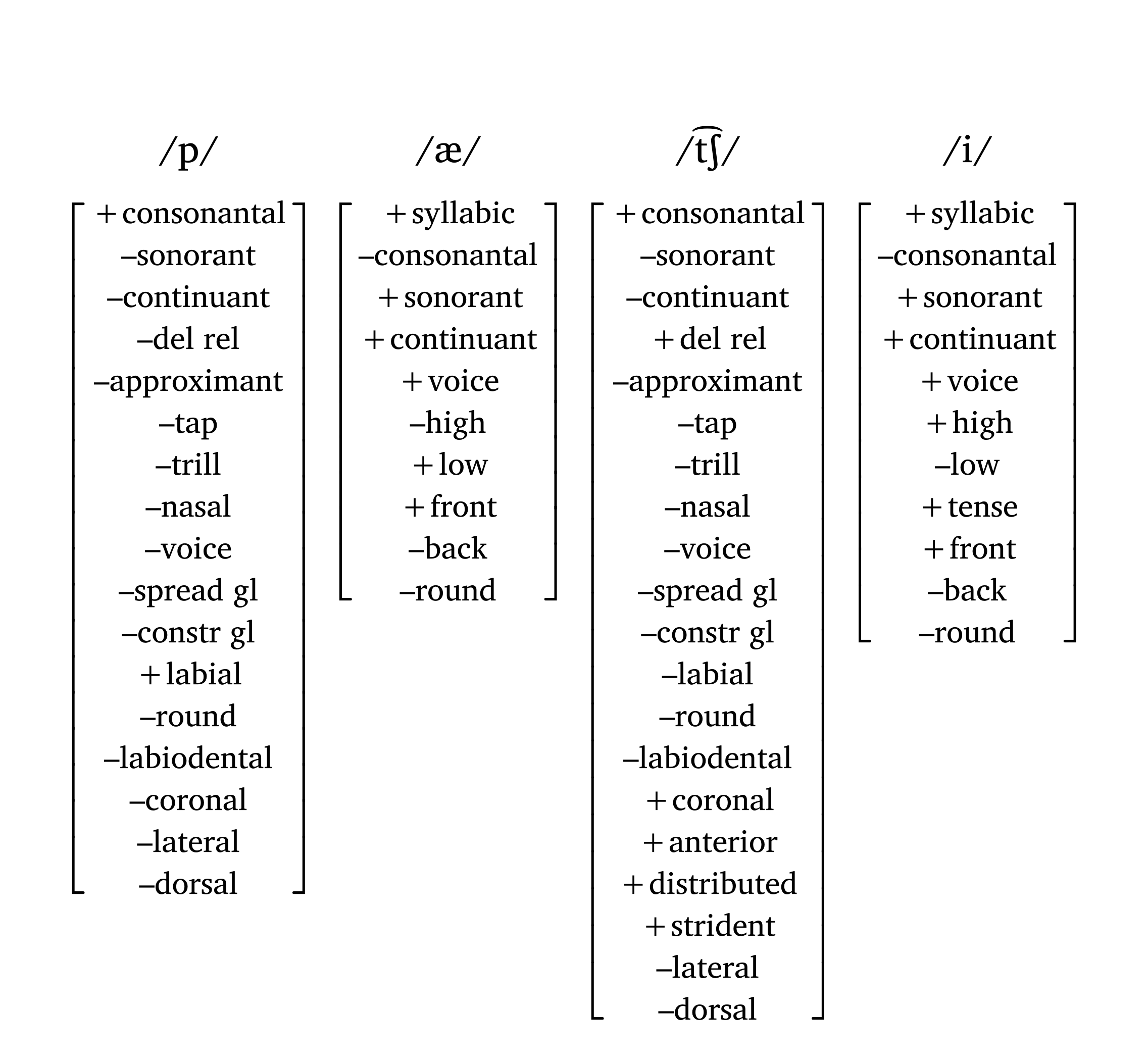
The second function, #feat(), creates a matrix given a set of features — this is the function used in a rewrite rule. Alpha notation requires a specific syntax: X + "feat" or X + [smallcaps("feat")]. A helper function #blank() adds a long underline for the context of application, and #a-r adds a right arrow (other arrows: #a-l, #a-u, #a-d, #a-lr, #a-ud, #a-sr, #a-sl, #a-r-large). Figure 16 shows a nasal place assimilation rule.
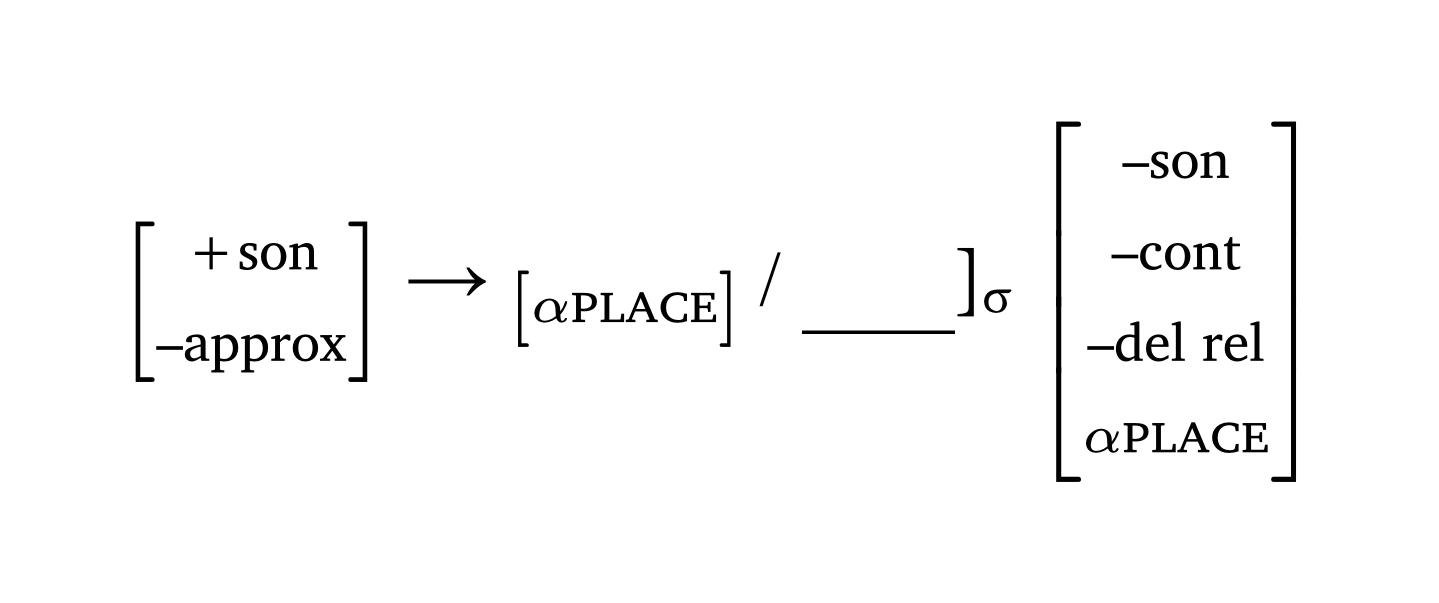
SPE rewrite rule
#feat("+son", "–approx") #a-r
  #feat(sym.alpha + [#smallcaps("place")]) / #blank()\]#sub[#sym.sigma]
  #feat("–son", "–cont", "–del rel", sym.alpha + [#smallcaps("place")])
5 Prosody
5.1 Sonority
When discussing the sonority principle in introductory courses, it is useful to illustrate relative sonority with a visual representation. The function #sonority(), based on the sonority scale in Parker (2011, 18), plots phonemes and their relative sonority profiles. If syllable boundaries are detected in the input, the function alternates between white and gray fills to distinguish each syllable.
Sonority profile
#sonority("vA \\*r .sI.ti", scale: 0.7)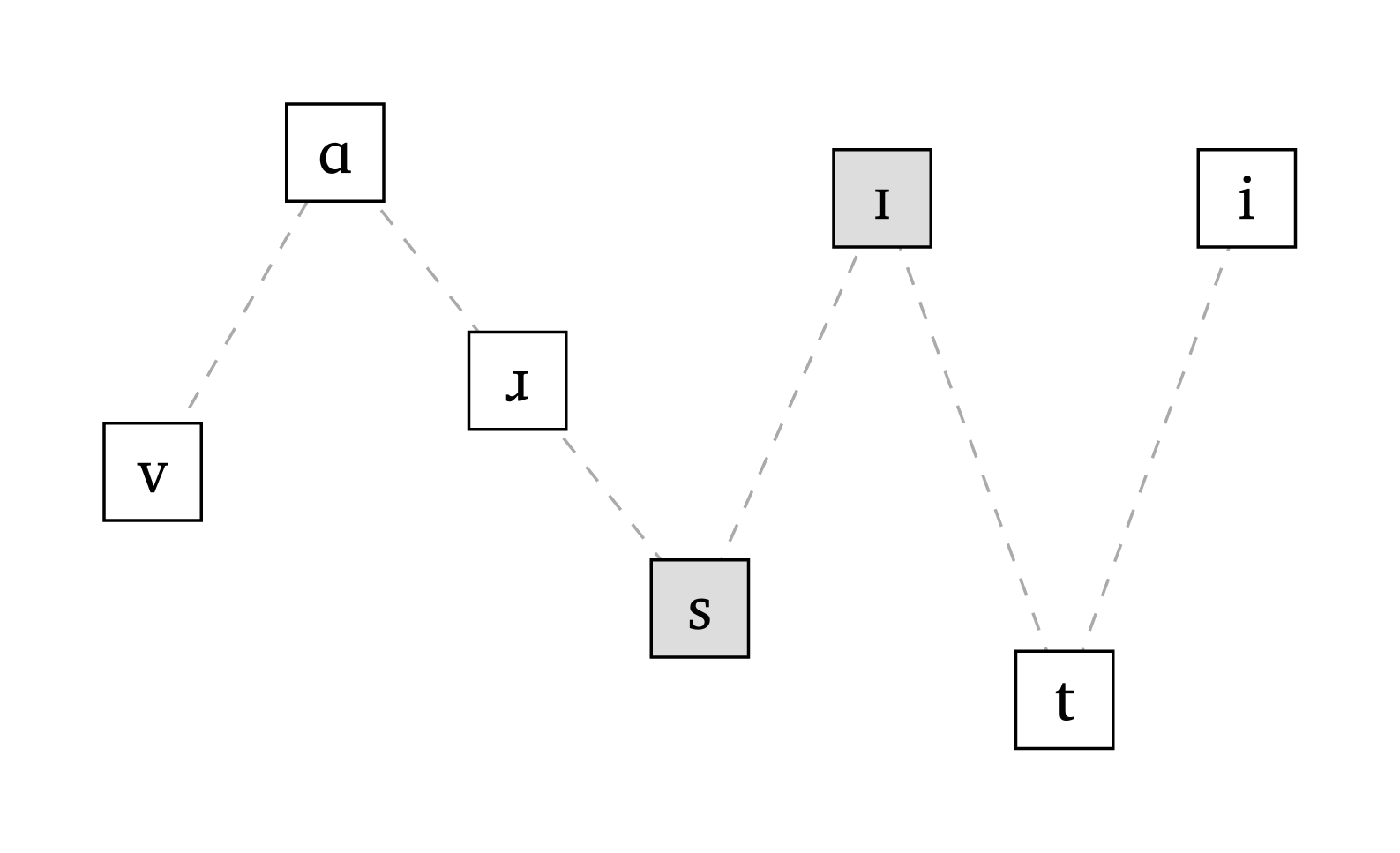
5.2 Syllables, feet and prosodic words
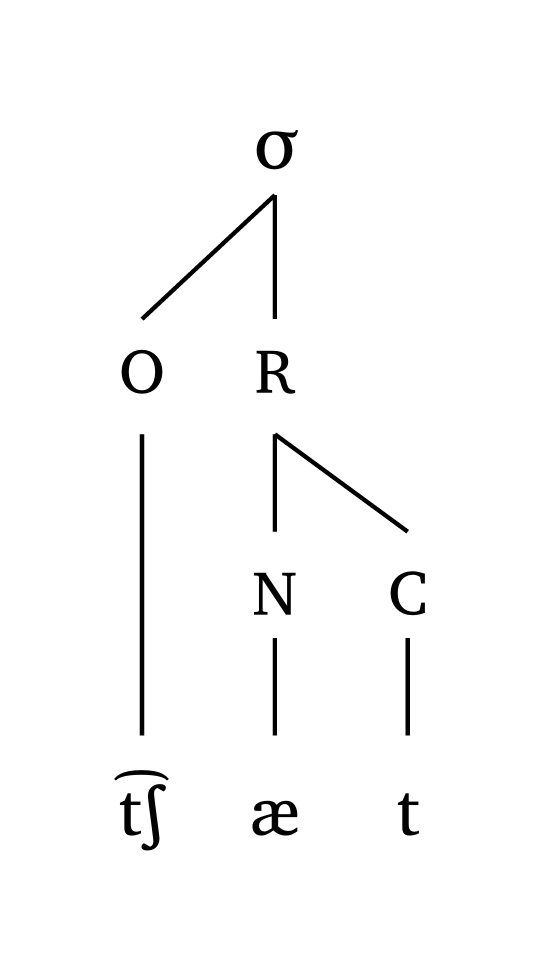
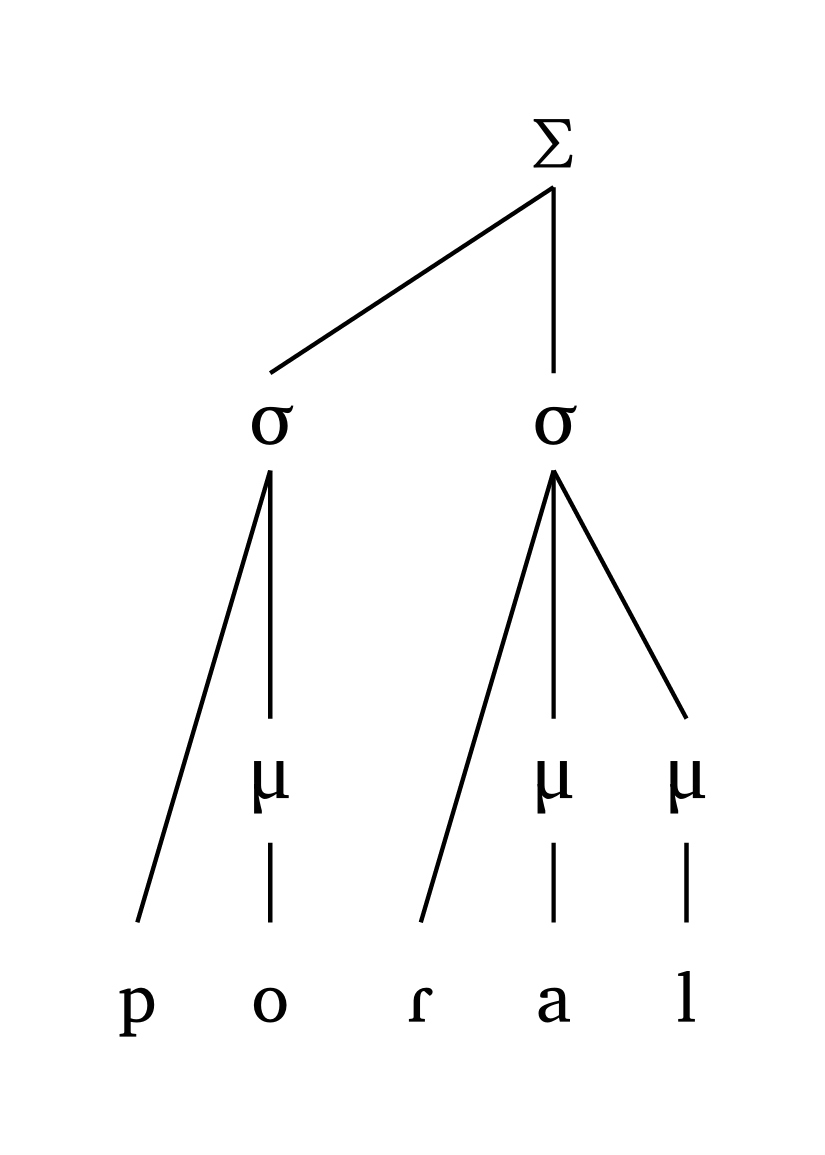
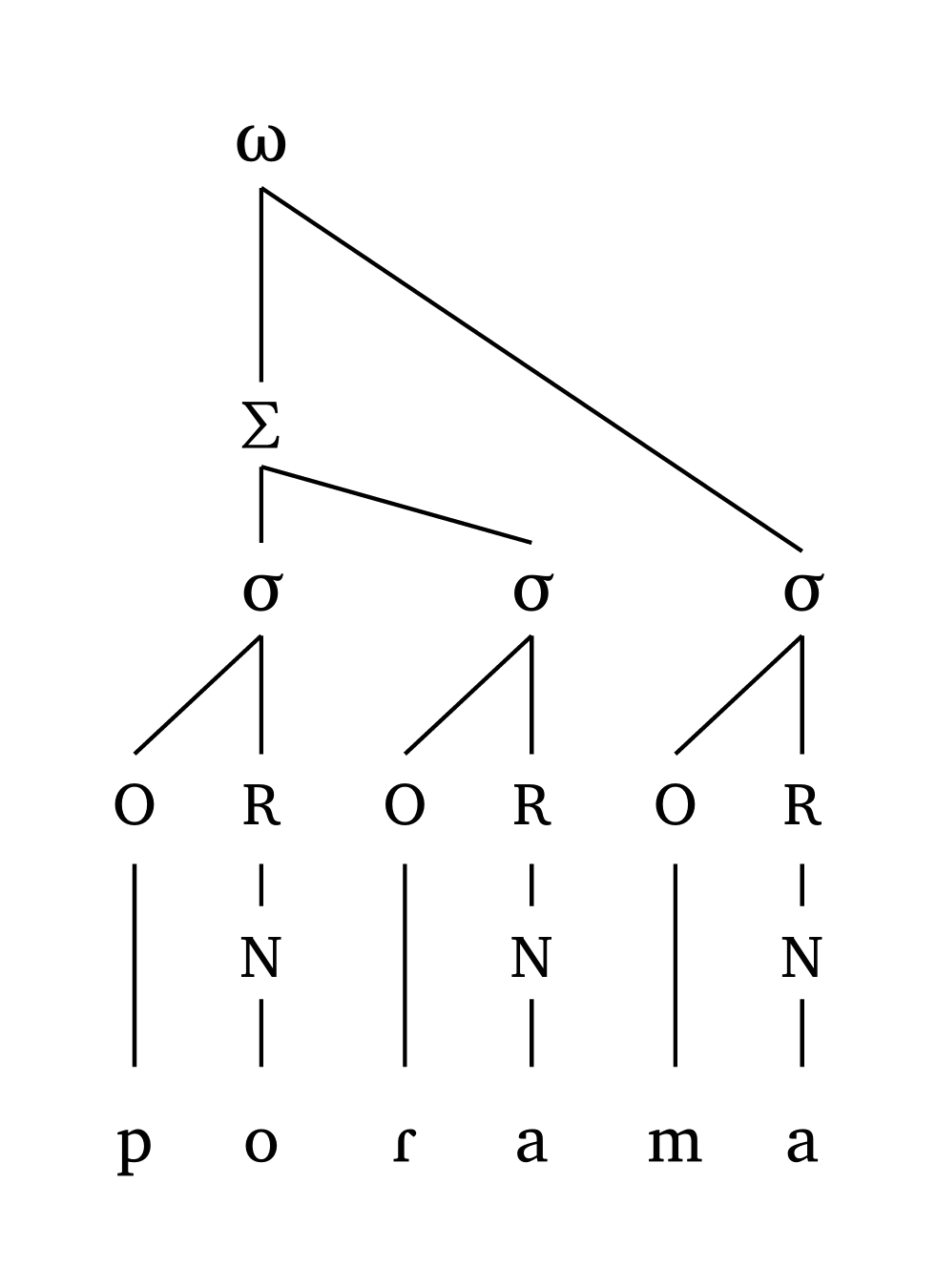
Six functions cover prosodic structure: #syllable() and #mora() for single syllables (onset-rhyme and moraic), #foot() and #foot-mora() for a single foot, and #word() and #word-mora() for prosodic words. All of them take the same input as #ipa(), plus a few conventions: a period . marks syllable boundaries, an apostrophe ' marks the head of a foot, parentheses () define feet (unfooted syllables attach directly to the PWd), and : marks vowel length. In moraic representations, coda: true makes codas moraic; in words with more than one foot, foot: "L" or foot: "R" (default) sets which foot carries primary stress. Figure 18, Figure 19 and Figure 20 show one example of each type.
Syllable, foot and prosodic word
#syllable("\\t tS \\ae t")
#foot-mora("po.'Ral", coda: true)
#word("('po.Ra).ma")
Representations adjust automatically to their input: complex onsets and codas widen the structure, geminates are linked to both coda and onset, and heights grow as needed to avoid line crossings (all lines are straight by design). Vertical spacing adapts to each representation by default (spacing: "auto"); use spacing: "fixed" for constant spacing, and distance to stretch or shrink specific levels. The scale argument resizes lines and text together, and symbol replaces the default labels (ω, Σ, σ, μ) with your own, e.g. #foot("'pa.ta", symbol: ("Ft", "Syl")). The PDF manual has many more examples, including long vowels, geminates, dactyls, and extreme cases.
5.3 Metrical grid
The function #met-grid() creates a metrical grid using \(\times\) to indicate prominence. Input can be a string with numbers indicating each syllable’s grid height, or tuples whose first element follows #ipa() conventions. Figure 21 shows the grid for butterfly.
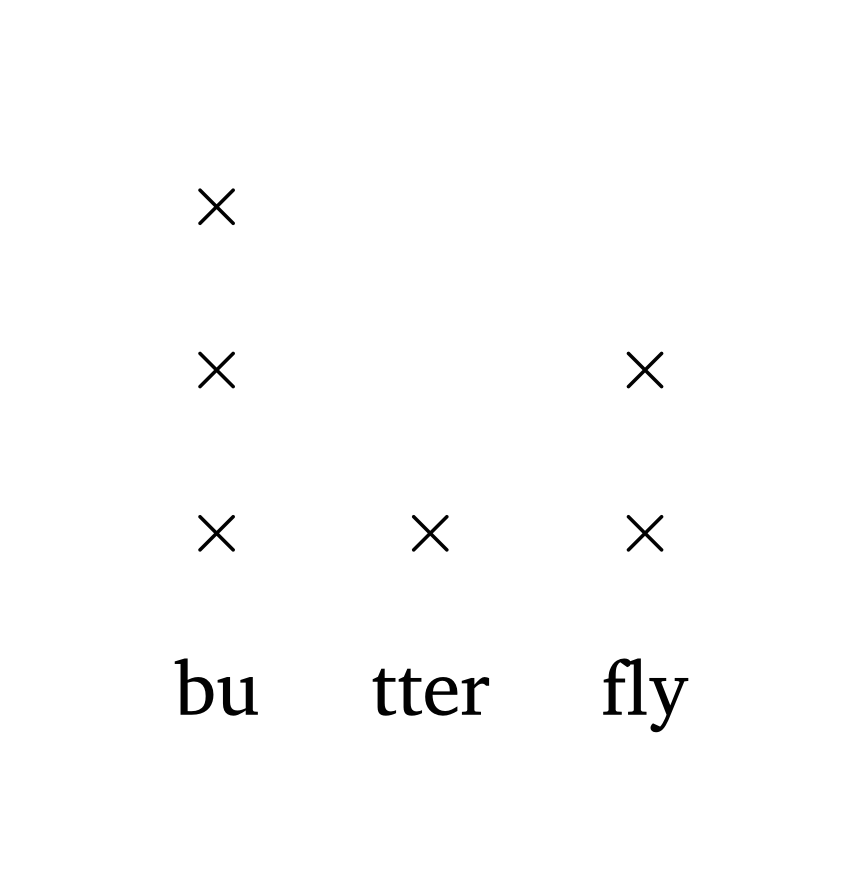
Metrical grid
#met-grid("bu3.tter1.fly2")                           // string input
#met-grid(("b2", 3), ("R \\schwar", 1), ("flaI", 2))  // tuple (IPA) input
6 Autosegments
The function #autoseg() allows you to represent either features or tones on a separate tier, including linking, delinking, floating tones, and contour tones. Inputs are arrays, so each phoneme is entered individually. This allows for empty spaces, domain boundary symbols, etc.
6.1 Feature spreading
Figure 22 demonstrates #autoseg() in a simple scenario of feature spreading. The argument links is an array of tuples: ((2,1),) means “draw a link from index 2 to index 1”. The argument arrow adds or removes arrow heads on linking lines.
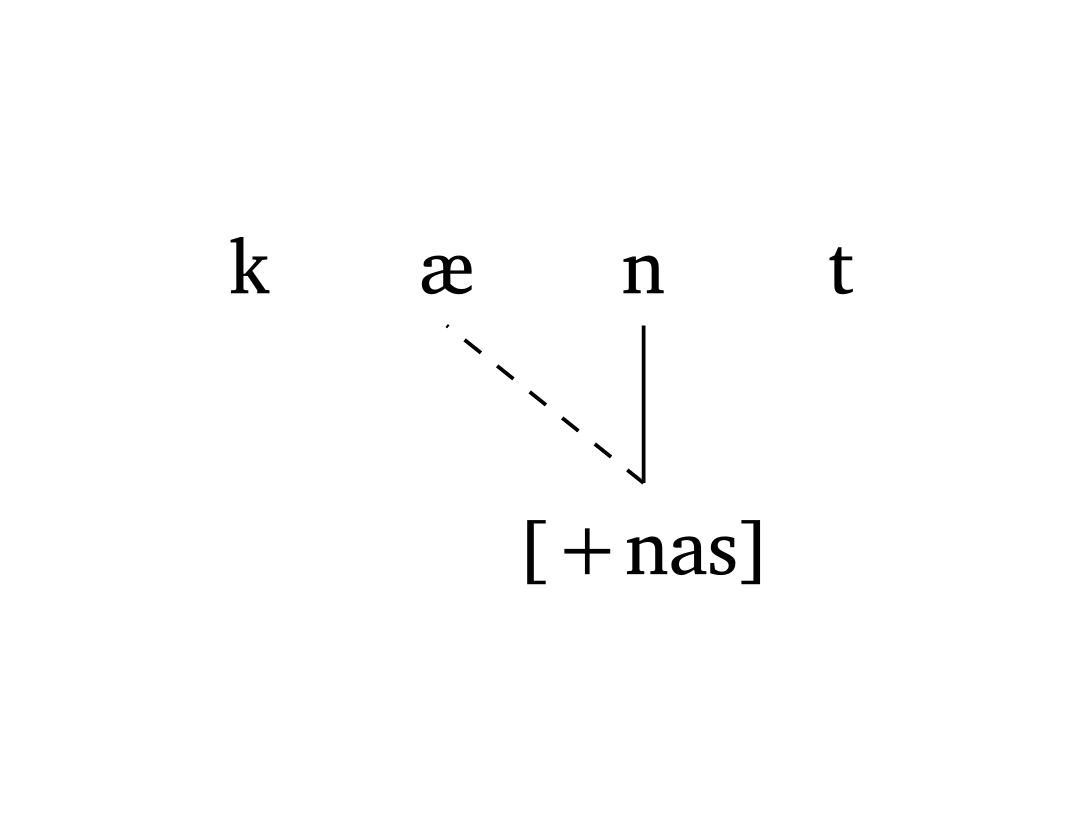
Nasal spreading
#autoseg(
    ("k", "\\ae", "n", "t"),
    features: ("", "", "[+nas]", ""),
    links: ((2, 1),),
    spacing: 1.0,
    arrow: false,
  )
Figure 23 shows an example of metaphony in Brazilian Veneto (Garcia and Guzzo 2023) where [+high] spreads from the final /i/ to /e/ (position 3) and /o/ (position 1). The argument gloss allows quick annotation.
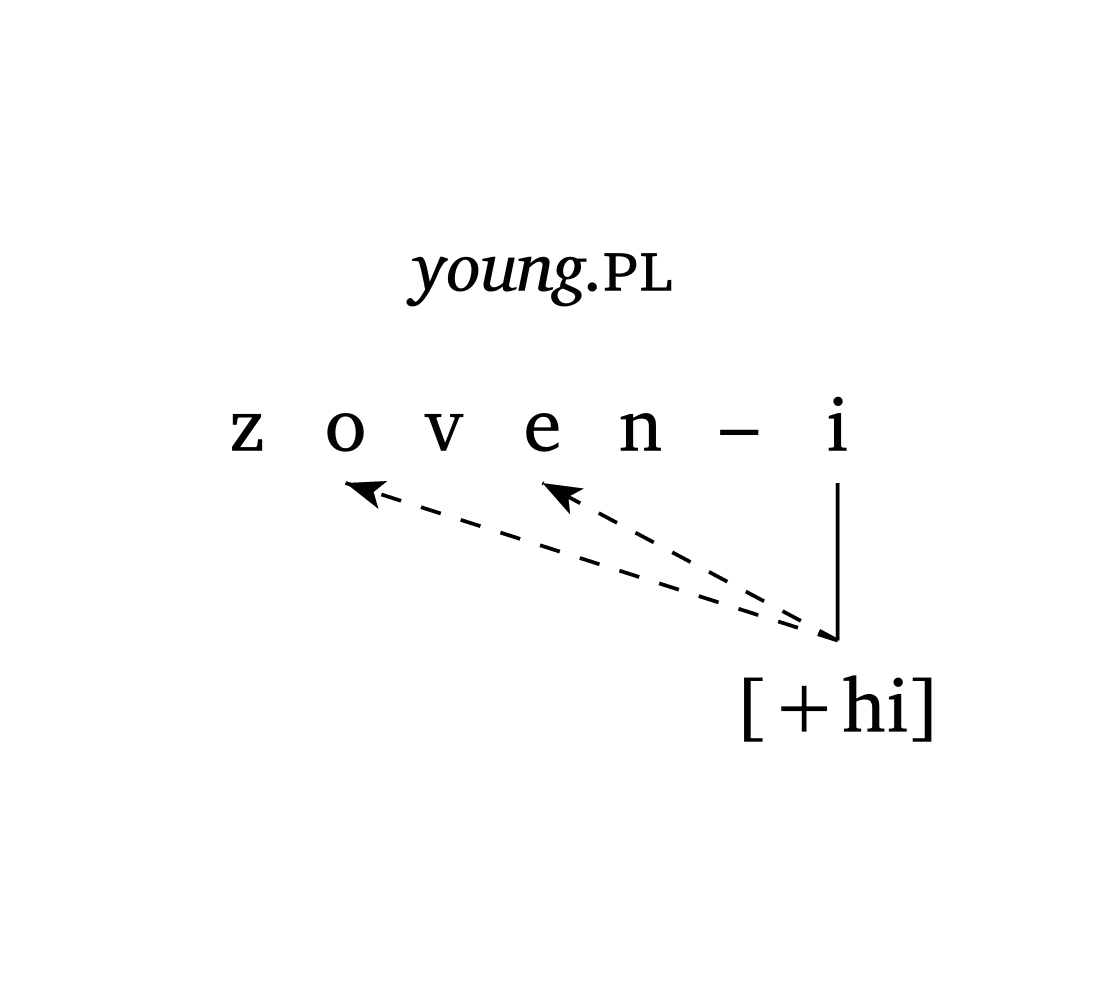
Metaphony (Brazilian Veneto)
#autoseg(
    ("z", "o", "v", "e", "n", "–", "i"),
    features: ("", "", "", "", "", "", "[+hi]"),
    links: ((6, 3), (6, 1)),
    spacing: 0.5,
    arrow: true,
    gloss: [_young_.#smallcaps("pl")],
  )
6.2 Tones
The argument tone: true “flips” the representation vertically to show tones above the segmental tier. Figure 24 shows low tone spreading without delinking in Nupe (Zsiga 2024).
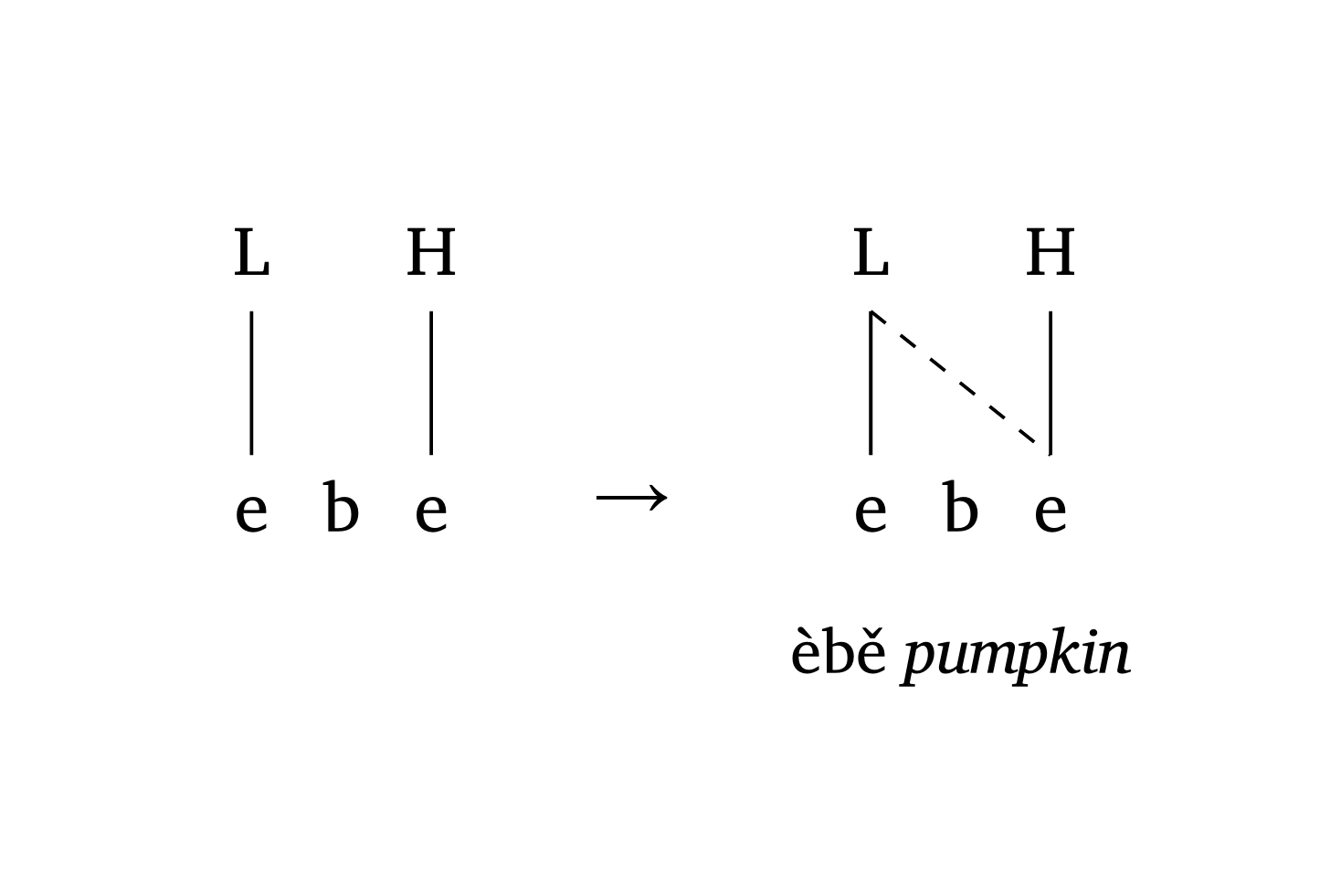
Tone spreading (Nupe)
#autoseg(
  ("e", "b", "e"),
  features: ("L", "", "H"),
  spacing: 0.5,
  tone: true,
  gloss: [],
)
#a-r  // arrow between stages
#autoseg(
  ("e", "b", "e"),
  features: ("L", "", "H"),
  links: ((0, 2),),
  spacing: 0.5,
  tone: true,
  gloss: [èbě _pumpkin_],
)
Floating tones can be added with the float argument. Figure 25 demonstrates how to add a floating tone and draw a circle around it with the highlight argument.
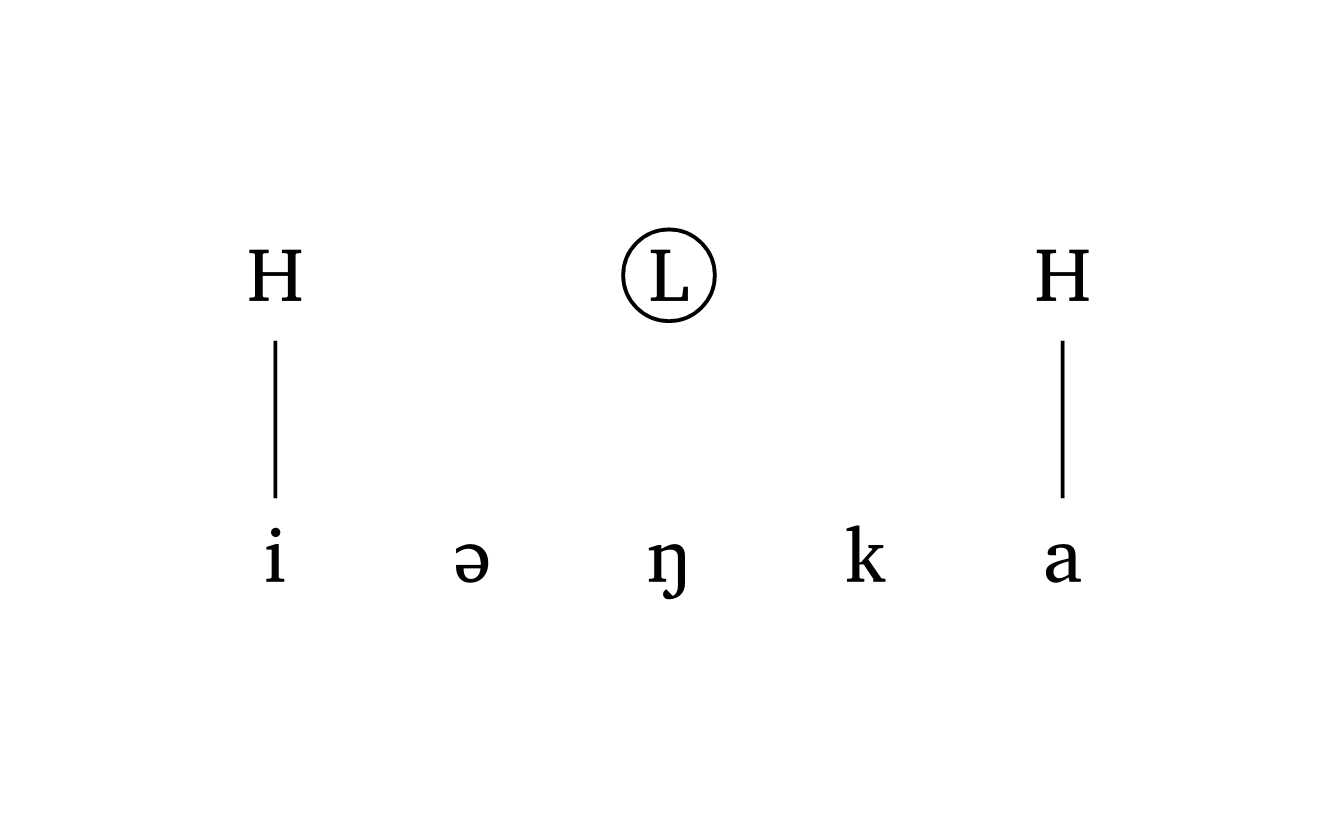
Floating tone
#autoseg(
      ("i", "@", "N", "k", "a"),
      features: ("H", "", "L", "", "H"),
      highlight: (2,),
      spacing: 1.0,
      tone: true,
      float: (2,),
    )
Spreading from a contour tone requires a tuple inside features for the vowel linked to two tones. The links argument uses nested tuples: (((2, 0), 1),) means “from the first tone at position 2 (i.e., H), draw a dashed line to segment 1”. Figure 26 illustrates this.
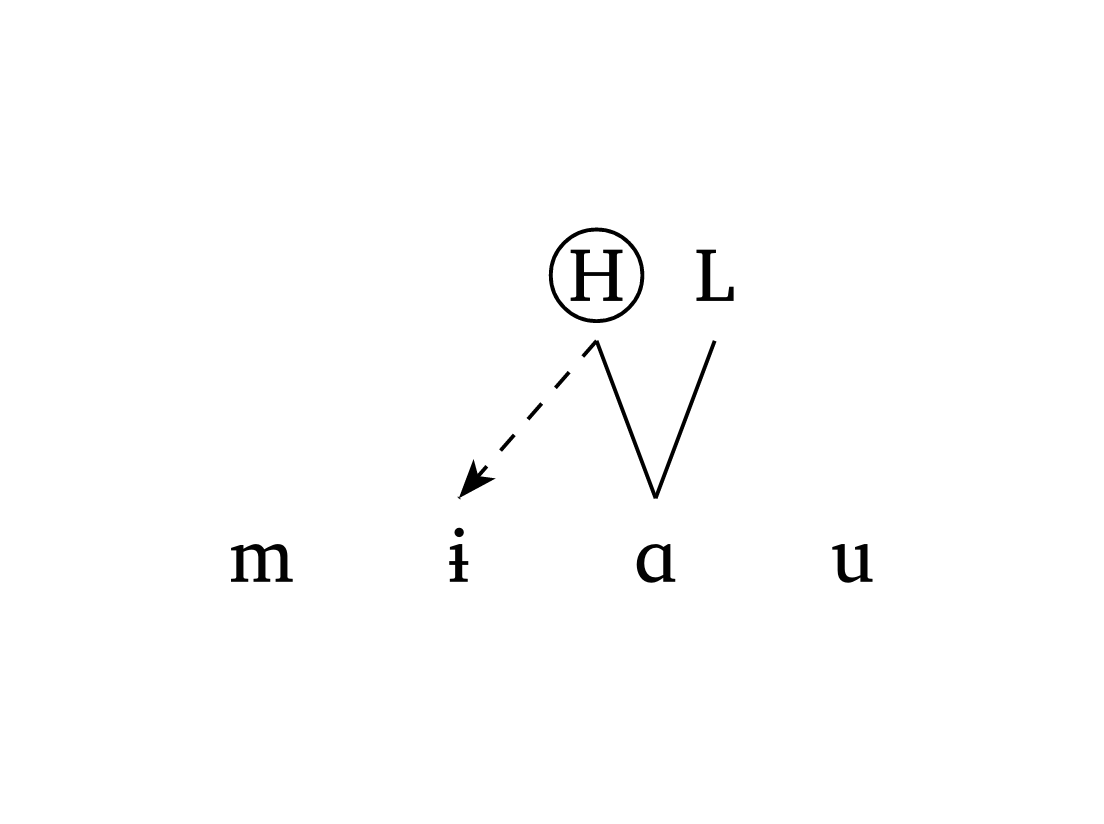
Contour tone
#autoseg(
  ("m", "1", "A", "u"),
  features: ("", "", ("H", "L"), ""),
  links: (((2, 0), 1),),
  tone: true,
  highlight: ((2, 0),),
  spacing: 1.0,
  arrow: true,
),
Figure 27 shows a three-stage OCP effect in Vai (Zsiga 2024), demonstrating delinking (delinks) and one-to-many tone relationships (multilinks). The argument delinks: ((3, 3),) states that the link between position 3 and itself must be delinked. The argument multilinks: ((6, (6, 9)),) means “center a tone on segments 6 and 9 simultaneously”.
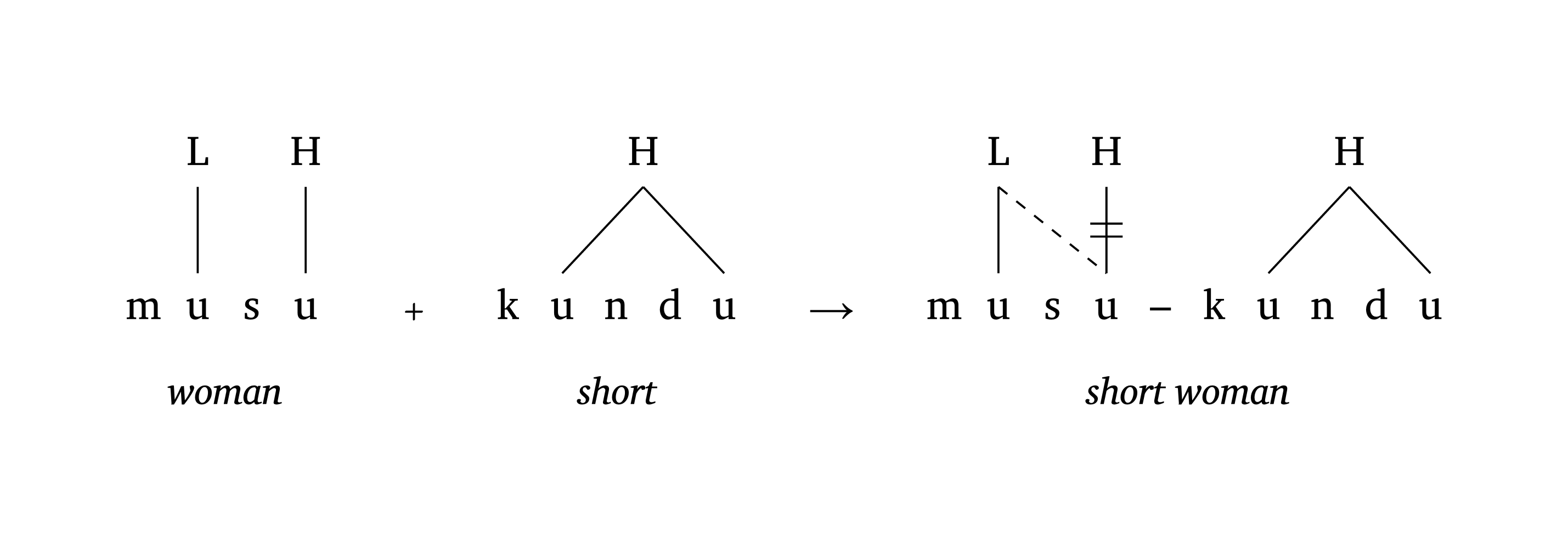
OCP effects (Vai)
#autoseg(
      ("m", "u", "s", "u"),
      features: ("", "L", "", "H"),
      tone: true, spacing: 0.5, baseline: 37%,
      gloss: [_woman_],
    ) +
    #autoseg(
      ("k", "u", "n", "d", "u"),
      features: ("", "H", "", "", ""),
      tone: true,
      float: (1,),
      multilinks: ((1, (1, 4)),),
      spacing: 0.5, baseline: 37%,
      arrow: false,
      gloss: [_short_],
    ) #a-r
    #autoseg(
      ("m", "u", "s", "u", "–", "k", "u", "n", "d", "u"),
      features: ("", "L", "", "H", "", "", "H", "", "", ""),
      links: ((1, 3),),
      delinks: ((3, 3),),
      arrow: false,
      multilinks: ((6, (6, 9)),),
      tone: true,
      baseline: 37%,
      spacing: 0.50,
      gloss: [_short woman_],
    )
6.3 Prosody with ToBI
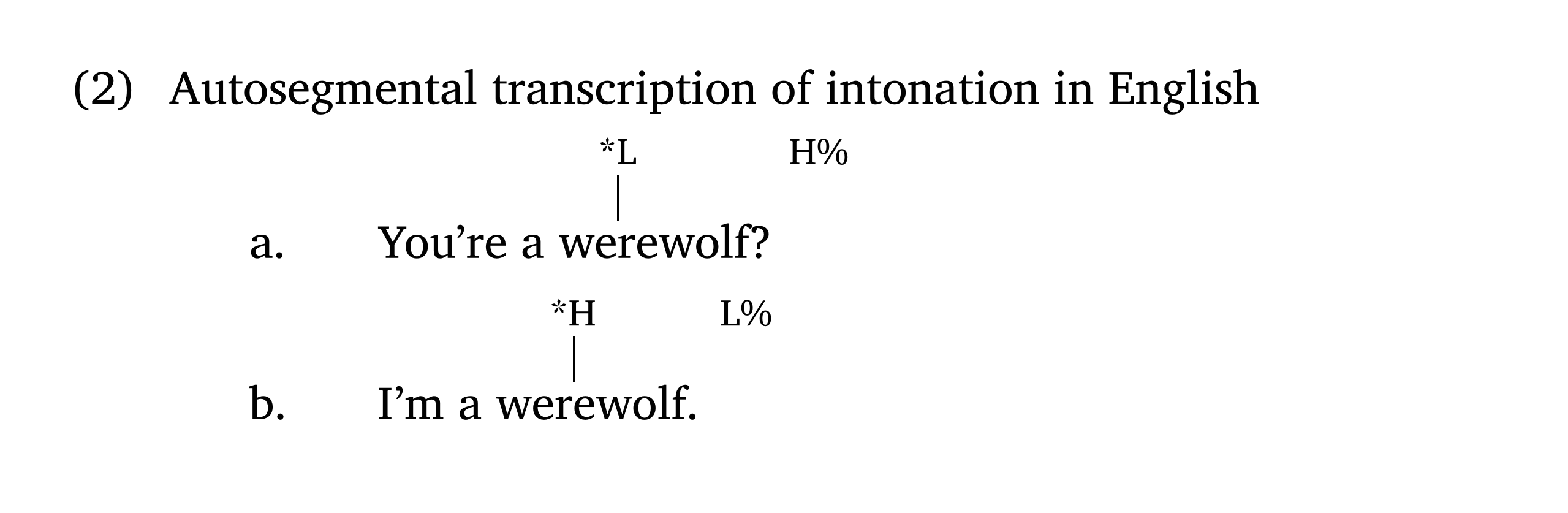
Adding ToBI labels to strings can be achieved with the function #int(). The argument line: false turns off the vertical stem (e.g., for boundary tones). By default, the font size of tones is 0.8em.
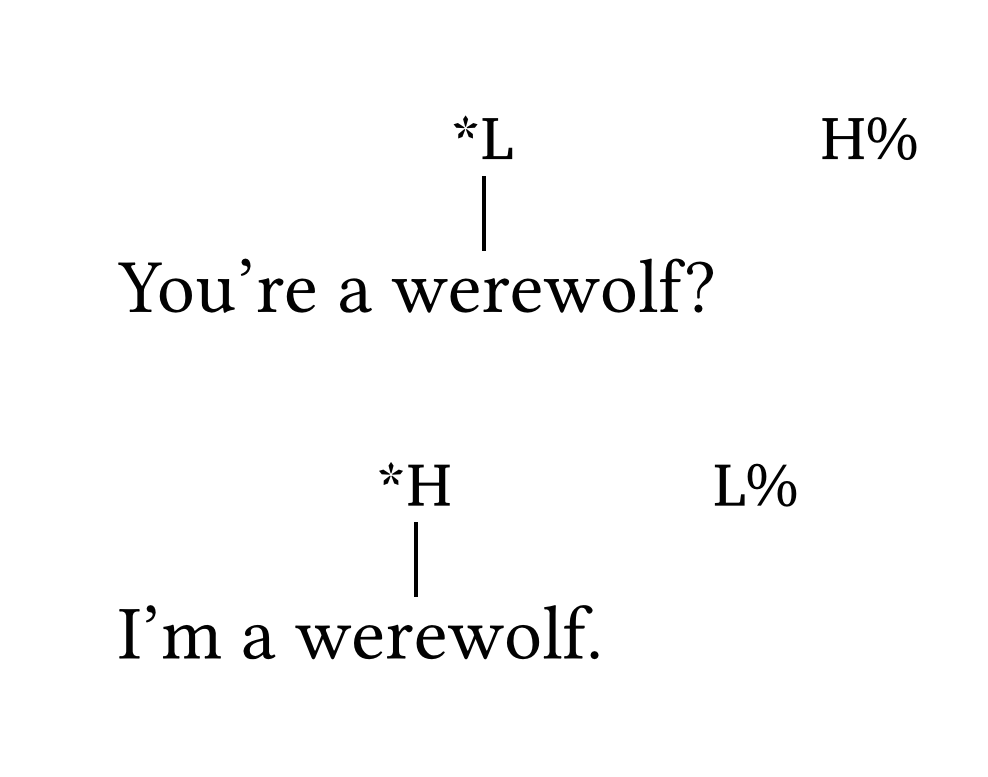
Inline ToBI
You're a we#int("*L")rewolf?#h(2em)#int("H%", line: false)

I'm a wer#int("*H")ewolf.#h(2em)#int("L%", line: false)
Note that #int() is not meant to be used in numbered/unnumbered lists. In the vast majority of cases, strings with ToBI labels will appear in numbered examples — see the Numbered examples section.
6.4 Multi-tier
The function #multi-tier() provides the freedom to create a wide range of non-linear structures that cannot be generated by single-purpose functions. The main argument is levels, an array of rows, where each row is an array of elements. Elements are automatically linked to the element on the level below; additional links can be specified with the links argument.
Figure 29 reproduces a figure from Booij (2012, 159) on the interface of phonology and morphology. Figure 30 shows the same figure with show-grid: true to help visualize positions.
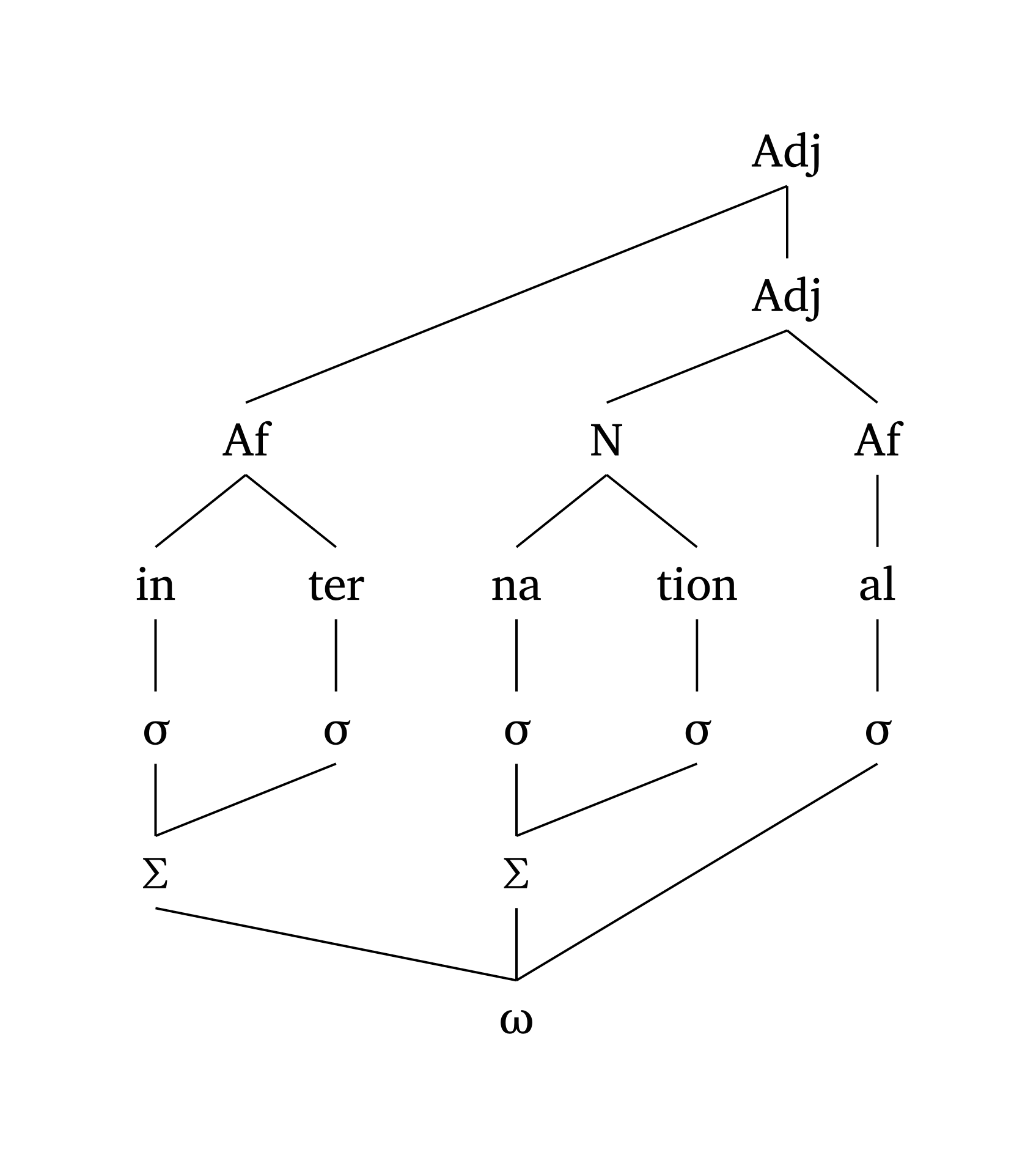
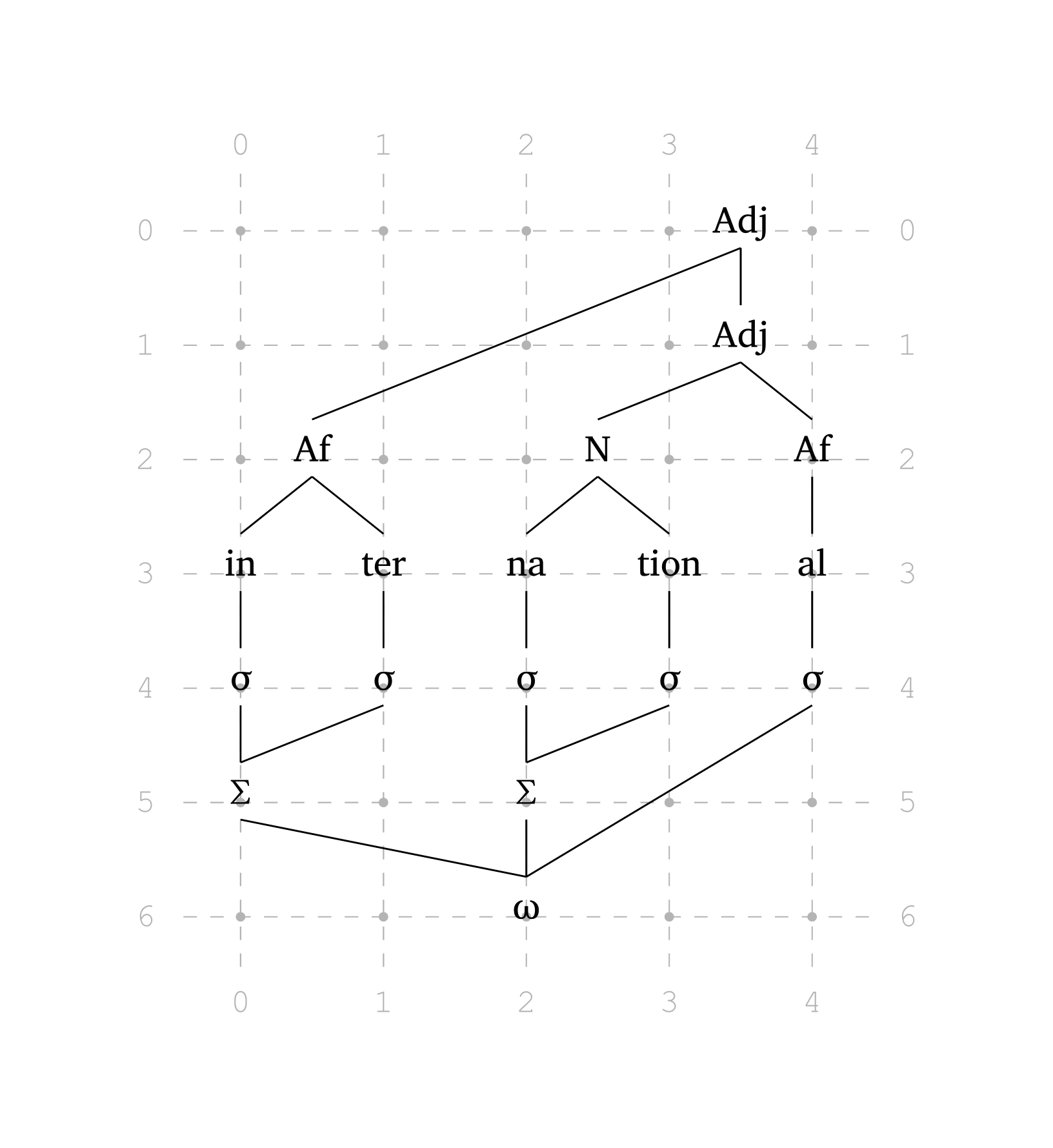
Multi-tier (morphophonology)
#multi-tier(
  show-grid: true, // <- to help you see the grid
  levels: (
    ("", "", "", "", ("Adj", 3.5)),
    ("", "", "", "", ("Adj", 3.5)),
    ("", ("Af", 0.5), "", ("N", 2.5), "Af"),
    ("in", "ter", "na", "tion", "al"),
    ("sigma", "sigma", "sigma", "sigma", "sigma"),
    ("Sigma", "", "Sigma", "", ""),
    ("", "", "omega", "", ""),
  ),
  links: (
    ("adj1", "af1"),
    ("adj2", "n1"),
    ("af1", "in1"),
    ("n1", "na1"),
    ("sigma2", "sigma6"),
    ("sigma4", "sigma7"),
    ("sigma5", "omega1"),
    ("sigma6", "omega1"),
  ),
)
As of version 0.5.7, non-empty string labels receive automatic names in reading order (adj1, adj2, sigma3, etc.), so links can refer to nodes by name, as in the code above. Names are case-insensitive: both sigma and Sigma become sigmaX, where X is the nth occurrence of sigma. Coordinates ((row, column), counting from 0) still work and may be clearer for IPA-heavy labels, since normalization can make names less transparent (/p@lis/ becomes p-lisX). Content nodes (in square brackets) receive no automatic names and must be referenced by coordinates. To see the exact reference for each node, use show-refs: true (version 0.5.8), which prints it below the node while you complete your links.
Elements specified as ("N", 2.5) are placed at fractional positions on the grid. The function also automatically detects Greek letters: adding "sigma" renders as \(\sigma\), "Sigma" as \(\Sigma\), "omega" as \(\omega\). Numbers in elements are automatically rendered as subscripts.
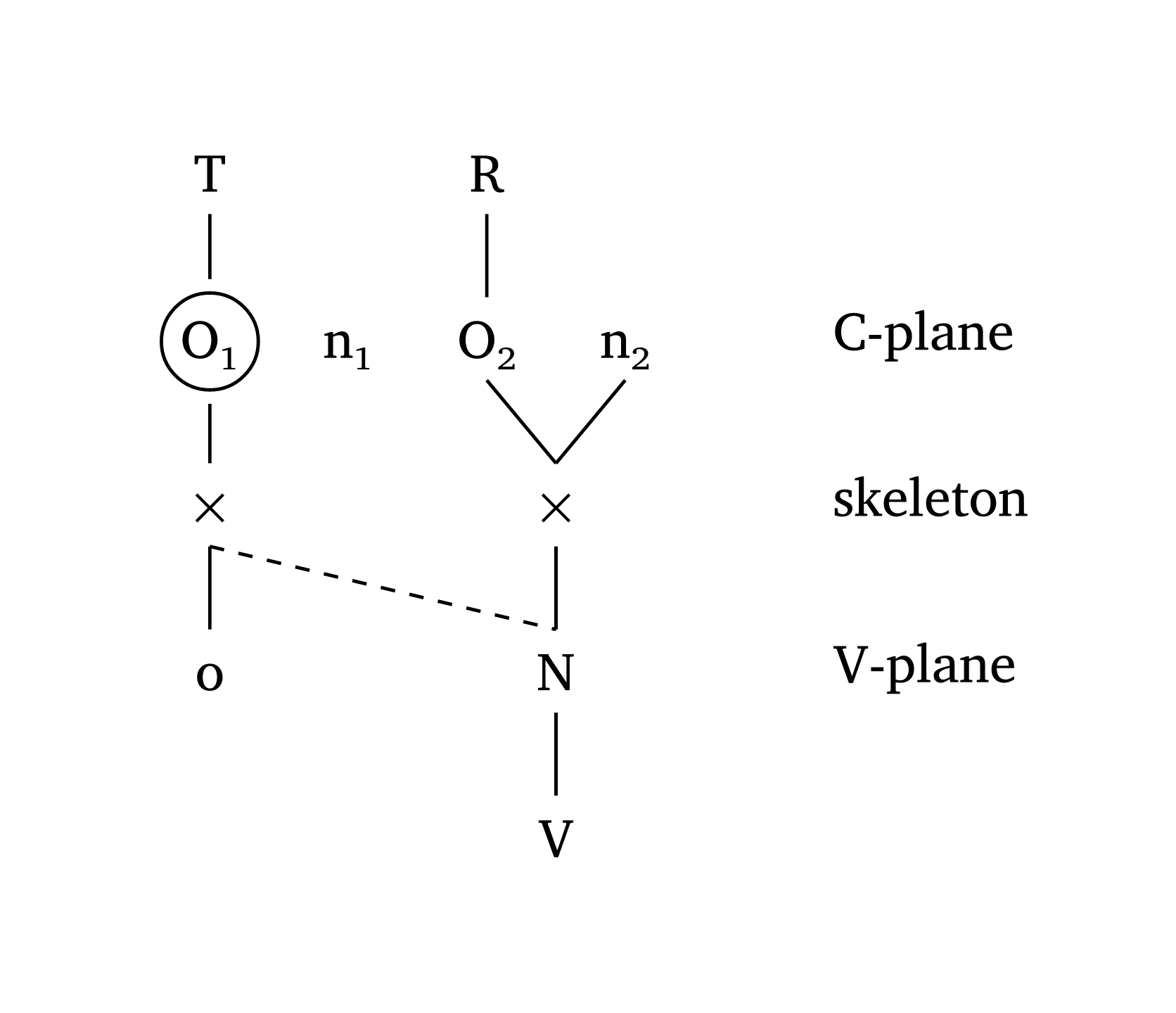
#multi-tier() can also create Government Phonology and CV Phonology representations. Figure 31, adapted from Goad (2012, 355), shows how arrows and arrow-delinks work. It is also possible to label tiers, as shown in Figure 32, adapted from Carvalho (2017).
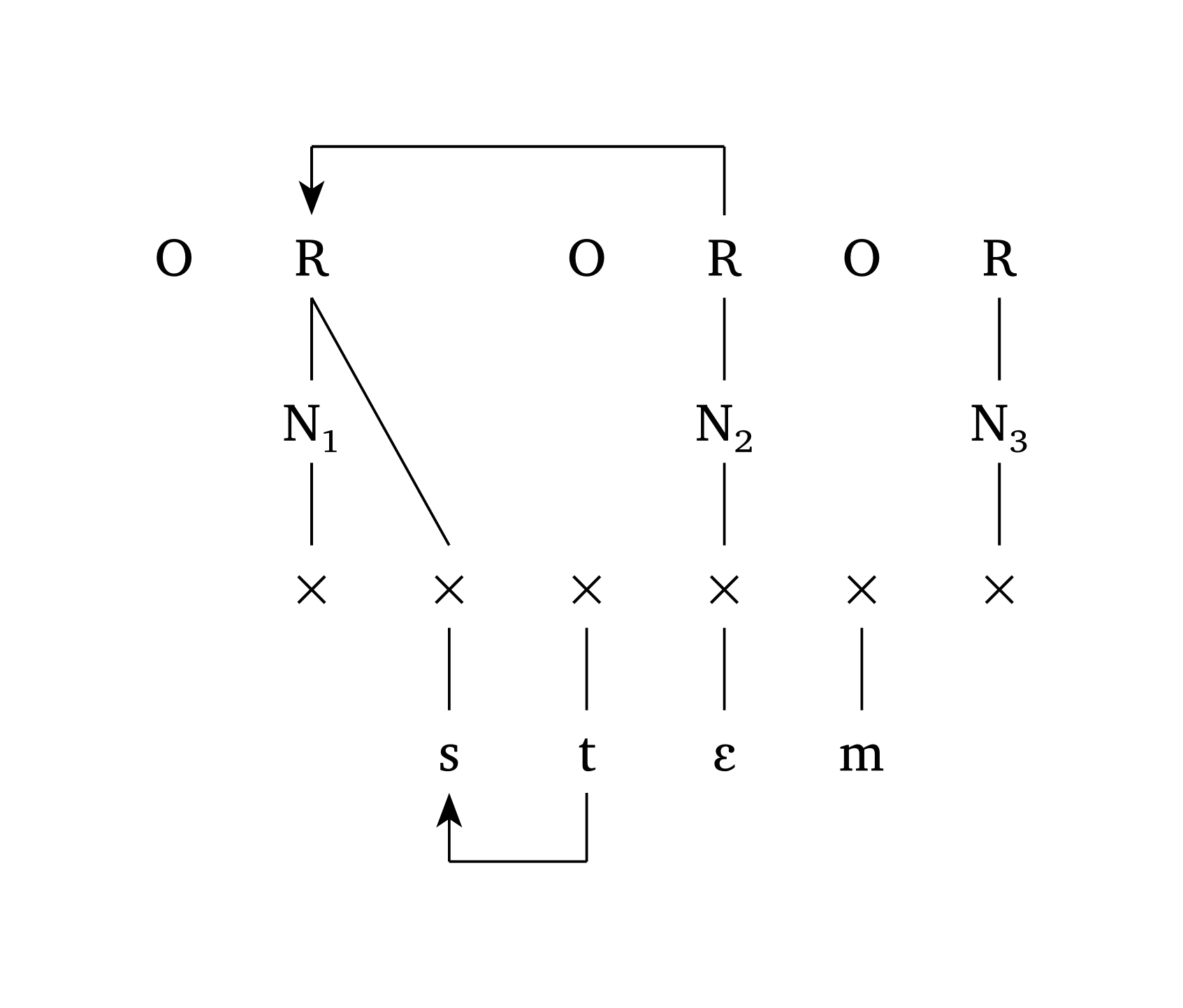
Government Phonology
#multi-tier(
  levels: (
    ("O", "R", "", "O", "R", "O", "R"),
    ("", "N1", "", "", "N2", "", "N3"),
    ("", "x", "x", "x", "x", "x", "x"),
    ("", "", "s", "t", "E", "m", ""),
  ),
  links: (("r1", "x2"),),
  ipa: (3,),
  arrows: (
    ("t1", "s1"),
    ("r2", "r1"),
  ),
  arrow-delinks: ((1,)),
  spacing: 1,
)
CV Phonology with tier labels
#multi-tier(
  levels: (
    ("T", "", "R", ""),
    ("O1", "n1", "O2", "n2"),
    ("x", "", ("x", 2.5), ""),
    ("o", "", ("N", 2.5), ""),
    ("", "", ("V", 2.5), ""),
  ),
  links: (("n21", "x2"),),
  dashed: (("x1", "n1"),),
  level-spacing: 1.2,
  highlight: ("o11",),
  spacing: 1,
  stroke-width: 0.7pt,
  tier-labels: (
    (1, "C-plane"),
    (2, "skeleton"),
    (3, "V-plane"),
  ),
)
7 Feature geometry
Feature geometry presents some important challenges, including the user interface: if too many degrees of freedom are available, a function becomes too convoluted. phonokit offers two dedicated functions: #geom() for single-segment trees and #geom-group() for multiple trees and processes.
7.1 Single trees
The arguments of #geom() are named after the nodes they add. If you add a node \(n\), the function automatically builds any parent node needed. For example, adding voice: true also adds [laryngeal]; adding anterior: true also adds [coronal]. Arguments accept both boolean and string values: nasal: true adds [nasal], while nasal: "+" adds [+nasal].
Figure 33 reproduces the full consonant representation from Clements and Hume (1995, 292).
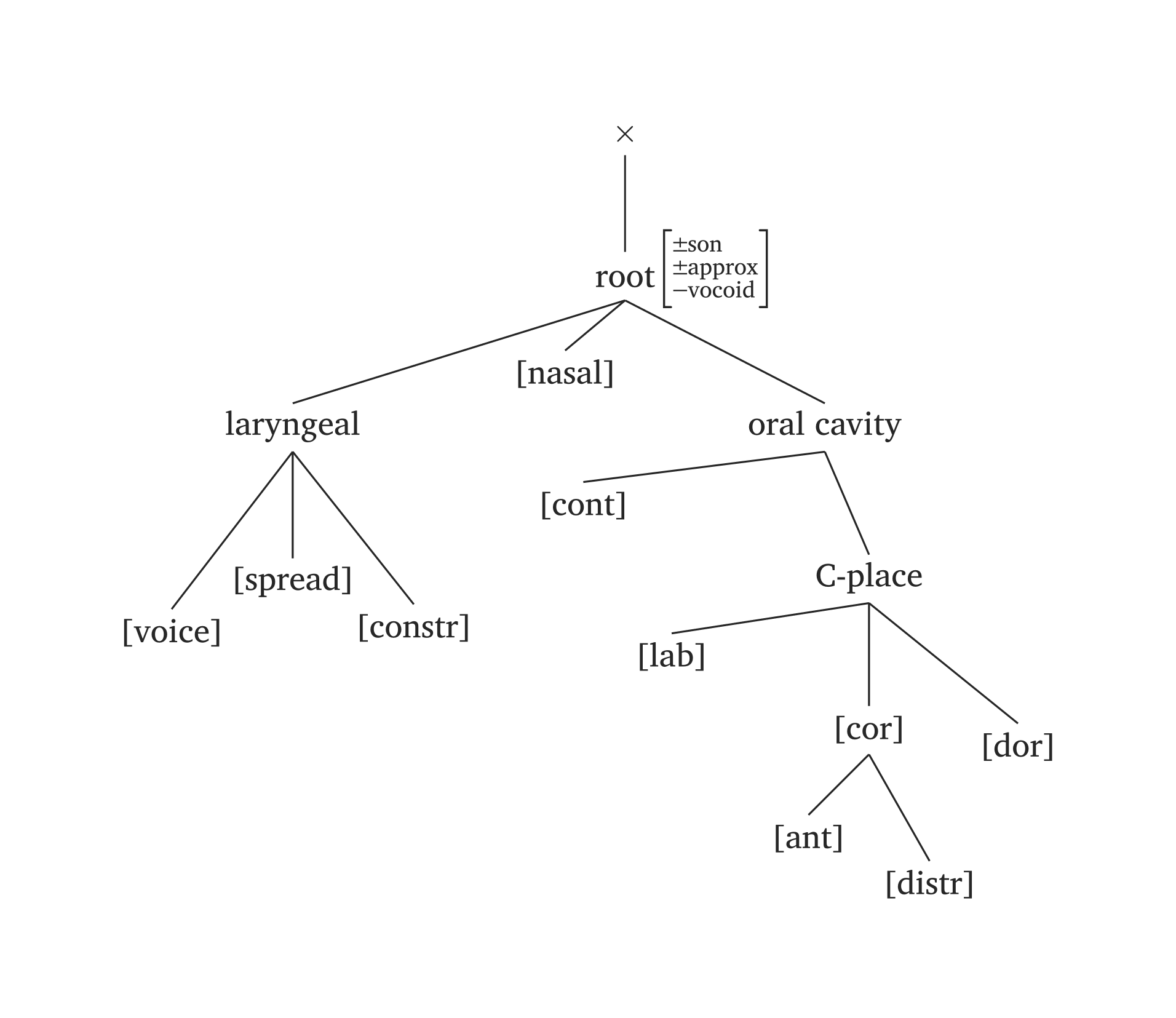
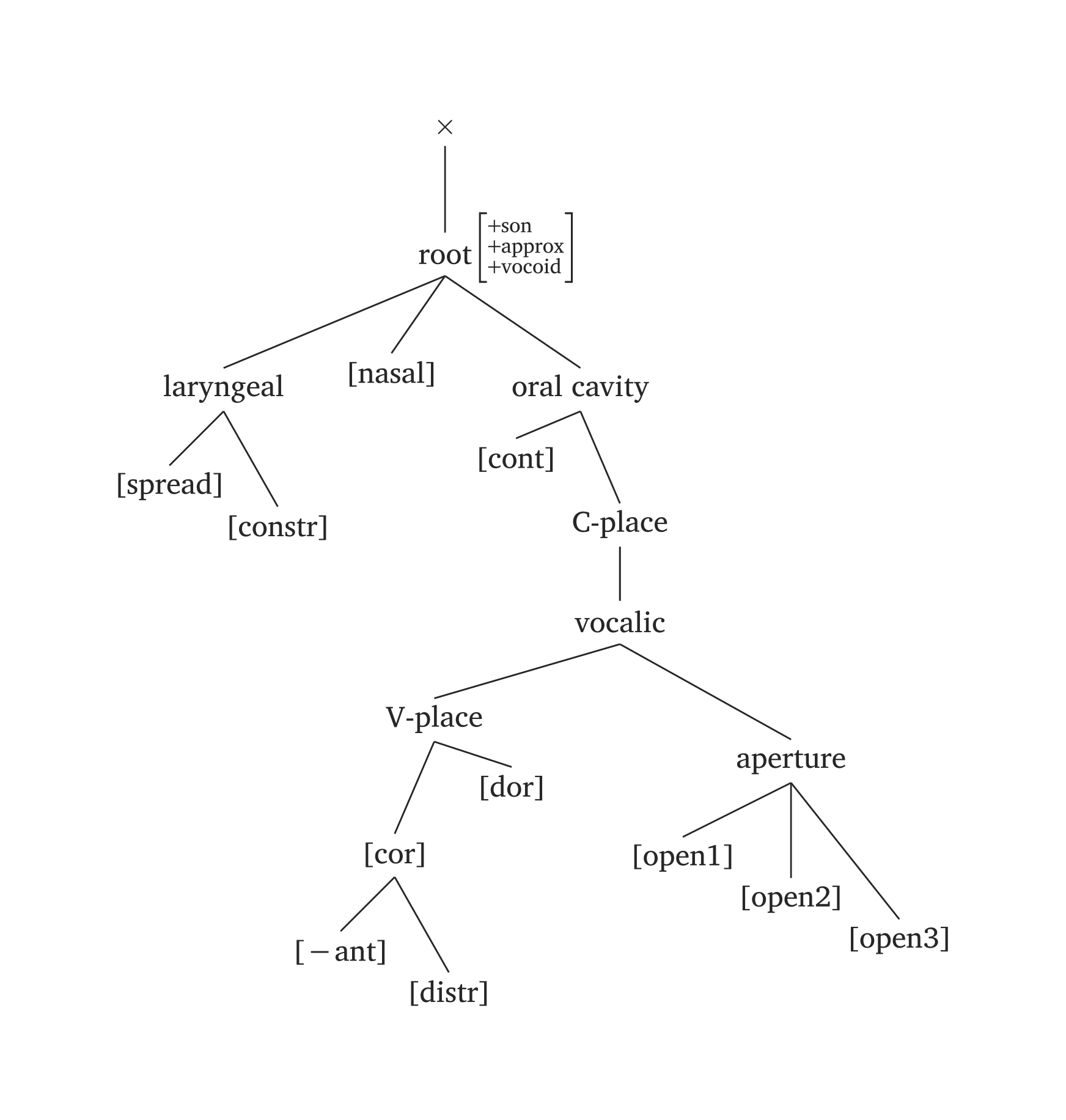
Full consonant feature geometry
#geom(
  root: ("±son", "±approx", "-vocoid"),
  spread: true,
  constricted: true,
  nasal: true,
  voice: true,
  labial: true,
  anterior: true,
  distributed: true,
  dorsal: true,
  continuant: true,
)
Full vocoid feature geometry
#geom(
  root: ("+son", "+approx", "+vocoid"),
  spread: true,
  constricted: true,
  nasal: true,
  vplace: true,
  aperture: (true, true, true),
  coronal: true,
  anterior: "-",
  distributed: true,
  dorsal: true,
  continuant: true,
  scale: 0.9,
)
Several phonemes come pre-built in #geom() via the ph argument, using the same #ipa() conventions. In the figures below, the only code needed is #geom(ph: "..."). You will also note timing units added by default (x). You can disable timing units by adding timing: false, or you can add morae instead (timing: "mora" or timing: "mu"). The timing argument also takes an array for long vowels: timing: ("x", "x"). For example, if you prefer morae to x slots, you’d add timing: ("mora", "mora") for the long vowel in Figure 36.
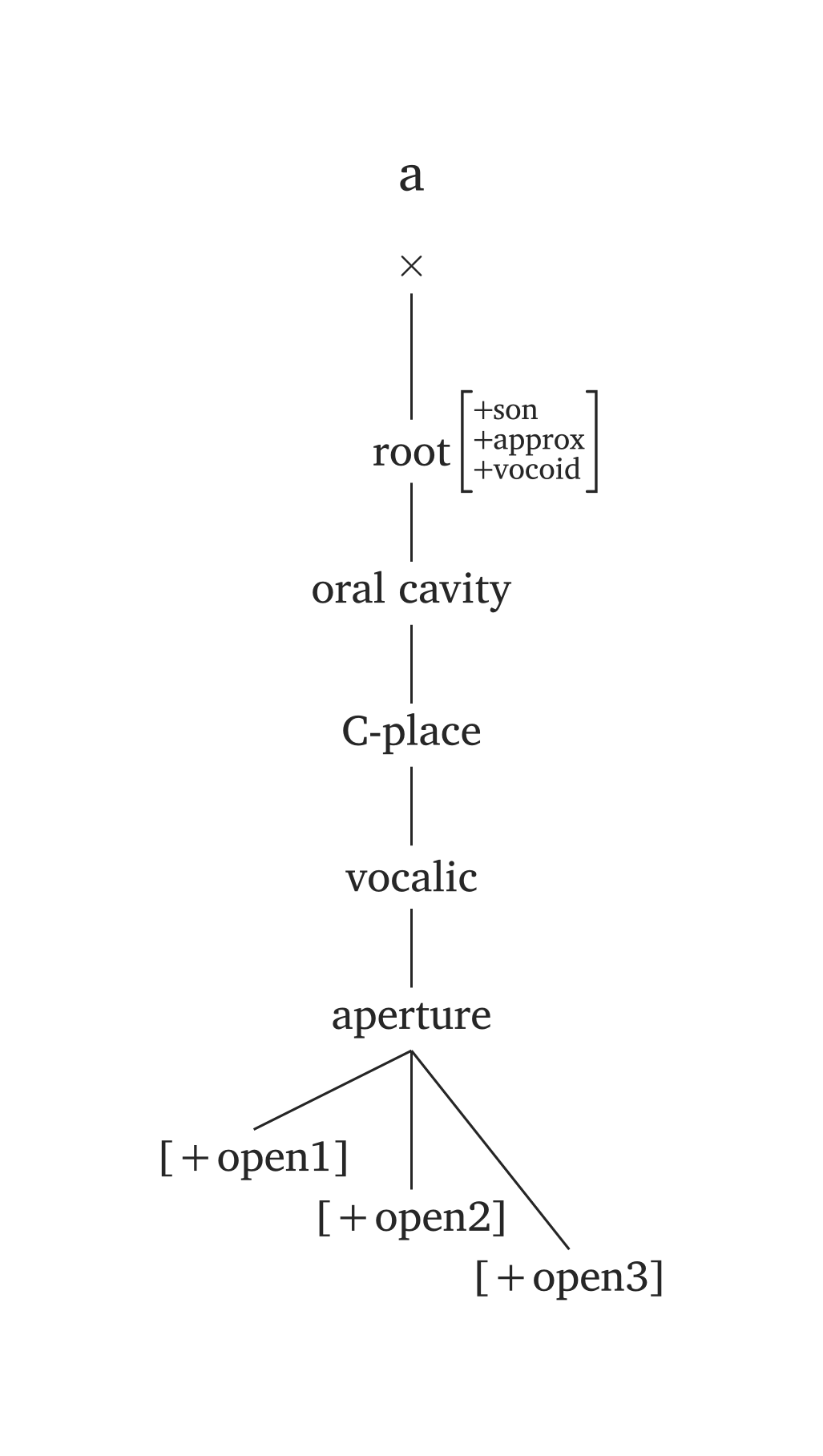
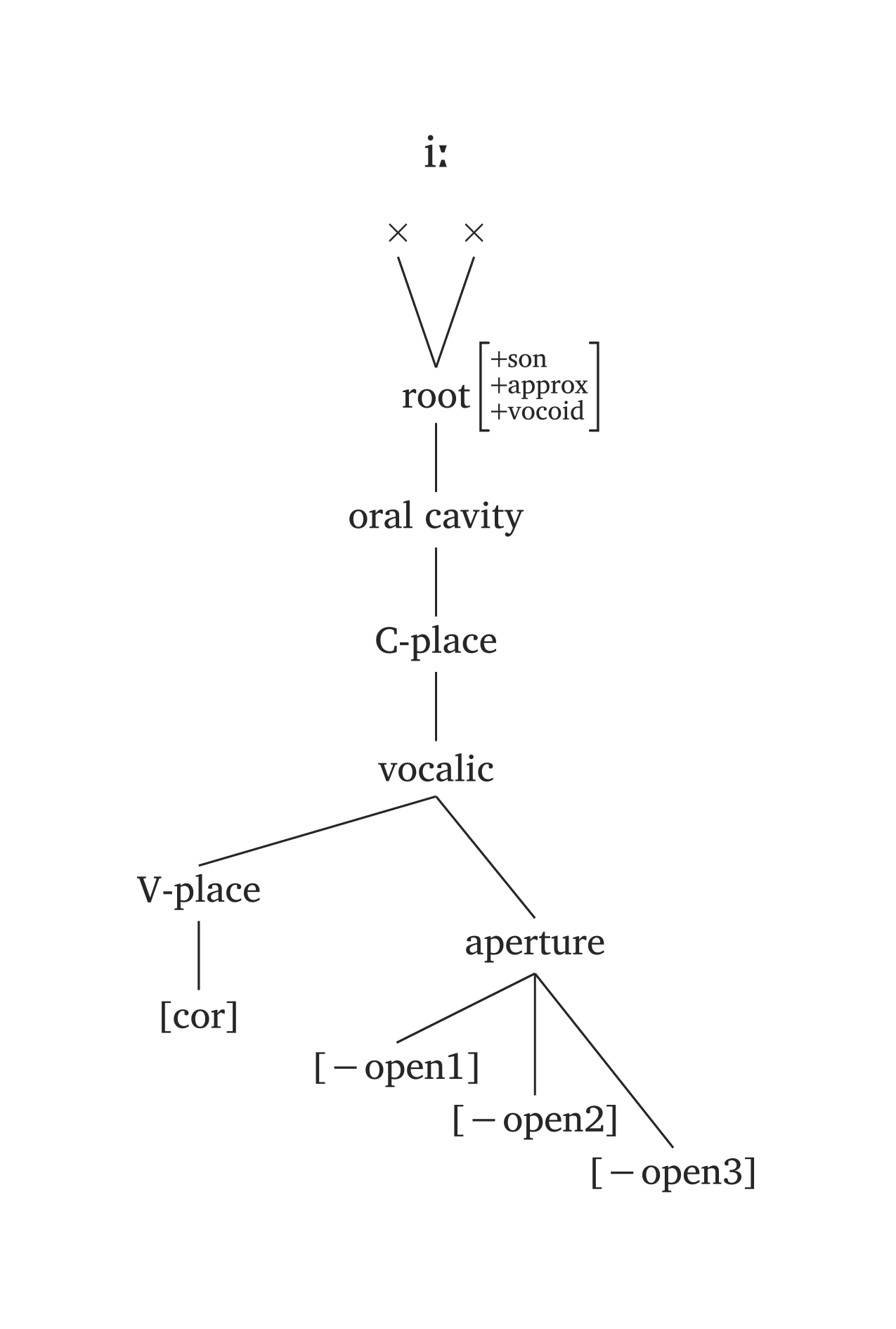
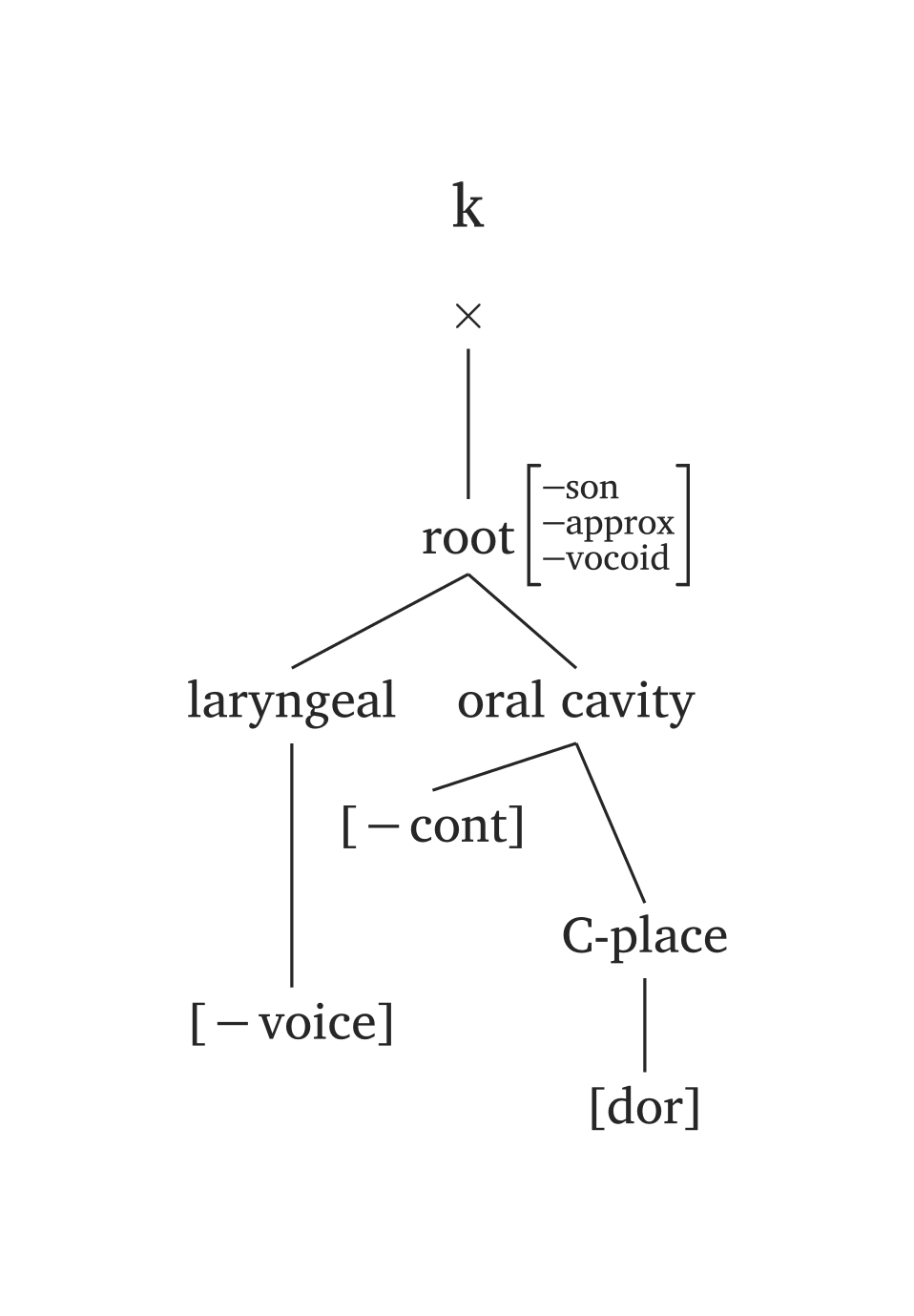
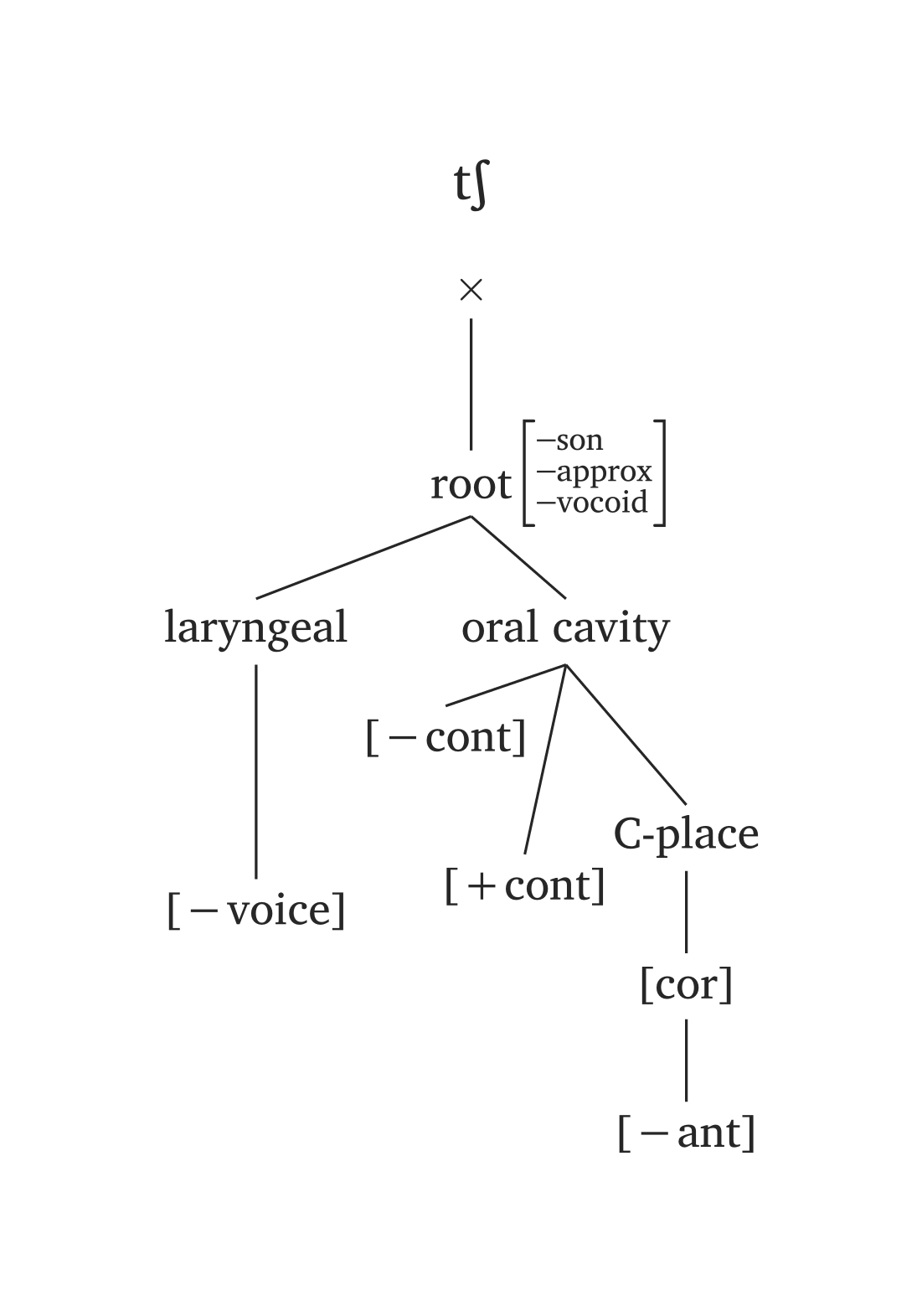
The ph argument offers minimal syntax, but you are not locked to presets. Any node can be overridden: for example, #geom(ph: "a", aperture: (true,)) overrides only the aperture specification for the preset /a/.
7.2 Multiple trees
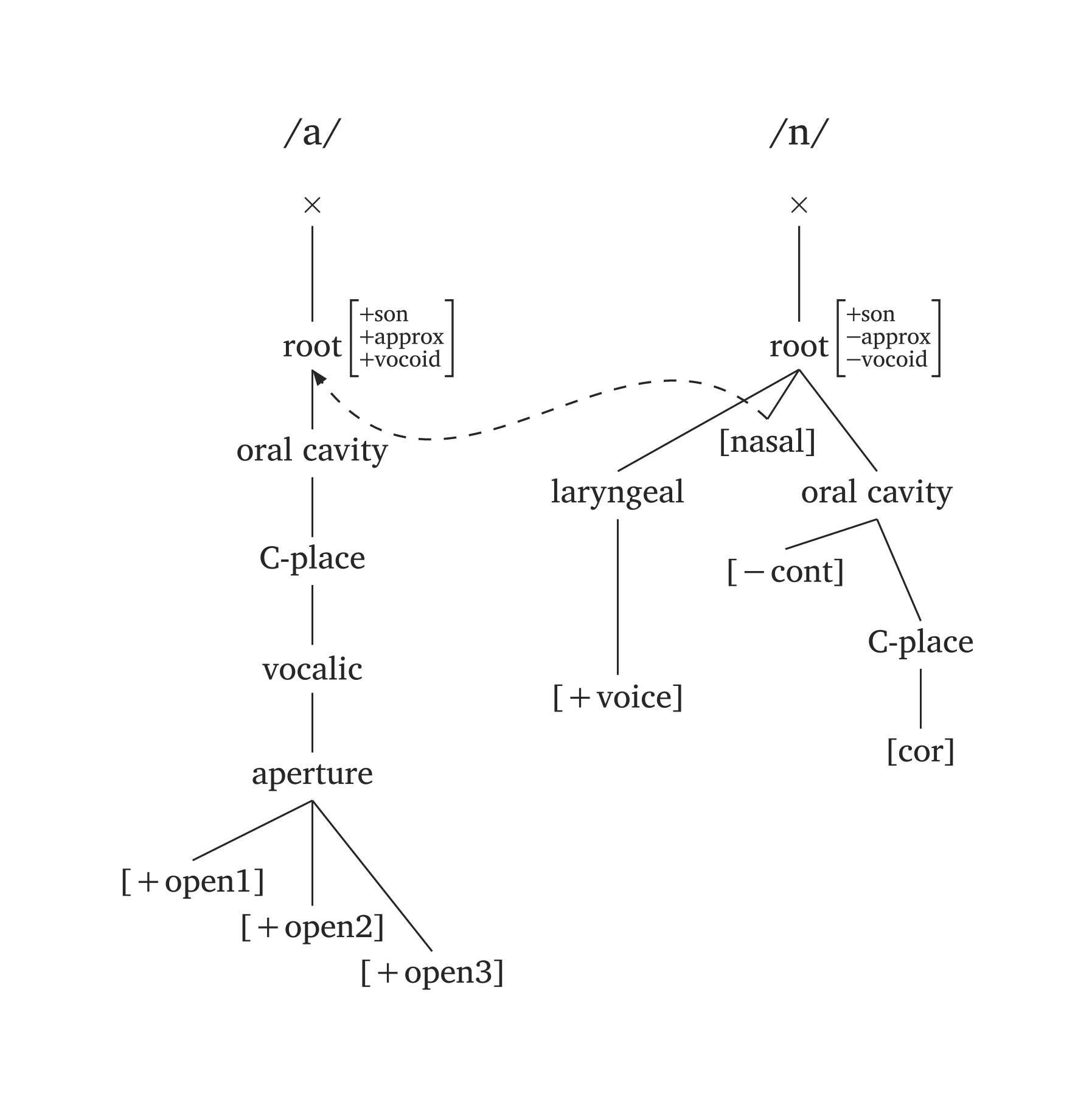
The function #geom-group() works as a wrapper to “glue” multiple #geom() trees together, enabling arrows across trees. The key additional arguments are arrows, curved, and delinks.
Arrows reference nodes by name with a tree index: "nasal2" refers to [nasal] in tree 2, "root1" to the root in tree 1. The argument ctrl adjusts the control points of the Bezier curve (start and end directions). Figure 39 shows the spreading of [nasal].
Nasalization
#geom-group(
  (ph: "/a/"),
  (ph: "/n/"),
  arrows: (
    (from: "nasal2",
     to: "root1",
     ctrl: (1.1, -1.5)),
     ),
  curved: true,
  gap: 1,
)
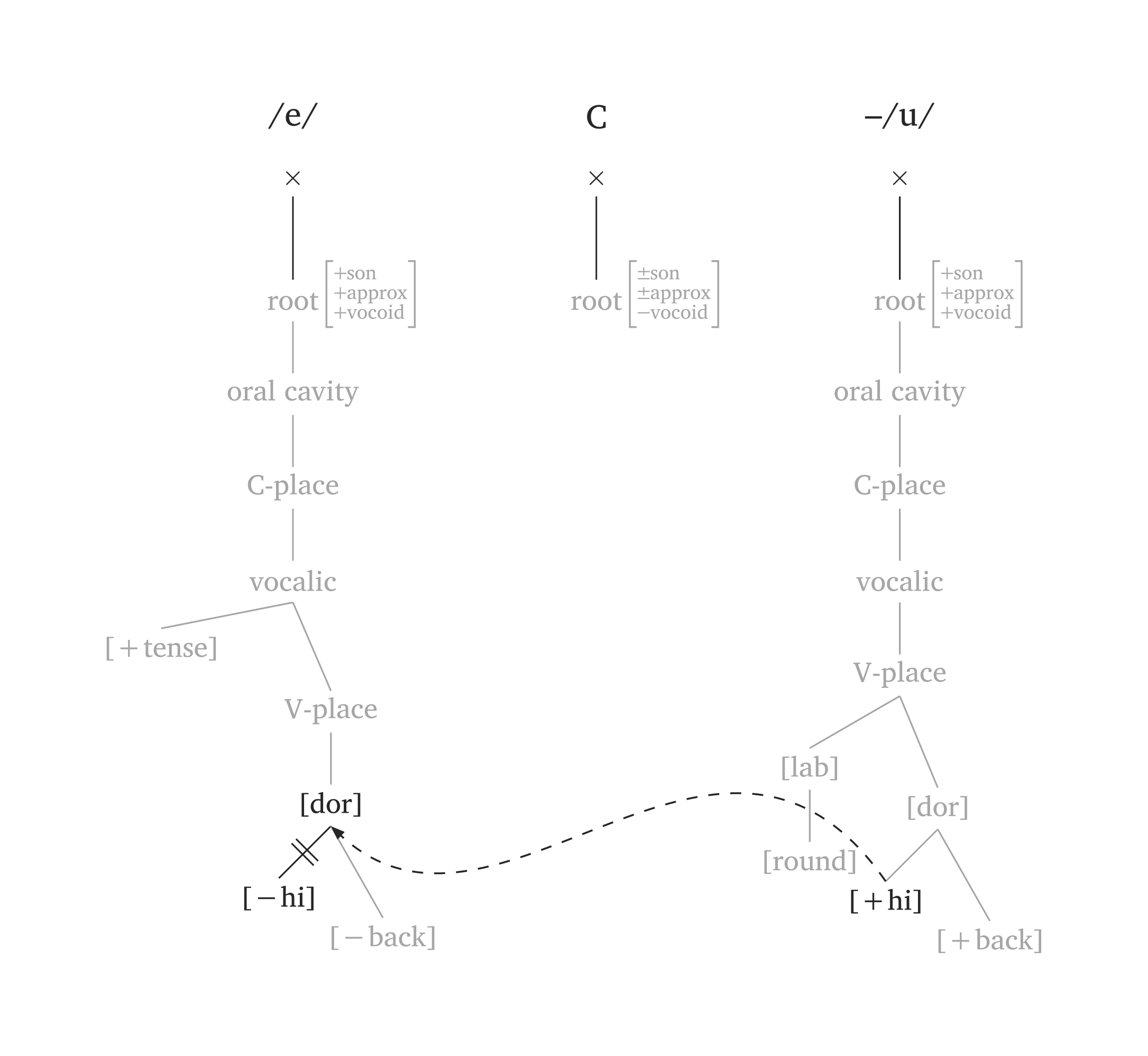
By default, #geom() uses the Clements and Hume (1995) model. Setting model: "sagey" uses height features (Sagey 1986) instead of aperture. The argument highlight dims the entire representation and only highlights the specified nodes. Figure 40 illustrates metaphony where /e/ → [i] / __ C₀ /u/:
Metaphony (Sagey model)
#geom-group(
  (ph: "/e/"),
  (ph: "\\C"),
  (ph: "/u/", prefix: "-"),
  arrows: (
    (from: "high3", to: "dorsal1", ctrl: (2.3, -1.5)),
  ),
  delinks: ("high1",),
  highlight: ("high1", "dorsal1", "high3"),
  gap: 1.5,
  model: "sagey",
)
8 Optimality Theory
The function #tableau() generates OT tableaux (Prince and Smolensky 1993). It takes six arguments: input, candidates, constraints, violations, winner, and dashed-lines. The violations argument requires a nested structure. Both winner and dashed-lines count from zero: winner: 0 selects the first candidate, and dashed-lines: (0,) dashes the line after the first constraint (use dashed-lines: () for none). Cells are automatically shaded after a fatal violation (!), and the pointing finger symbol ☞ is added for the winner.
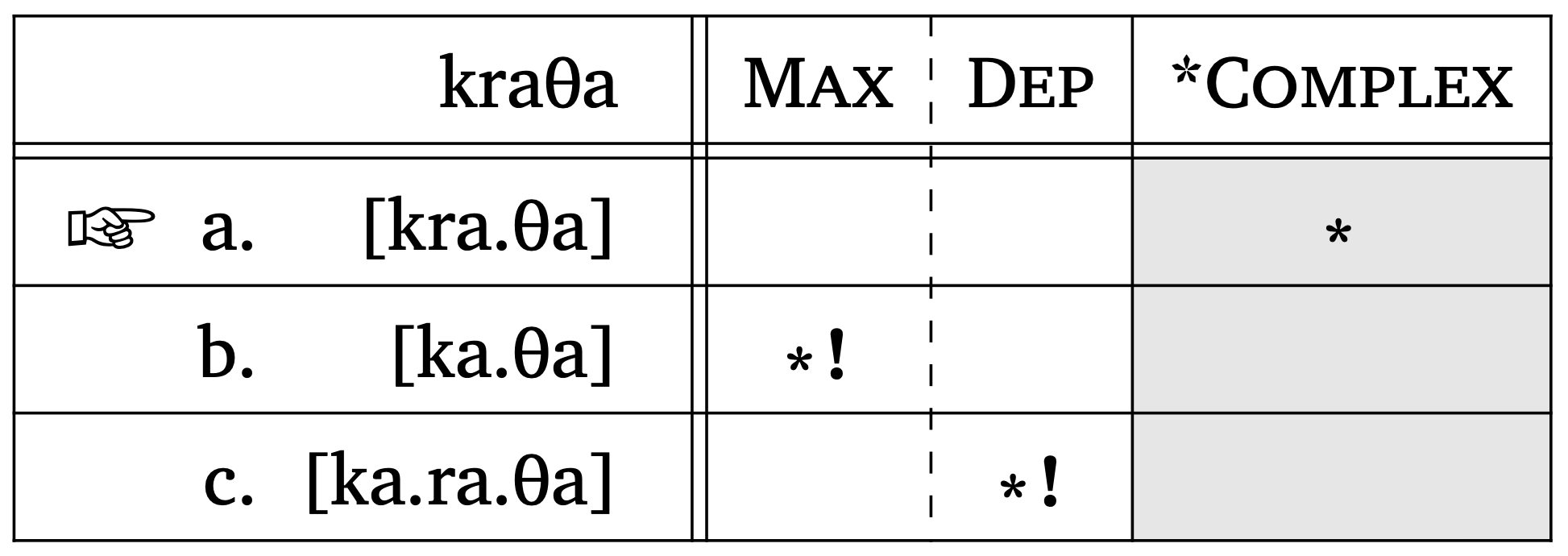
OT tableau
#tableau(
  input: "/kraTa/",
  candidates: ("[kra.Ta]", "[ka.Ta]", "[ka.ra.Ta]"),
  constraints: ("Max", "Dep", "*Complex"),
  violations: (
    ("", "", "*"),
    ("*!", "", ""),
    ("", "*!", ""),
  ),
  winner: 0,        // position of winning candidate
  dashed-lines: (0,), // note the comma
  shade: true,      // true by default
  letters: true,     // a., b., c., ...
)
One nice feature of #tableau() is that the function automatically shades cells once a fatal violation is entered (!). Likewise, it adds the “☞” symbol for the winner, whose position is extracted from the winner argument. Candidates can also be labeled with letters (a., b., c., …) by setting letters: true. When letters are used, the ☞ symbol is placed to the left of the winning candidate’s letter.
Additionally, #tableau() supports prosodic structures as candidates.1 You can pass prosodic function calls as content using square brackets, e.g., [#syllable("mat")]. This is the recommended approach because it avoids conflicts with the single quote character, which is also used for stress marking in prosodic notation. Figure 42 shows an example with #word() candidates. When passing content directly, you control the scale via the function’s own scale argument (this is key because prosodic structures are often too large for a tableau). Figure 42 also shows the gloss argument in case more information is needed for the input. This argument requires two strings (orthographic form and translation).
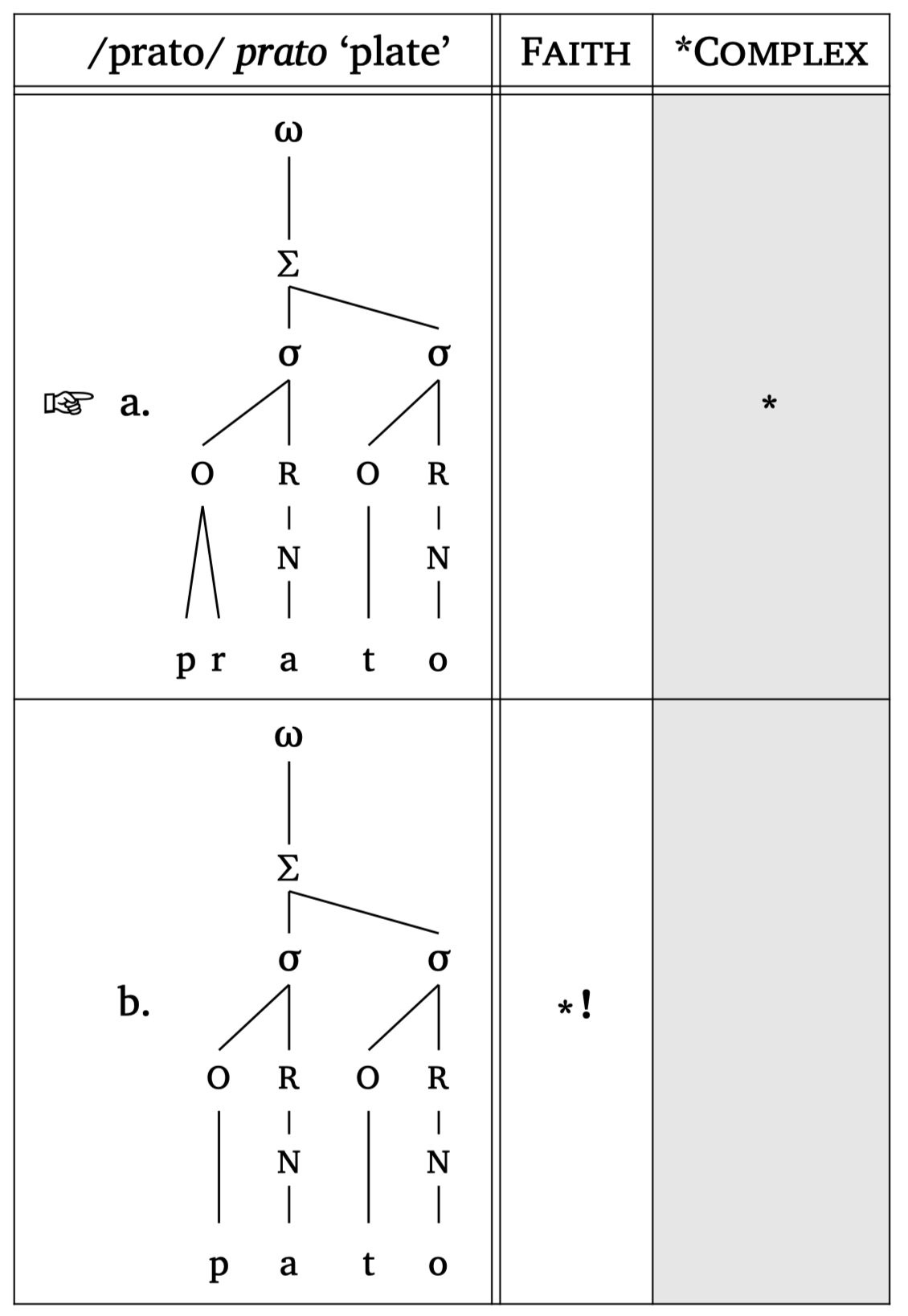
OT tableau + prosody
#tableau(
    input: "/prato/",
    candidates: (
      [#word("('pra.to)", scale: 0.8)],
      [#word("('pa.to)", scale: 0.8)],
    ),
    constraints: ("Faith", "*Complex"),
    violations: (
      ("", "*"),
      ("*!", ""),
    ),
    winner: 0,
    letters: true,
    gloss: ("prato", "plate"),
  )
Hasse diagrams for constraint rankings can be generated with the #hasse() function — see Figure 43 and Figure 44. The function takes tuples with \(n\) elements: a 2-element tuple ("C1", "C2") draws a ranking edge; a 1-element tuple ("C3",) creates a floating constraint. The third element in a tuple controls the “stratum” (vertical position). A fourth element can specify line type: "dashed" or "dotted".
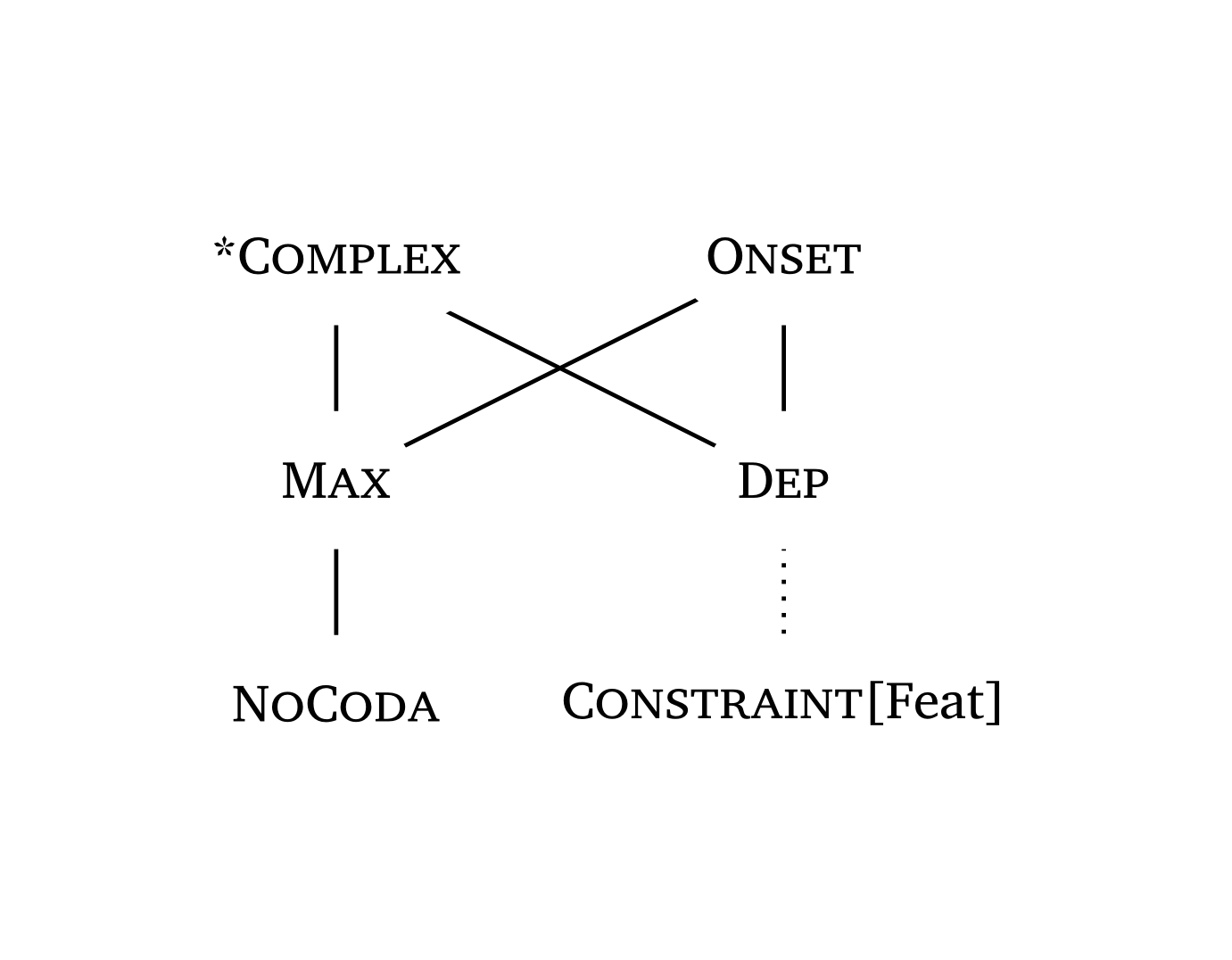
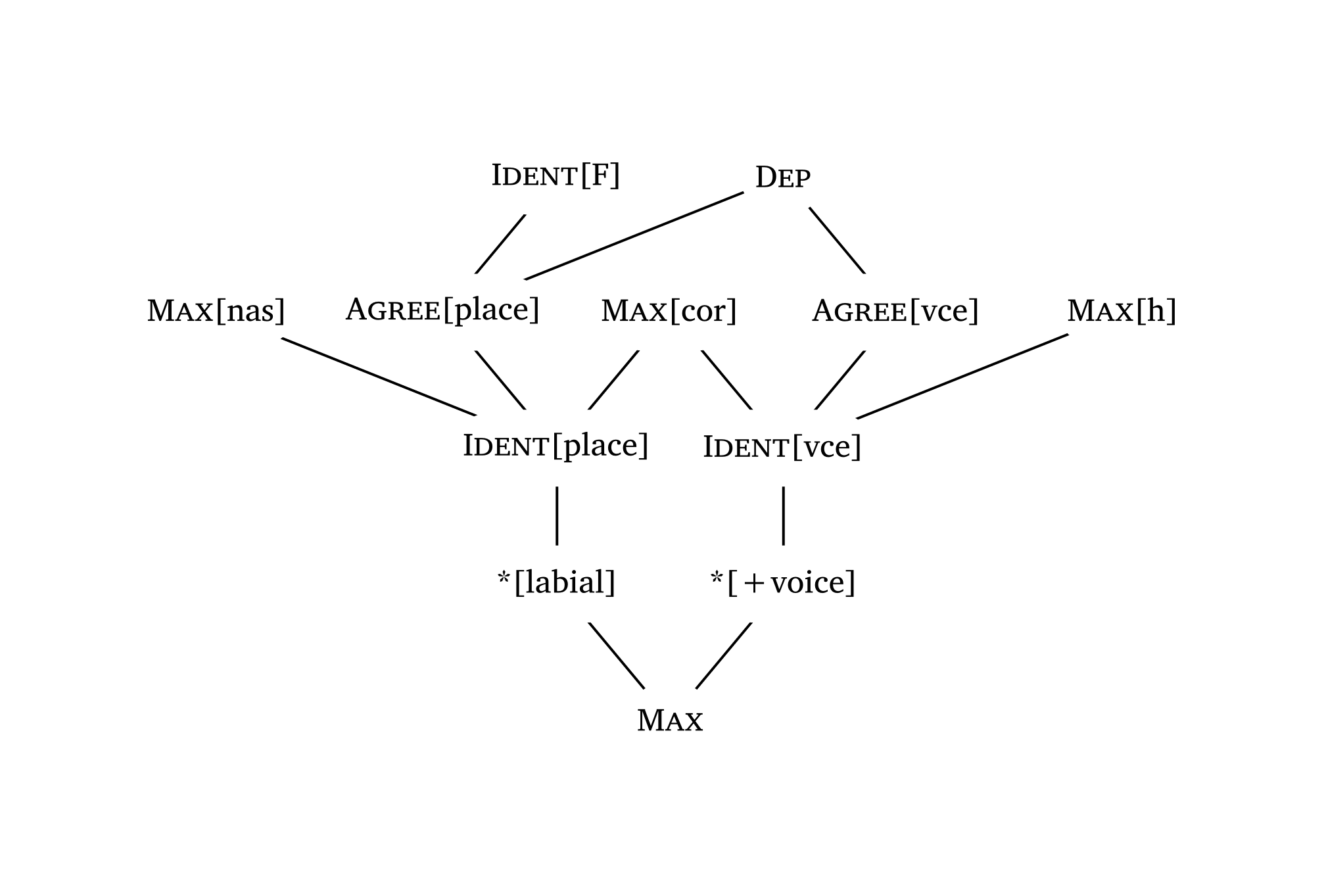
Constraint names are automatically rendered in small caps (except features inside square brackets).
Hasse diagram with dotted lines
#hasse(
    (
      ("*Complex", "Max", 0),
      ("*Complex", "Dep", 0),
      ("Onset", "Max", 0),
      ("Onset", "Dep", 0),
      ("Max", "NoCoda", 1),
      ("Dep", "Constraint[Feat]", 1, "dotted"),
    ),
    node-spacing: 3,
  )
Complex Hasse diagram
#hasse(
    (
      ("Ident[F]", "Agree[place]", 0),
      ("Dep", "Agree[vce]", 0),
      ("Dep", "Agree[place]", 0),
      ("Max[nas]", "Ident[place]", 1),
      ("Max[cor]", "Ident[place]", 1),
      ("Max[cor]", "Ident[vce]", 1),
      ("Max[h]", "Ident[vce]", 1),
      ("Agree[place]", "Ident[place]", 1),
      ("Agree[vce]", "Ident[vce]", 1),
      ("Ident[place]", "*[labial]", 2),
      ("Ident[vce]", "*[+voice]", 2),
      ("*[labial]", "Max", 3),
      ("*[+voice]", "Max", 3),
    ),
  )
9 Maximum Entropy
The function #maxent() produces a MaxEnt tableau (Goldwater and Johnson 2003; Hayes and Wilson 2008). Given the constraint weights and violations, it automatically calculates \(h_i\), \(e^{-h_i}\), and \(P(y|x)\):
\[P(y|x) = \frac{e^{-\sum_{i=1}^n w_i C_i(y,x)}}{Z(x)}\]
The column \(h_i\) displays the Harmony score (weighted sum of violations); \(e^{-h_i}\) is the unnormalized probability (MaxEnt score); and \(P_i\) is the normalized predicted probability. The function also prints probability bars at the right margin by default (visualize: true, top and bottom in Figure 45); visualize: false turns them off (middle). Candidates can be sorted from most to least probable with sort: true (bottom in Figure 45).
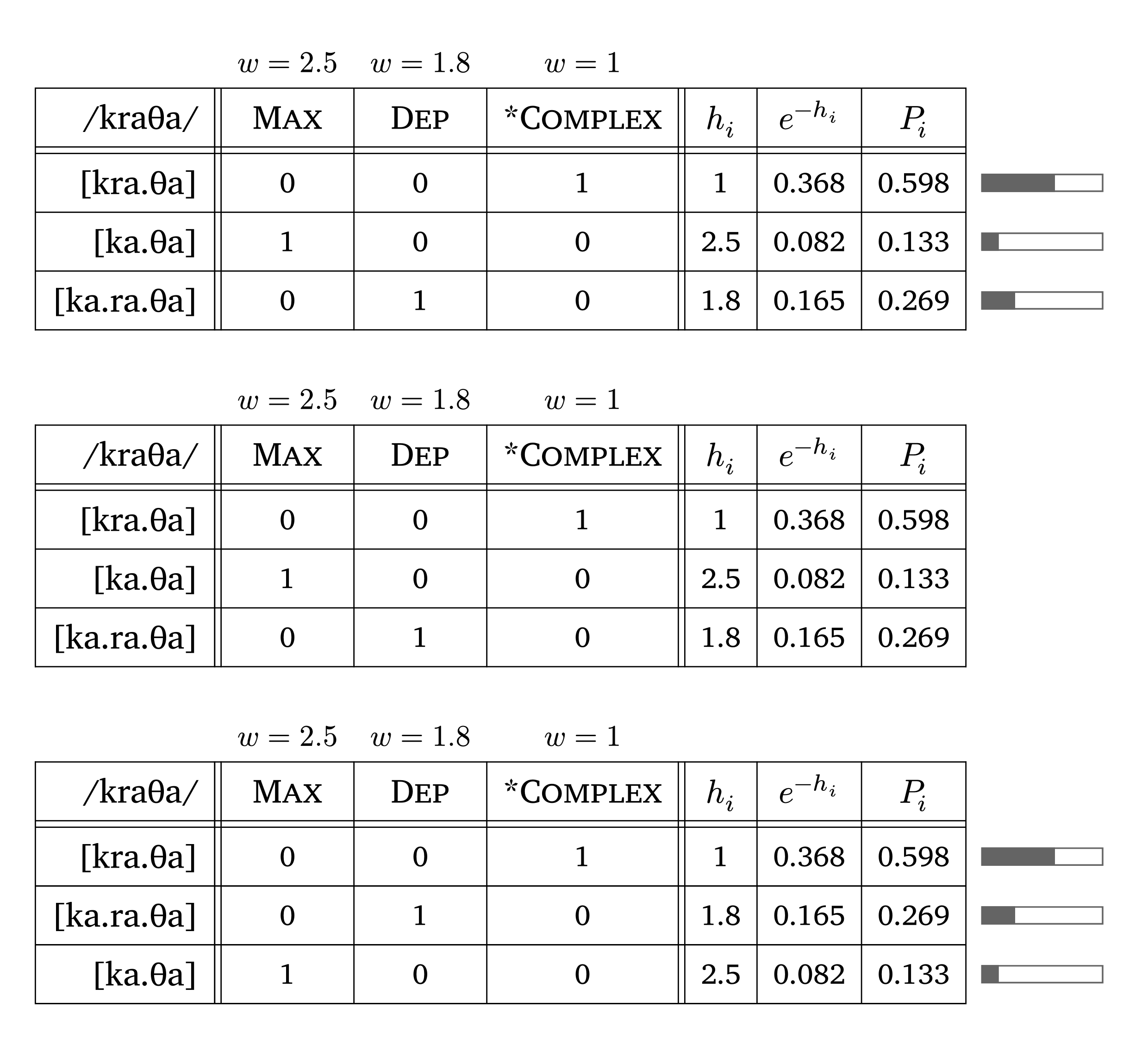
MaxEnt tableau
#maxent(
  input: "/kraTa/",
  candidates: ("[kra.Ta]", "[ka.Ta]", "[ka.ra.Ta]"),
  constraints: ("Max", "Dep", "*Complex"),
  weights: (2.5, 1.8, 1),
  violations: (
    (0, 0, 1),
    (1, 0, 0),
    (0, 1, 0),
  ),
  visualize: true,  // show probability bars (default)
  sort: true,       // sort candidates from most to least probable
  letters: true     // assigned after sorting when sort: true
)phonokit also has functions for Harmonic Grammar (#hg()) and Noisy Harmonic Grammar (#nhg()). These functions share the same syntax as #maxent(), with one important difference: #hg() and #nhg() follow the convention in which violations are negative numbers and the candidate with the highest harmony wins, whereas #maxent() takes positive violation counts. If you reuse a violations array from #maxent(), negate the values first. The #nhg() function derives probabilities by simulating evaluations (default: 1000) given the constraints and violations, and can display the noise column. These functions are based on conventions in Flemming (2021).
#hg(
  input: "/kraTa/",
  candidates: ("[kra.Ta]", "[ka.Ta]", "[ka.ra.Ta]"),
  constraints: ("Max", "Dep", "*Complex"),
  weights: (2.5, 1.8, 1),
  violations: (
    (0, 0, -1),   // note the negative violations
    (-1, 0, 0),
    (0, -1, 0),
  ),
)
10 Numbered examples
The function #ex() creates numbered linguistic examples. In its simplest form, it wraps content directly, and the number is generated automatically: #ex[#ipa("/anba/") & #a-r & #ipa("[amba]")]. Use & to separate columns, just like in LaTeX tables; the number of columns is inferred from the number of & separators. For sub-examples, use list syntax (-): each item is lettered automatically (a., b., …).
To use this function, add this line after importing the package: #show: ex-rules
Numbered example
// #import "@preview/phonokit:X.X.X": *
// #show: ex-rules  // <- add to your document
// ...
#ex(caption: "A phonology example",
    labels: (<ex-anba>, <ex-anka>),
    columns: (5em, 2em, 5em))[
      - #ipa("/anba/") & #a-r & #ipa("[amba]")
      - #ipa("/anka/") & #a-r & #ipa("[aNka]")
    ] <phon-ex>
ToBI numbered example
#ex(caption: "Some ToBI examples",
    title: [Autosegmental transcription of intonation in English @zsiga2013sounds],
    labels: (<ex-tobi1>, <ex-tobi2>),
    )[
      - You're a we#int("*L")rewolf?#h(1em)#int("H%", line: false)
      - I'm a wer#int("*H")ewolf.#h(1em)#int("L%", line: false)
    ] <tobi-ex>
The entire example can be referred to as @phon-ex, and sub-examples can be referred to by their labels (e.g., @ex-anba); without labels, only the example as a whole can be referenced. The columns argument is optional (data columns default to auto width), but specifying exact widths guarantees perfect alignment across different examples in the document.
The optional title argument places a title on the same line as the example number, with the sub-examples below (Figure 47). The caption argument in #ex() is not printed directly — it is there in case you wish to create a table of contents for examples using #outline(target: figure.where(kind: "linguistic-example")).
Copyright © Guilherme Duarte Garcia
References
Footnotes
This also applies to other constraint-based functions in the package, discussed later in this manual.↩︎