



Last updated: October 2026
1 Introduction
This manual introduces synkit and its functions. synkit is a Typst package designed to streamline the creation of syntactic structures while maintaining typographical precision. Typst is a programming language for typesetting. There is a good tutorial here, and an introductory YouTube series here.
The package provides functions for phrase-structure trees, movement arrows, multidominance, semantic annotation, cross-tree equivalence lines, in-line movement notation, numbered linguistic examples, and interlinear glosses. The main goals of synkit are to minimize effort and maximize quality: the syntax should stay intuitive and compact without sacrificing typographic quality.
There are at least two excellent packages in LaTeX for syntax trees, tikz-qtree (Chiang 2009) and forest (Živanović 2017). Typst also has tree packages already, but synkit aims to cover a broader set of use cases that matter in syntax and semantics, especially for authors who want to migrate away from LaTeX without giving up movement arrows, semantic composition, or richer tree layouts.
The GitHub repository for the package can be found at guilhermegarcia/synkit. Comments, suggestions, and bug reports are welcome.
1.1 Installation
Typst packages are loaded with #import at the top of your typ document. Replace X.X.X with the version you wish to import:
Package import (Typst Universe)
#import "@preview/synkit:X.X.X": *Alternatively, if you want the most up-to-date version, clone the repository and load the package locally:
Local import
#import "synkit/lib.typ": *You may need a symlink depending on how you structure your files, since Typst restricts imports to files within the compilation root and its subdirectories.
2 Basic trees
The main function for trees is #tree(), whose main argument is a bracketed string. Spaces are intentionally flexible, so [S[NP][VP]] and [ S [ NP ] [ VP ] ] are interpreted identically.
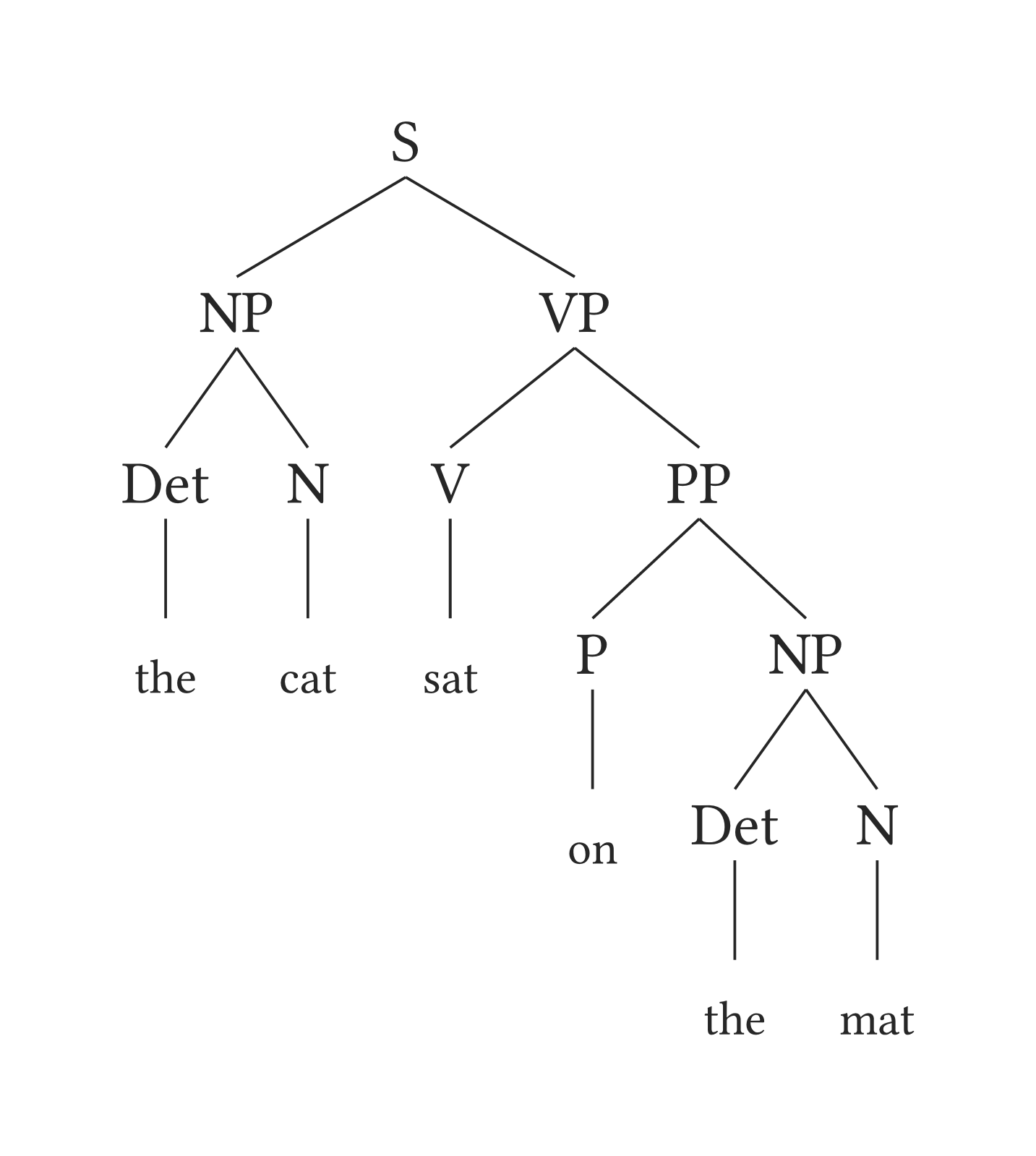
Basic tree
#tree(
  "[S [NP [Det the] [N cat]] [VP[V sat][PP[P on] [NP [Det the] [N mat]]]]]",
  terminal-branch: true,
)
By default, terminal branches are omitted, but you can change that by setting terminal-branch: true — this is shown in Figure 1 above. Triangles are added automatically when a phrase node directly dominates leaf content, as in [NP the cat]. If needed, you can also specify the triangle argument manually.
3 Arrows
Movement arrows are added with the arrows argument. Arrows can be rectangular or curved, and each arrow can be customized independently through keys such as dash, color, line-width, bend, and shift.
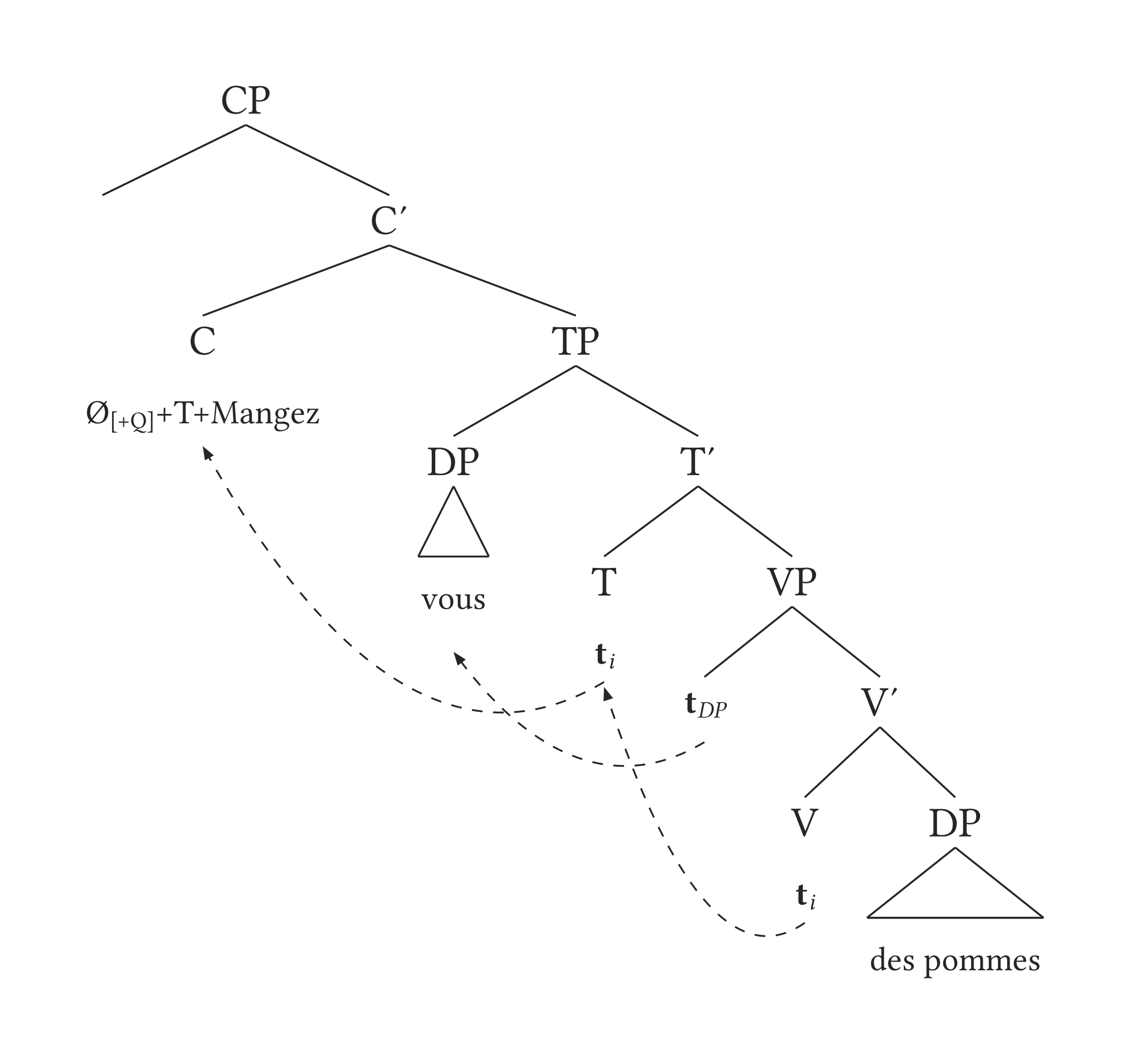
Tree with arrows
#tree(
  "[ CP [ C' [ C Ø_{[+Q]}+T+Mangez ] [ TP [ DP vous ] [ T' [ T *t*_i ] [ VP [ *t*_DP ] [ V' [V *t*_i ] [DP des pommes] ] ]  ] ] ] ]",
  arrows: (
    (from: "t3", to: "T1"),
    (from: "t2", to: "DP1"),
    (from: "t1", to: "C1"),
  ),
  curved: true,
)
Labels are created automatically, and arrow targets can be refined further with suffixes such as -top, -down, and optional degree values. This allows fine-grained control while keeping the common case minimal.
4 Semantics
The dominance argument adds long-distance dominance lines between nodes. This is useful for multidominance and other structures that cannot be represented with ordinary local branching alone. The annotation argument allows for comprehensive annotation in the tree. The example below comes from Fox and Johnson (2016).
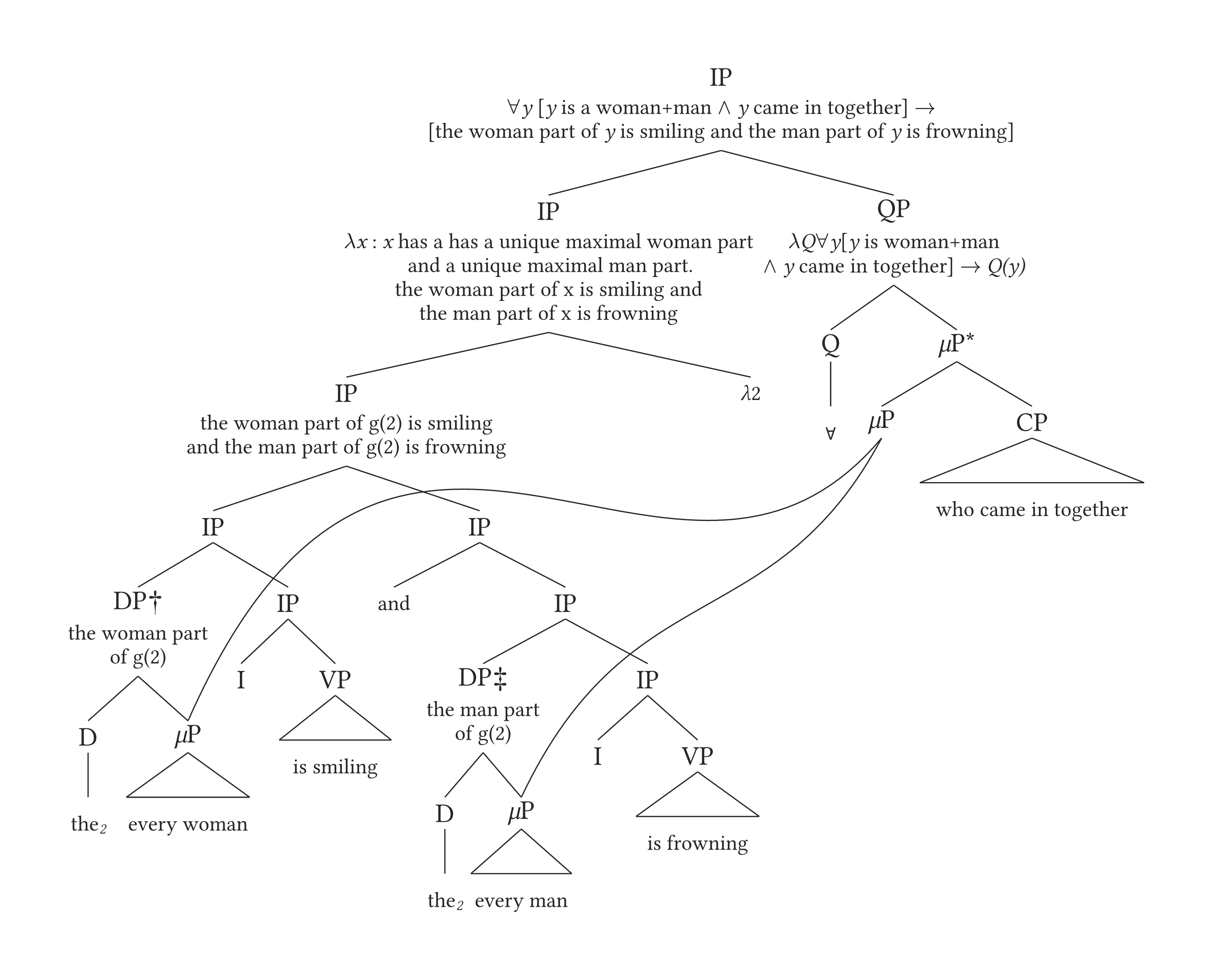
Multidominance
#tree(
 "[IP [IP [IP [IP [DP† [D the_2] [\\muP every woman] ]
 [IP [I] [VP is smiling] ] ] [IP [and] [IP [DP‡ [D the_2] [\\muP every man] ]
 [IP [I] [VP is frowning] ] ] ] ] [\\lambda2] ] [QP [Q \\forall ]
 [\\muP\\* [\\muP] [CP who came in together] ] ] ]",
 annotation: (
   (
     "IP1",
     [$forall$_y_ [_y_ is a woman+man $and$ _y_ came in together] $arrow$ \
       [the woman part of _y_ is smiling and the man part of _y_ is frowning]],
   ),
   (
     "IP2",
     [$lambda$_x_ : _x_ has a has a unique maximal woman part \
       and a unique maximal man part. \
       the woman part of x is smiling and \
       the man part of x is frowning],
   ),
   (
     "QP1",
     [$lambda$_Q_$forall$_y_[_y_ is woman+man \
       $and$ _y_ came in together] $arrow$ _Q(y)_],
   ),
   (
     "IP3",
     [the woman part of g(2) is smiling \
       and the man part of g(2) is frowning],
   ),
   (
     "DP†1",
     [the woman part \
       of g(2)],
   ),
   (
     "DP‡1",
     [the man part \
       of g(2)],
   ),
 ),
 annotation-size: 0.8,
 dominance: (
   (from: "muP4", to: "muP1", ctrl: (-6.1, 8.5)),
   (from: "muP4", to: "muP2", ctrl: (-6, 5)),
 ),
 scale: 0.8,
 spread: 0.8,
 terminal-branch: true,
)
The same tree can still use local spacing arguments such as spread-local and drop-local, which means multidominant trees remain controllable without editing absolute coordinates.
5 Bilingual trees
The #garden() function allows multiple trees to share a single canvas with dashed equivalence lines between corresponding nodes. This is useful for bilingual comparisons or any scenario where two structures need to be aligned visually. The example below comes from David Chiang’s tutorial on tikz-qtree.
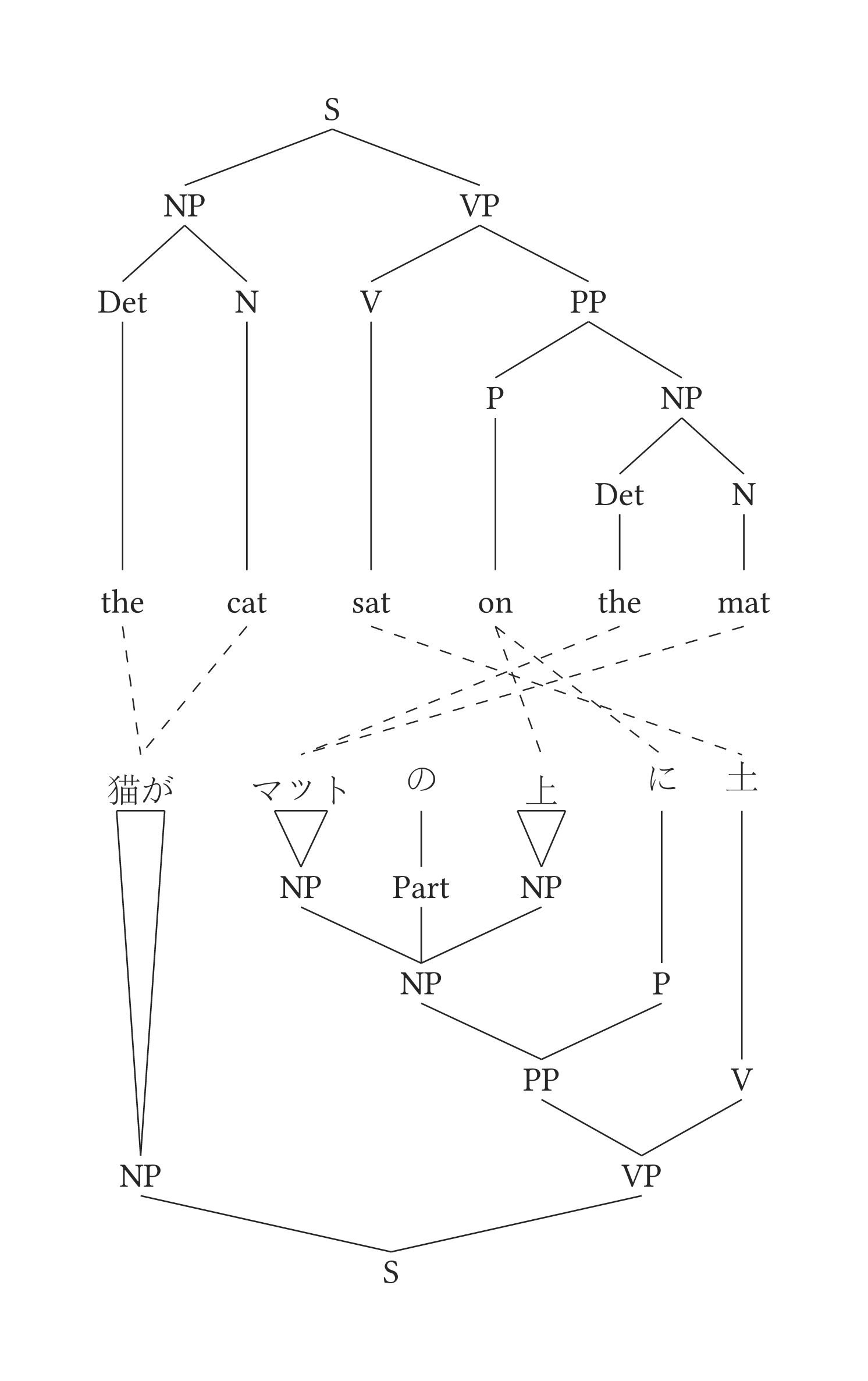
Two trees with equivalence lines
#garden(
   (
     input: "[S [NP [Det the] [N cat]] [VP [V sat] [PP [P on] [NP [Det the] [N mat]]]]]",
     spread: 1.55,
     content-size: 1,
   ),
   (
     input: "[S [NP 猫が] [VP [PP [NP [NP マット] [Part の] [NP 上] ] [P に]] [V 座った]]]",
     direction: "up",
     content-size: 1,
   ),
   equivalence: (
     ("Det1-1", "NP1-2"),
     ("P1-1", "P1-2"),
     ("P1-1", "NP4-2"),
     ("N1-1", "NP1-2"),
     ("N2-1", "NP3-2"),
     ("Det2-1", "NP3-2"),
     ("V1-1", "V1-2"),
   ),
   gap: 2.5,
   scale: 0.7,
 )
6 Numbered examples
In-line movement notation is handled by #move(). Each word automatically becomes a labelable anchor, so arrows can target visible copies, traces, or words without manual anchor definitions.
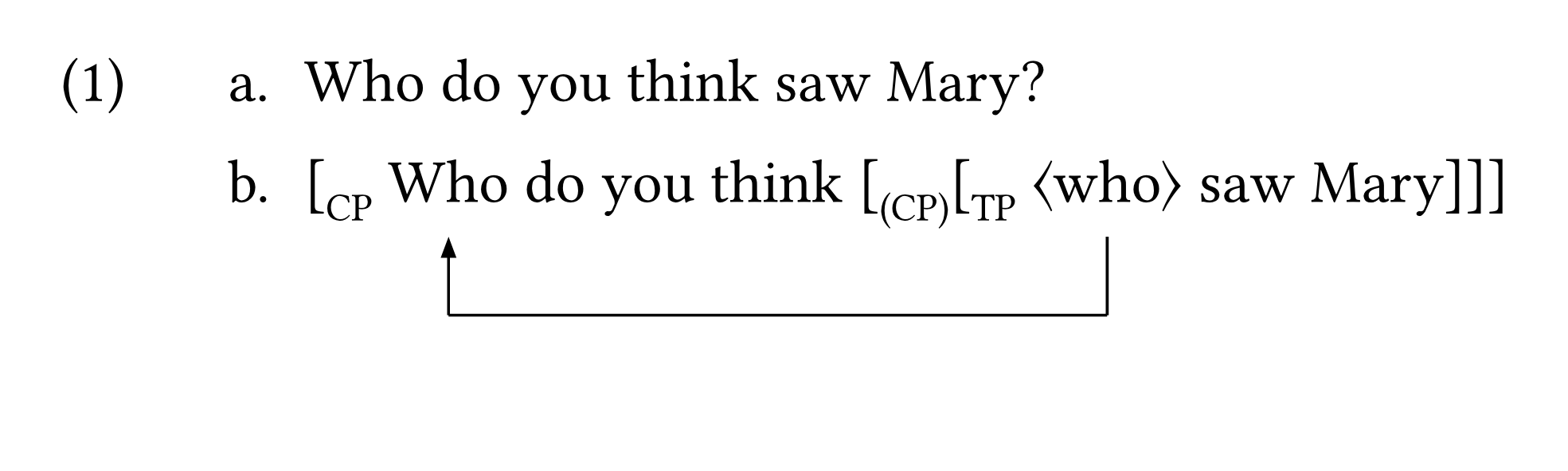
In-line movement
#show: eg-rules

#eg(labels: (<s-plain>, <s-move>))[
  - Who do you think saw Mary?
  - #move(
      "[CP Who do you think [(CP)[TP<who>saw Mary]]]",
      arrows: ((from: "who2", to: "who1", dash: "solid", color: black),),
    )
] <eg-wh>
When used as a standalone object, protect: true is useful because it reserves vertical space for the arrows below the text. Inside numbered examples or table cells, protect: false is often the better default because it keeps baseline alignment cleaner.
The labels argument allows individual subexamples to be referenced. The title argument places a title on the same line as the example number, and caption becomes useful if you later generate an outline targeting only linguistic examples.
7 Glosses
The #gloss() function creates aligned interlinear glosses with the same numbering stream as #eg(). Its syntax is intentionally minimal: each line is simply a list item, and the function aligns material by splitting on spaces.

Gloss with three lines
#show: eg-rules

#gloss(spacing: 1.2em, caption: [An example from Portuguese])[
  - eu gosto de maçã
  - I like-{1sg.prs} of apple
  - 'I like apples.'
]
8 Extras
This section gathers a number of arguments that make trees easier to tune in practice.
8.1 Spacing
Four arguments are central to spacing in #tree():
| Parameter | Purpose |
|---|---|
spread |
Global spacing between sister nodes |
spread-local |
Local spacing between sister nodes |
drop |
Global spacing between levels |
drop-local |
Local spacing between levels |
All four operate on direct multipliers, which makes them easier to reason about than absolute positional tweaks.
Spacing example
#tree(
  "[ A [ B [C] [D] ] [ E [F] [G] ] ]",
  spread-local: ( ("C1", 0.4), ),
  drop-local: (
    ("C1", 0.5),
    ("F1", 1.3),
  ),
  arrows: ("C1", "F1"),
)
8.2 Line breaks
Long phrases can be broken with \\n, which is often preferable to forcing a tree to become too wide.
Line breaks inside phrases
#tree(
  "[S [NP the orange cat \\n that lives next door]
    [VP[V sat][PP[P on]
    [NP the new couch \\n we purchased \\n last week]]]]",
)
8.3 Formatting
Because tree input is a string, formatting shortcuts matter. #tree() supports italics, bold, small caps, superscripts, subscripts, and symbol shortcuts directly in the input string. Highlighting is handled separately through the highlight argument.
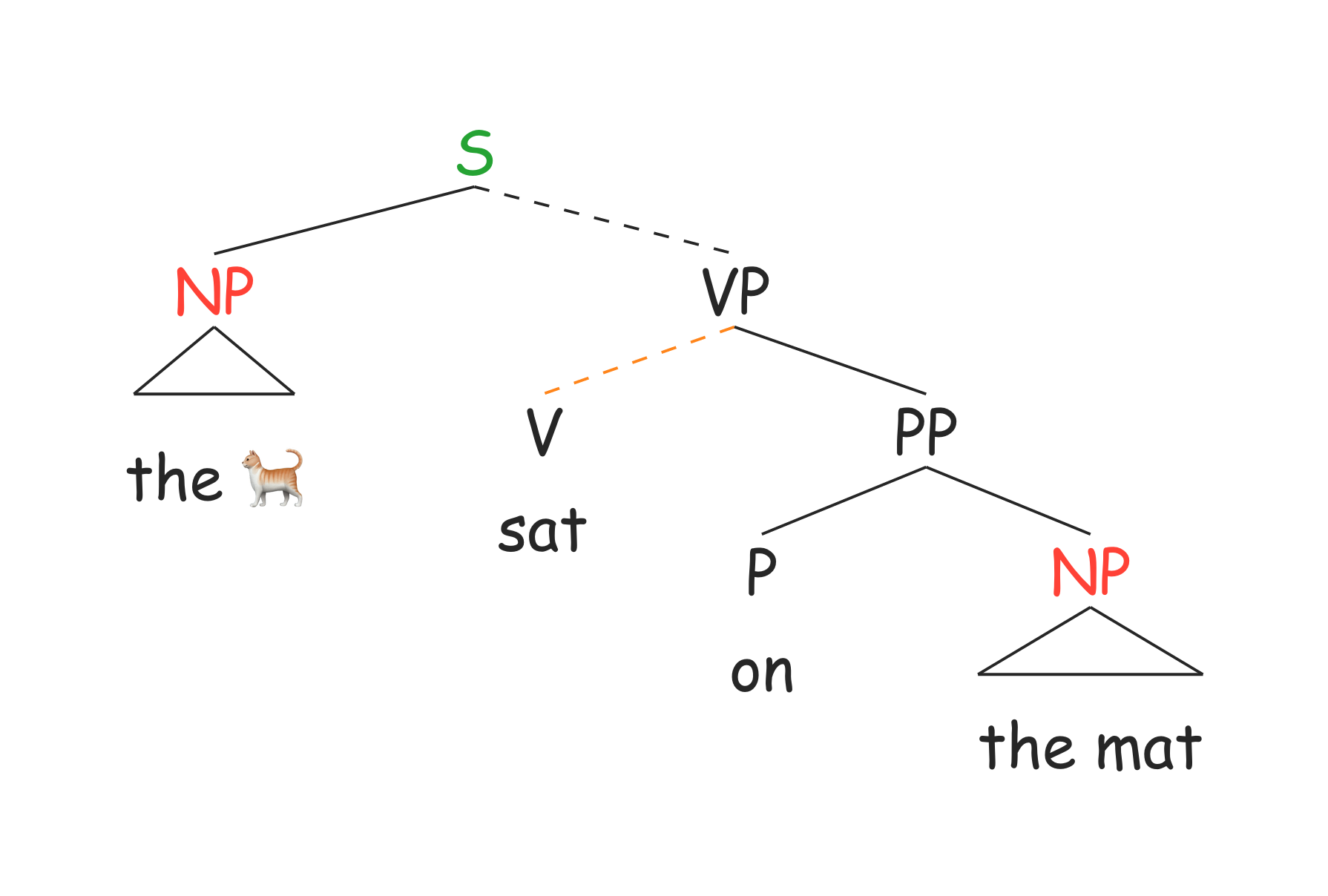
Formatting shortcuts
#tree(
  "[S [NP the 🐈] [VP[V sat][PP[P on] [NP the mat]]]]",
  content-size: 1,
  drop: 0.8,
  spread: 1.5,
  dash-branches: (
    ("VP1", "V1"),
    ("S1", "VP1"),
  ),
  color: (
    ("S1", green.darken(20%)),
    ("NP1", red),
    ("NP2", red),
    ("P1down", blue),
    ("VP1", "V1", orange),
  ),
  font: "Comic Sans MS",
)
8.4 Direction
Trees can grow in four directions: "down", "up", "left", and "right". This is particularly important for mirrored bilingual trees and compact sideward layouts.
Changing tree direction
#tree(
  "[S [NP_\\omega the *cat*] [VP[V @sat@][PP[P on] [NP^\\phi the **mat**]]]]",
  direction: "left",
)
8.5 Sizing
The arguments scale, content-size, and node-size affect different layers of the layout. scale changes the whole object, while content-size and node-size tune terminal content and node labels more locally.
Sizing example
#tree(
  "[S [NP the cat] [VP[V sat][PP[P on] [NP the mat]]]]",
  content-size: 1.2,
  node-size: 0.6,
  drop: 0.8,
  spread: 1.5,
)
8.6 Branch styling
Branch appearance can be changed with dash-branches, while color can target nodes, leaf content, or specific parent-child branches.
8.7 Font
Each function inherits the document font by default, but you can choose a local font with the font argument. This can be useful when you want a single tree to stand out or when a particular font handles symbols more gracefully.
9 Future work
The package is still young, so there will be bugs and limitations. Comments and suggestions are especially helpful at this stage because they directly improve precision and coverage. The package has also benefited from feedback by colleagues in syntax and semantics.
10 Argument reference
The table below summarizes the arguments currently available in #tree().
| Argument | Type | Default | Description |
|---|---|---|---|
arrows |
array | () |
Cross-node arrows as tuples or dicts |
scale |
number | 1.0 |
Uniform scale factor for the whole tree |
triangle |
array | () |
Anchor names rendered with a triangle |
content-size |
number | 0.8 |
Size multiplier for leaf content |
node-size |
number | 1.0 |
Size multiplier for node labels |
curved |
bool | false |
Use Bézier curves instead of rectangular arrows |
direction |
string | "down" |
Growth direction |
highlight |
array | () |
Anchors to box |
bottom |
bool | false |
Align all leaves at the lowest level |
terminal-branch |
bool | false |
Draw branches to terminals |
dash-branches |
array | () |
Dashed parent-child branches |
delinks |
array | () |
Delink marks on arrow shafts |
index |
array | () |
Coreference subscripts |
append |
array | () |
Extra subscript text after a node label |
drop |
number | 1.0 |
Vertical spacing multiplier |
drop-local |
array | () |
Per-level or per-node vertical adjustments |
spread |
number | 1.0 |
Horizontal width per leaf |
spread-local |
array | () |
Per-level or per-node horizontal adjustments |
dominance |
array | () |
Long-distance dominance lines |
color |
array | () |
Colors for nodes, leaves, or branches |
annotation |
array | () |
Content between a node label and its branches |
annotation-size |
number | 0.70 |
Size multiplier for annotation text |
annotation-leading |
length or auto |
auto |
Line spacing for multi-line annotations |
numbers |
array | () |
Circled numbers next to node labels |
numbers-size |
number | 0.85 |
Size multiplier for circled numbers |
line-width |
number | 1.0 |
Stroke width multiplier for tree lines |
font |
string | none |
Local font family |
11 Using Typst offline?
While the online editor at Typst.app is very convenient, many users prefer to work locally. One of the best IDE options is VS Code with the Tinymist extension (Dreamin and Varner 2024). Tinymist is also available in other editors, including NeoVim and Positron.
12 Packages in Typst
Typst packages are imported rather than installed system-wide in the way LaTeX or Python users may expect. The two common workflows are:
- Import from the official Typst package repository with
@preview/.... - Clone a repository locally and import its
lib.typfile.
If the package is stored outside your document root, a symlink is often the simplest solution.
Creating a local symlink to a package
# From your working directory:
ln -s PATH_TO_PACKAGE_DIRECTORY package_name
Typst’s package repository also keeps each released version in its own directory, which is why explicit version imports are so important.
Copyright © Guilherme Duarte Garcia