Ditching LaTeX?
My typesetting needs
Like most academics, I need to produce articles, letters, slides, CVs, posters, and longer documents (books). Most of these documents are static, so PDF is the fundamental file type I use (although HTML is a close second for tutorials and class notes these days). I have used LaTeX for about 15 years at this point, and it has always produced great results. On top of professional-looking documents, LaTeX allows me to generate structures that are simply essential in linguistics:
- great phonetic symbols using
tipa - glosses
- trees (for syntax or phonology) using
tikz-qtree - non-linear representations and matrices in general — see this tutorial
While you can do all that even in Microsoft Word, LaTeX simply does a better job across the board. Besides, there’s reference management, complicated cross-references that just work, the possibility to automate appendices from PDF files or images, and so much more. In short, everything I’ve done thus far depends on LaTeX.
But LaTeX has its cons, some of which I have discussed here. The list below is not exhaustive:
- it’s heavy: if you’ve ever installed LaTeX, you know what I mean
- the language is clunky and the error messages are often useless
- given the previous point, it is unsurprising that the learning curve can be steep
- it’s a macro system, not a language per se, so while for-loops and variables do work, they don’t feel natural, and if you want to create more convoluted functions, good luck
- it’s slow to compile, especially if you use XeLaTeX (for whatever reason)
- font support, while amazing, requires some tweaking (UTF-8 support isn’t just “there” out of the box)
Up until recently, these cons didn’t bother me too much because there was no other option: if you’re in academia and you value high-quality typesetting… LaTeX is what you use. But now we do have something else, and it’s great.
Typst
Typst is very recent: it was first published in 2022. In a nutshell, it’s a programming language designed for typesetting (from scratch). You can use their online app here and their package libraries here. I use it in Neovim, but you can also use it through Quarto, for example.
Though I had used it (very briefly) a while ago, I have recently decided to seriously consider it as a potential replacement for LaTeX in my workflow (linguistics, phonology). To do that, I have spend the last month on four tasks:
Slides. I need slides for teaching and for conferences, and I have a long list of functions I use to automate exercises, solutions (and can be hidden), phonemic and phonetic transcriptions, and several other aesthetic elements that allow me to create slides very quickly
My CV. CVs can be quite difficult to typeset if you like to add different dimensions of information. My LaTeX CV took me a long time to create, as I wanted to have icons and information on margins, etc.
Exams. I always use the
exampackage (see here), and having a similar package is essential since it’s very difficult to go back once you’ve started using this type of package for exercises and evaluations more generallyNon-linear representations in prosody. This is tricky, as
tikzoffers a wide range of possibilities in LaTeX (although its syntax is far from ideal); fortunately, Typst hasCeTZ
With the help of Claude agent, I managed to transfer all my functions and templates to Typst very quickly. It wasn’t easy, but the bottom line is: everything I did with LaTeX can be done with Typst. This alone was a relief, considering how young Typst is, and how much detail I have in my templates and functions.
The pros
If Typst does what LaTeX does, why change? First, bear in mind that in my case1 Typst is actually a superset: it does more than LaTeX. But before we get into that, let me list the general advantages I have noticed.
- Typst compiles really fast; practically instantaneous (I use it in Neovim and compile it to Vivaldi in real-time). If you’ve used LaTeX, you know how amazing this is
- Error messages are intuitive and actually helpful
- The syntax is much easier to learn and get used to
- You write less and accomplish more: preambles are much simpler, for example
- Font support out of the box: you can literally paste an emoji on your document and it compiles without any issues
These advantages, I believe, are already enough to switch. But the fact that Typst is a full-fledged language gives you much more. For example, in my CV, I have a counter for conference presentations and publications. In LaTeX, I used to manually add the count, as it was too convoluted to automate the task. In Typst, the automation is simple, and counts are automatically added in reverse order. Likewise, in my CV, I had icons for doi and OSF, which were linked to the official publication and its pre-print, respectively. In Typst, I now have a function that automatically detects what the link is using RegEx and adds the icon using Academicons. That’s it. These are just two very simple examples; ultimately, Typst has the potential to make everything more automated, by definition (it’s not just a macro language).
One complex example comes from prosodic trees. I’ve always done such structures using tikz. It was a painstaking process since, unlike syntax trees, prosodic tress are often asymmetrical. I’ve always wanted to create a function that takes an input and returns the tree. While this is technically possible in LaTeX, creating it would be a nightmare that goes beyond my technical abilities (and my patience). In Typst, Claude agent was able to create a working function in minutes, and I simply needed to tweak it later on to adjust it to my needs. I am still working on the function, but I will make it available soon. Here’s a preview of what it does:
#word("('ka.ta)('ven.tos)", foot: "R")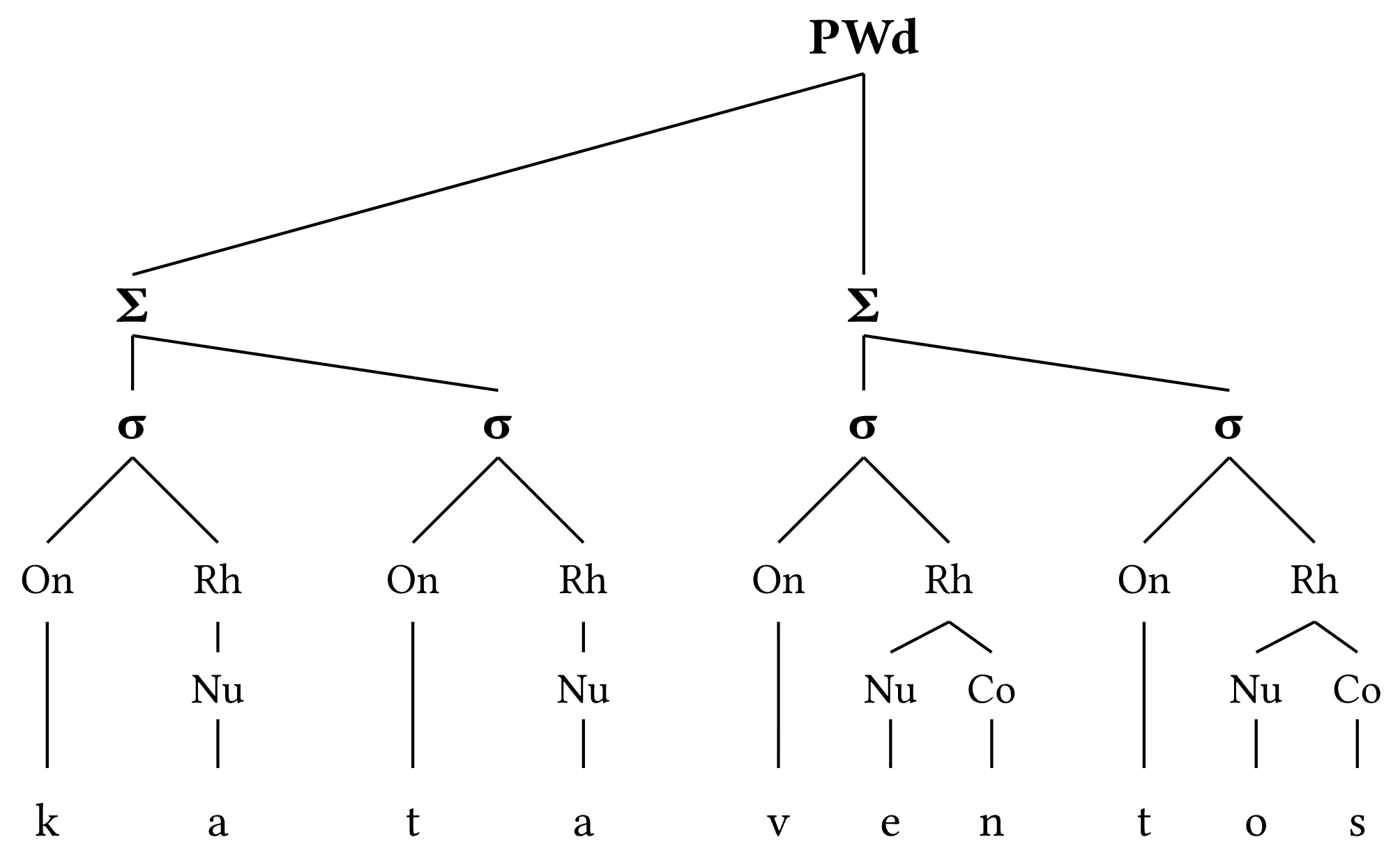
The cons
So far, I’ve identified two downsides for my use. First, phonetic transcription. I admit that this is a subjective point: some will argue that it is an advantage that you can simply type the phonetic symbols and they will render. That being said, I do miss tipa: I’m just faster with it, and that’s why I’m also working on a function that takes as argument what you’d use in tipa — this has now been addressed by phonokit. The second downside involves bibliography. In LaTeX, my bib file is gigantic, and I must admit it isn’t as clean and organized as it should be. Typst is much more demanding when it comes to organization. If an entry is missing some key information, or if you happen to have some additional lines that shouldn’t be there, Typst will complain. Thus, your bibliography file needs to be impeccable. Another important point is that at the moment Typst requires your bib file to be local. Mine is never local because I centralize all my work on a single bib file that is located in a Git repo. I then use absolute paths to it from within my tex files… But the solution is simple: use a symlink for your references and you’re good to go.
Conclusion
I have now tested Typst on everything I need from it, and it basically delivers amazing results in a much more streamlined way. After more than a decade using LaTeX, I think this is its replacement for me. Of course, your needs may differ, so you need to see if it could replace your workflow.
More to come.
Update
I have now published a package dedicated to phonology (phonokit). You can also access a short tutorial here.
Copyright © Guilherme Duarte Garcia
Footnotes
Technically, it is a superset insofar as it’s a full-fledged language. But you may need a particular package that isn’t available yet for Typst. I would argue that it’s only a matter of time, though…↩︎